
Once a claim has gone out, you should never send the same claim again as a new one. The payer treats it as a duplicate and denies it. Instead, Pabau gives you the right action for where the claim stands: correct it, void it, or appeal the payer’s decision. In this article, you will learn which one to use and how.
NOTE: Insurance billing is currently available for practices in the United States. These actions are for claims sent electronically through Claim.MD. For claims you mail on paper, see Exporting and submitting CMS1500 claims manually.
Which Action to Use
| The claim is… | Use | What happens |
|---|---|---|
| Rejected | Correct claim | The claim bounced before the payer assessed it, usually because of a data error. You fix it and send it again. |
| Denied | Correct claim, or Appeal | The payer assessed it and refused to pay. Send a corrected claim if something on it was wrong, or appeal if you think the payer is wrong. |
| Paid, but billed wrongly | Void claim | The payer cancels the claim it already processed. |
| Paid less than you expected | Appeal | You ask the payer to review its decision. |
Step 1: Correct a Rejected or Denied Claim
Open the claim from More → Claims. Then:
- Click View messages to read why it came back. Each message names the problem and, where it can, the field to fix.
- Click Correct claim. The claim opens for editing.
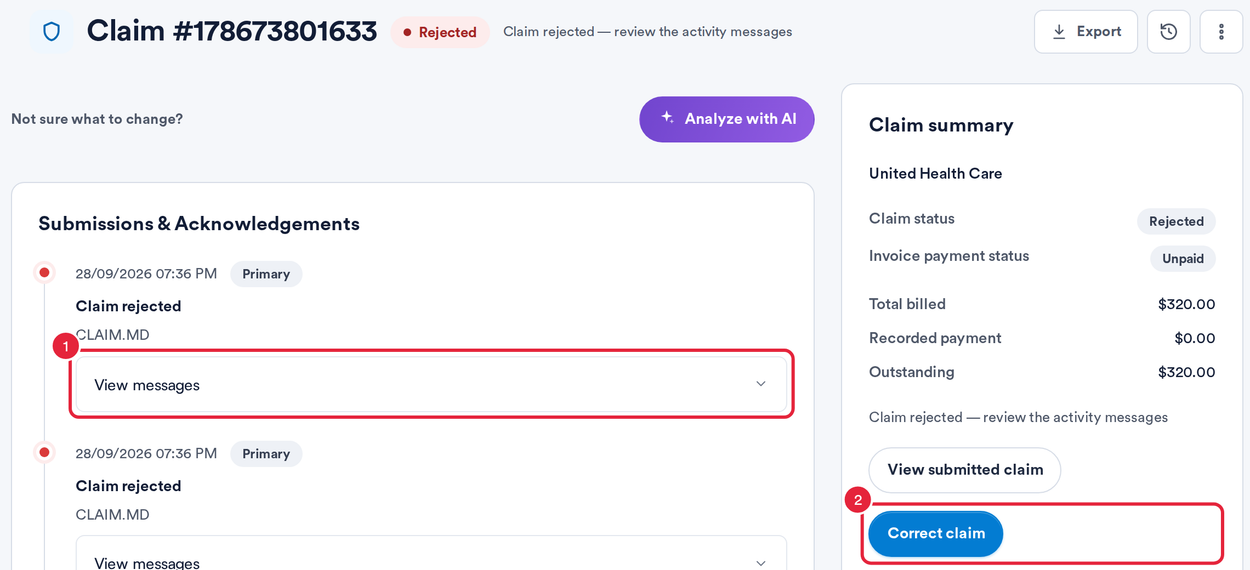
Read the messages, then click Correct claim
Fix the fields the messages name, click Validate and send the claim again. If you are not sure what to change, see How to use Analyze with AI on a rejected or denied claim.
IMPORTANT: A denied claim goes back to the payer as a corrected claim, which refers to the payer’s own claim number. Pabau adds it for you once it is on file. It arrives with the payer’s electronic remittance (ERA), or you can enter it as Payer claim ref when you record a paper EOB. If it is missing, Pabau tells you to pull the ERA in from the Remittance tab first.
Step 2: Appeal or Void a Processed Claim
When the payer has processed a claim and its claim number is on file, two more buttons appear on the claim:
- Appeal opens Claim.MD’s appeal form for this claim in a new tab. From there you can send the appeal electronically, by fax or by mail, or download it.
- Void claim asks the payer to cancel the claim, for example when you billed the wrong client or the wrong payer.

Appeal and Void claim on a processed claim
When you click Void claim, Pabau asks you to confirm:
- Click Yes, void it to send the void to the payer, or Keep to leave the claim as it is.

Confirm before the void goes to the payer
WARNING: A void cannot be undone. The payer usually takes back any money it paid on the claim. Only void a claim that should never have been paid as billed.
TIP: Appeals have deadlines that vary by payer, often 60 to 180 days from the decision. Check the payer’s rules before you start.
What's next?
- Understanding claim statuses on the Insurance claims list
- How to record a payer payment or denial from a paper EOB
- Box 22 – Resubmission Code and Original Reference Number
- When a payer reverses a payment
Was this guide helpful? Let us know by voting below - your feedback helps us write clearer articles.
For more guides, browse the related articles below or use the search bar at the top of the page. You can also watch our video learning series, the Pabau Academy, or visit the Support page for additional help.