
This article covers the new Client Card, available to selected clinics from August 2026. If your Client Card looks different, see the How to View Packages in the Client Card (Classic) guide instead.
Step 1: Navigate to the Client Card
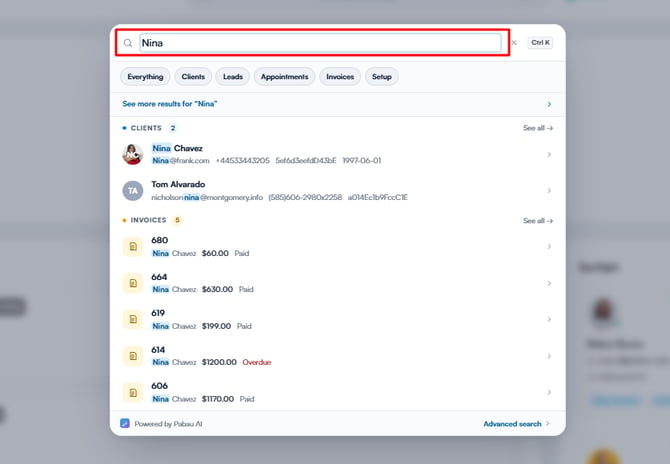
Start by logging in to your Pabau account, then use the search bar at the top of the page to find the client. Type at least three letters for the client to appear, then select them to open their client card.
NOTE: To learn more about packages and how to create them, please refer to this article.
Step 2: Open the Packages Tab
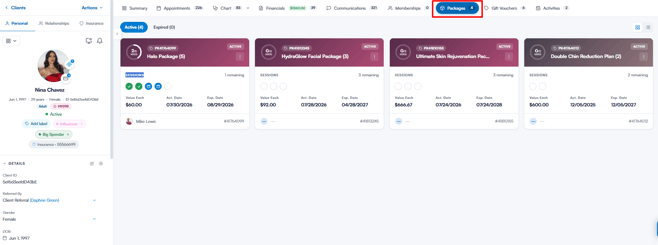
Once the client card opens, click on the Packages tab. Packages are grouped into two tabs: Active and Expired. Each package shows how many sessions have been used and how many remain, the value of each session, and the activation and expiry dates. Use the icons in the top-right corner to switch between the grid and list views.
NOTE: The Expired tab also lists packages whose sessions have all been used.
Step 3: Manage a Package
Click the three dots on a package to open its menu. For an active package, you can choose Expire Package, Change package duration, or More Details. For an expired package, you can choose Reopen package (+ 30 days) or More Details.
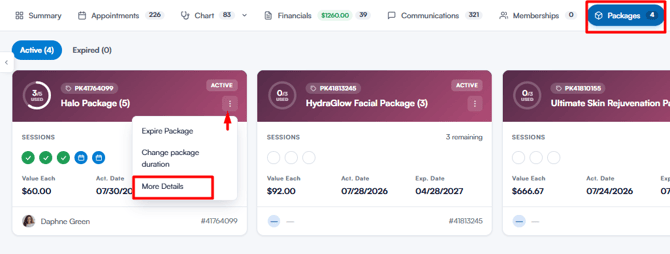
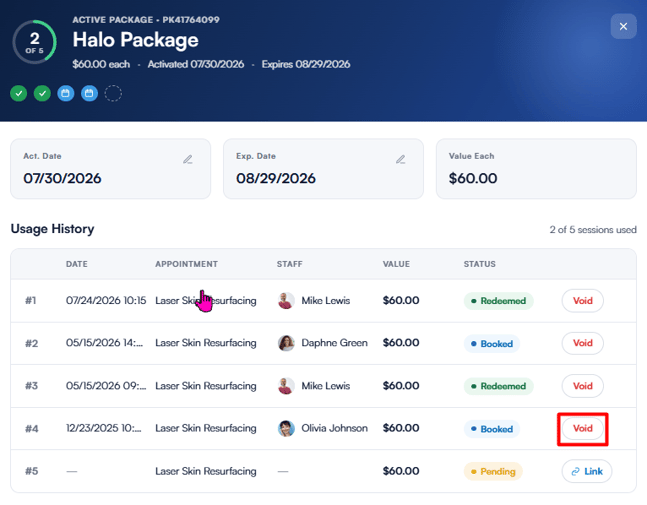
Select More Details (or click the package name) to open the package overview. Here you’ll find the package dates, the value of each session, and the usage history — the date, appointment, staff member, value, and status of every session. From this view, you can void a redeemed or booked session, or link a pending session to an appointment.
By following these steps, you can easily locate and manage packages from the client card.
Was this guide helpful? Let us know by voting below - your feedback helps us write clearer articles.
For more guides, browse the related articles below or use the search bar at the top of the page. You can also watch our video learning series, the Pabau Academy, or visit the Support page for additional help.