
This article covers the new Client Card, available to selected clinics from August 2026. If your Client Card looks different, see the How to Request to Complete the Medical History in the Client Card (Classic) guide instead.
Step 1: Navigate to the Client Card
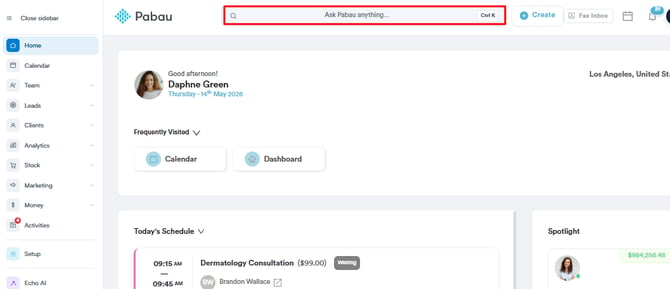
Start by logging in to your Pabau account using your login credentials. Then navigate to the search bar and type your client’s name, and click their name in the search results to open their client card.
Step 2: Open the EMR Tab
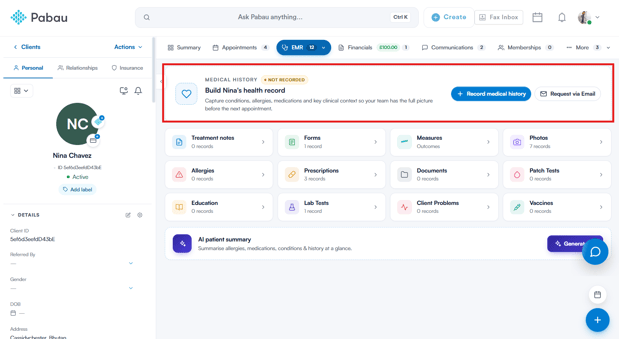
Click EMR in the navigation at the top of the client card (this tab is labelled Chart for US accounts). At the top of the EMR overview is the Medical History banner. If the client hasn’t recorded their medical history yet, it shows a Not recorded badge along with two options: Record medical history (complete it together with the client) and Request via Email (send it to the client to complete themselves).
Step 3: Send the Request
Click Request via Email to open the Request Medical History window.
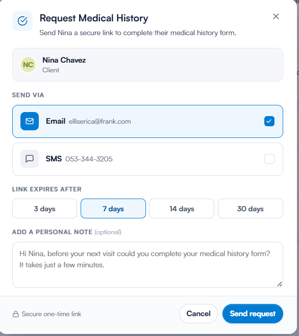
Choose how to send the request under Send via — Email, SMS or both. Then click Send request.
The client receives a secure, one-time link through their chosen channel(s). Opening it takes them to their medical history questionnaire, where they can complete or update their details.
By following these steps, you can easily request a client’s medical history in Pabau.
Was this guide helpful? Let us know by voting below — your feedback helps us write clearer articles.
For more guides, browse the related articles below or use the search bar at the top of the page. You can also watch our video learning series, the Pabau Academy, or visit the Support page for additional help.