
Insurers settle claims in batches: one bank transfer covering many invoices, listed on a remittance advice. Pabau's remittance tool records that payment once, puts the right amount on every invoice it covers, and passes any shortfall on to the client.
NOTE: This guide is for practices in the United Kingdom. You need the Can access remittance page permission to see the Remittance tab. Statements that reach you through Healthcode can be brought in with the Remittances button instead of being typed in by hand.
Step 1: Open the Remittance Tab
- Go to More → Claims and open the Remittance tab. The number beside it is how many remittances are still open.
- The list shows each remittance's Ref Number, Date, Company, Amount, Remaining and Status (Paid, Unpaid or Draft). Narrow it with the search box and the All statuses, All insurers and Date range filters.
- Items shows how many invoices on the remittance have a payment decision (paid, part paid or reissued) out of all the invoices it covers.
- Click Create manually to record a new remittance.
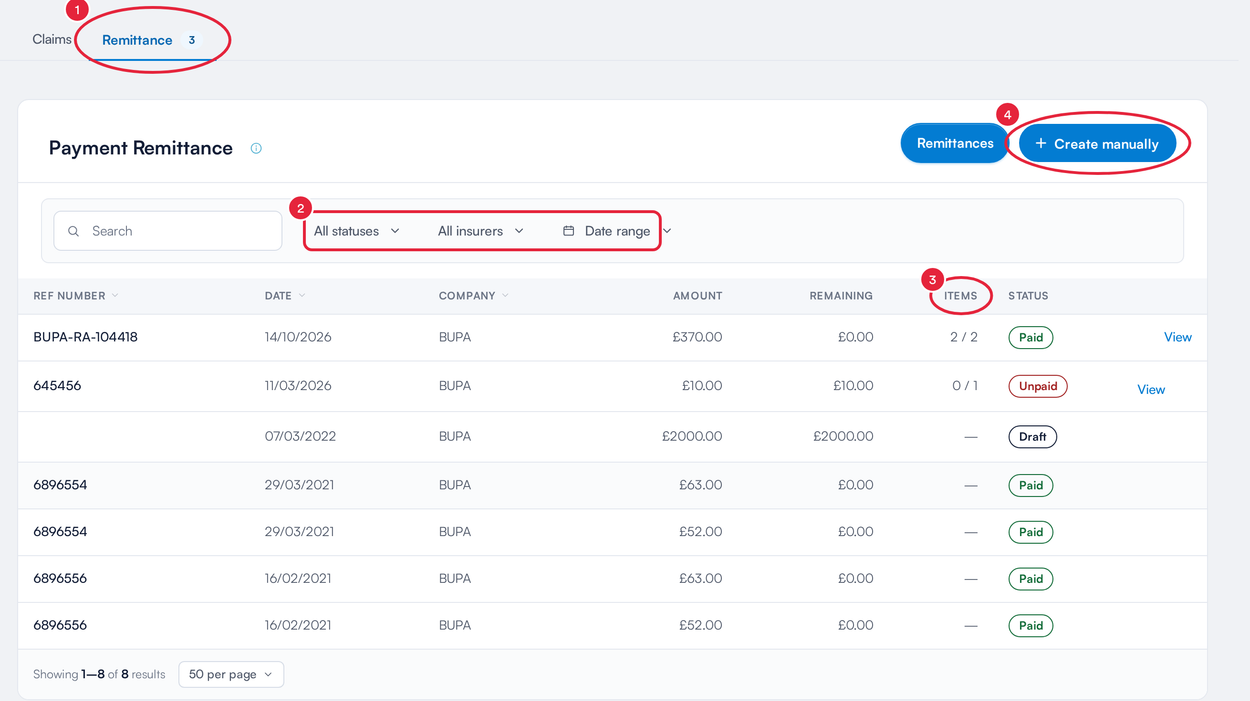
The Remittance tab sits beside Claims
TIP: Hover over the i next to Payment Remittance for a quick reminder of how remittances work.
Step 2: Choose the Insurer
- The Create remittance screen opens on Choose an insurer.
- Click the insurer whose payment you're recording.
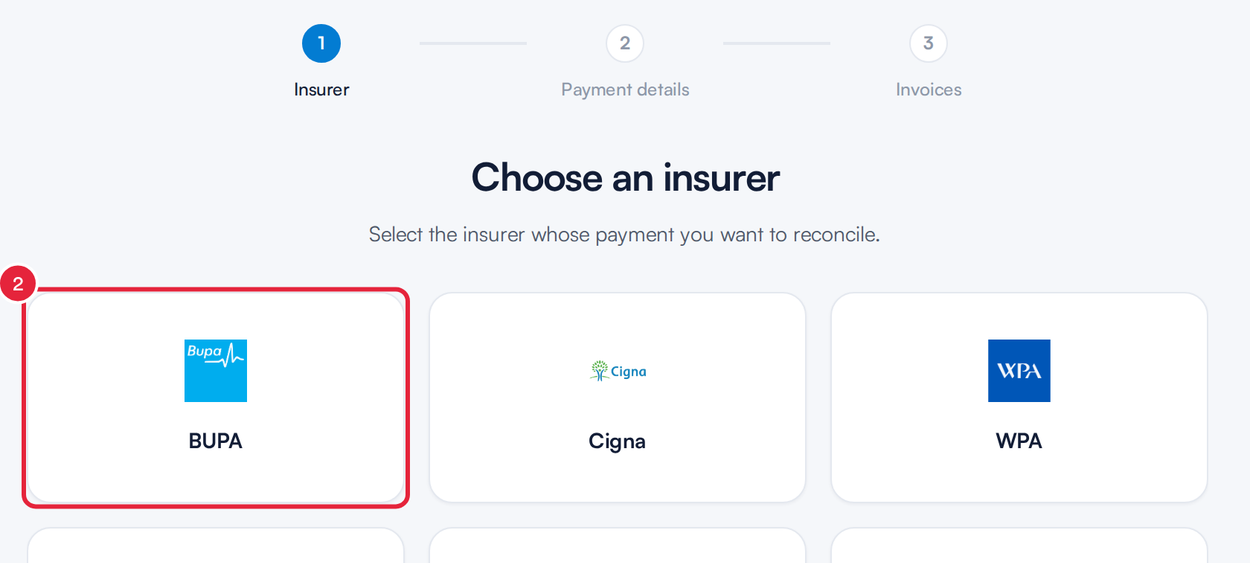
Pick the insurer that sent the payment
Step 3: Enter the Remittance Information
- Enter the Reference number from the remittance advice.
- Set the Payment Date and Payment Time.
- Under Choose the payment amount, type the amount you received against the payment method it came in by, for example Bank Transfer. Then click Next.
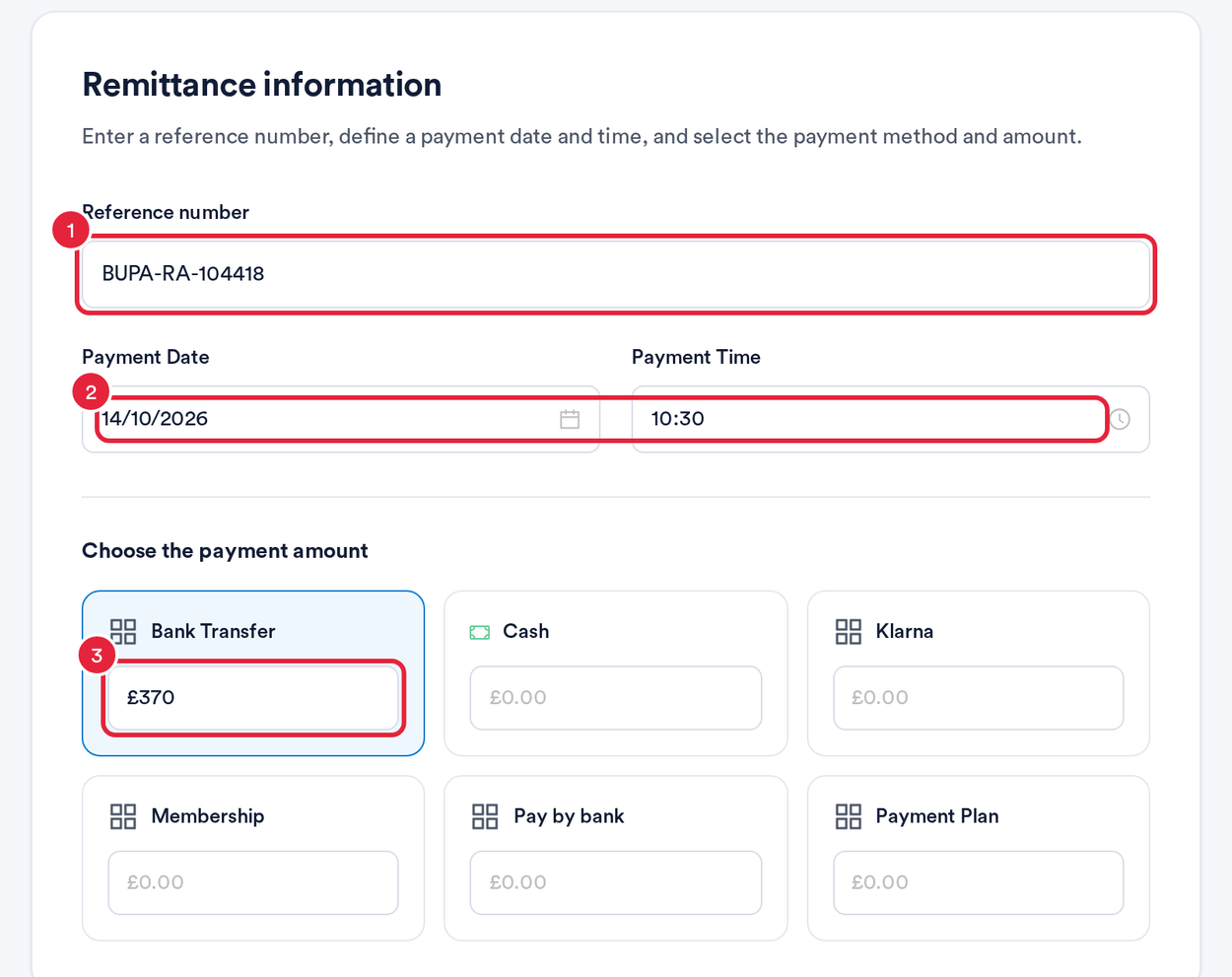
The reference, date and amount from the remittance advice
Step 4: Select the Invoices
Select invoices lists the insurer's outstanding invoices.
- Use Search by client name, invoice or membership no to find each invoice on the remittance advice.
- Tick the invoices the remittance covers. The Selected tab shows what you've picked.
- Click Match Payments. If you need to stop, click Resume Later to keep the remittance as a draft.
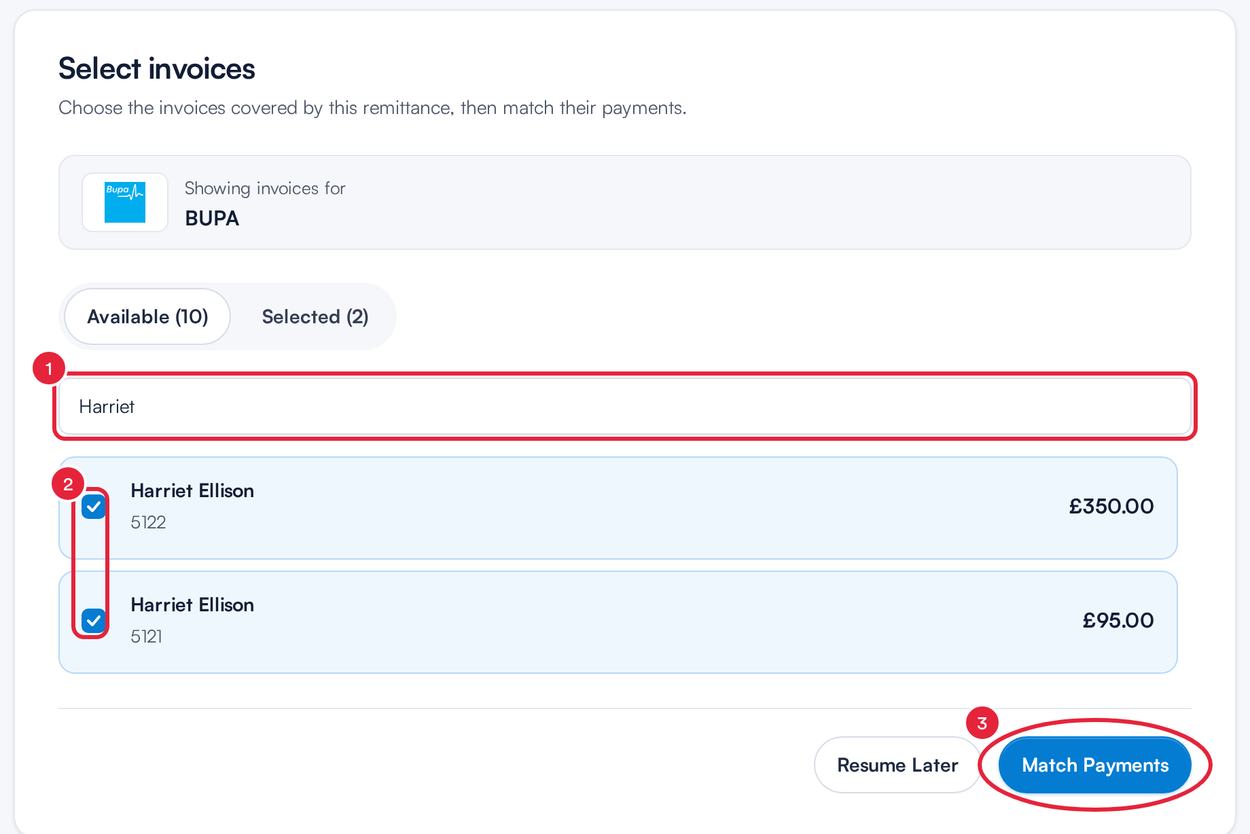
Tick every invoice on the remittance advice
Step 5: Match the Payments
The Manage remittance screen opens. Under Match invoice payments, enter what the insurer paid against each invoice. The cards at the top show the Remittance Total, the Payments Matched so far and what is Left to match.
- Click an invoice's Payment Amount and type the amount the insurer paid. Reverse takes an amount back off before you process.
- Missed an invoice? Click Add invoices. To take one off the remittance, click the ⓧ at the end of its row.
- If the insurer paid less than the invoice, the difference shows under Shortfall. Click Reissue to bill that amount to the client, or leave it if you are still chasing the insurer.
- When every invoice has a payment or a shortfall decision, click Process remittance.
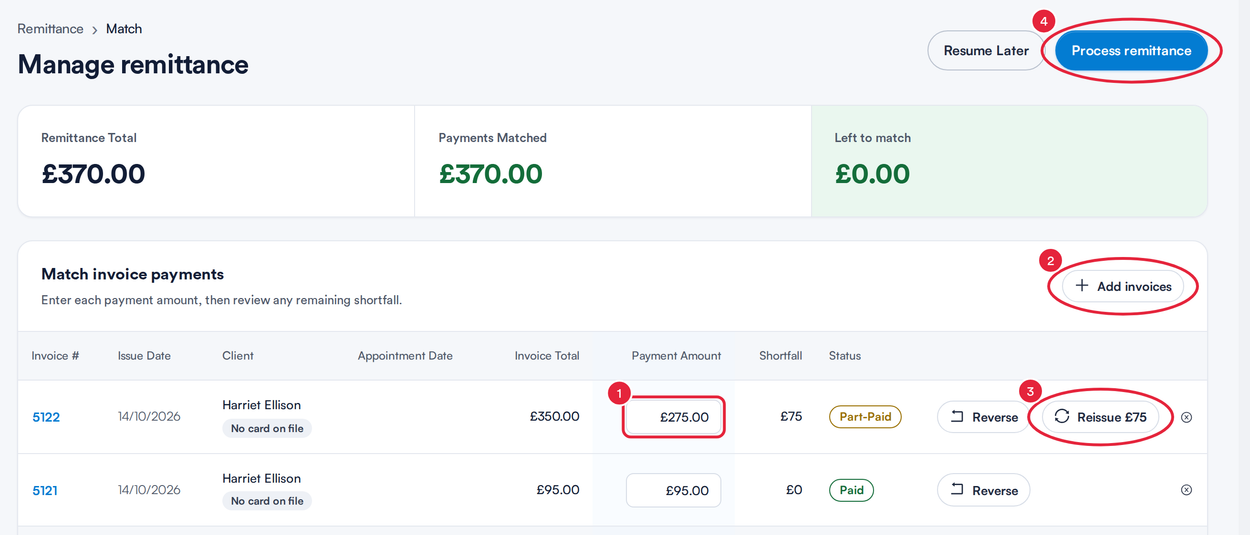
Enter each payment, then process the remittance
NOTE: Process remittance stays unavailable until every invoice has either a payment or a shortfall marked for reissue. Pabau names the invoices still to decide. It also stops you if the payments add up to more than the remittance.
Step 6: Process the Remittance
Nothing is posted until you confirm. Pabau first shows what will happen:
- Check Insurer payments to post (and Shortfalls to reissue to clients, if any). Invoices with nothing to post are listed as left as they are.
- Click Process remittance to post everything, or Cancel to go back and change it.
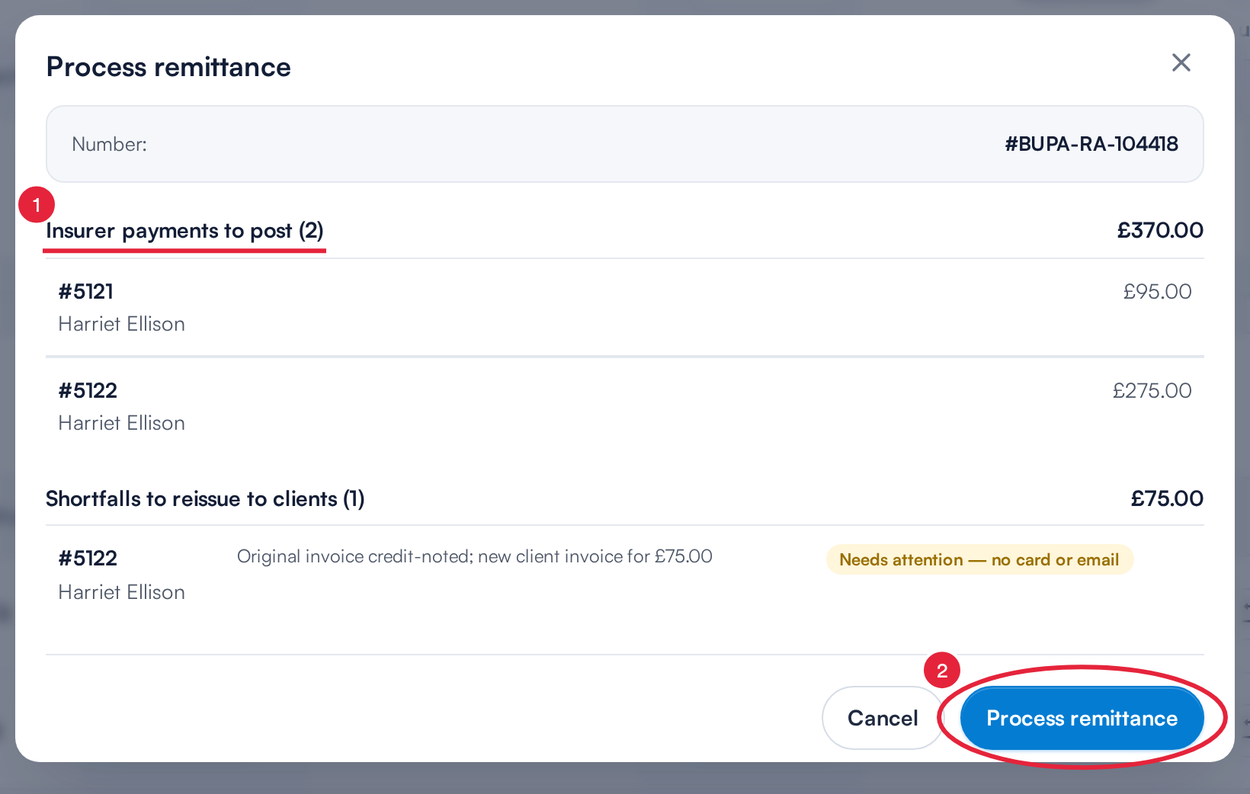
Check the summary, then confirm
Pabau posts each insurer payment to its invoice, then bills any shortfalls to the clients. Keep the tab open until the progress screen says it has finished. The claims on More → Claims and the client's financials update from the payments.
IMPORTANT: If part of the remittance isn't matched to any invoice, Pabau asks you to confirm before processing. Tick Process anyway and leave it unallocated only if you mean to leave that money unallocated.
Step 7: Find Your Remittance Later
- A remittance you processed in full shows as Paid. Click View to open it read-only.
- An Unpaid or Draft remittance can still be opened, edited or deleted from the ⋮ menu on its row. Paid remittances can't be edited or deleted.
What's next?
- Insurance Guide Part 4 (UK): Submit and track claims with Healthcode
- How to Use the Aged Debt Report (UK)
- Insurance billing glossary (UK)
Was this guide helpful? Let us know by voting below - your feedback helps us write clearer articles.
For more guides, browse the related articles below or use the search bar at the top of the page. You can also watch our video learning series, the Pabau Academy, or visit the Support page for additional help.