
NOTE: This feature is part of the new client card version and is currently available to select users only, starting August 2026. A wider rollout to all accounts is coming soon.
Gift vouchers are issued with a set validity period, after which they expire and can no longer be redeemed. If a client returns with an expired voucher, you can reactivate it directly from their client card instead of issuing a new one.
Step 1: Navigate to the Client Card
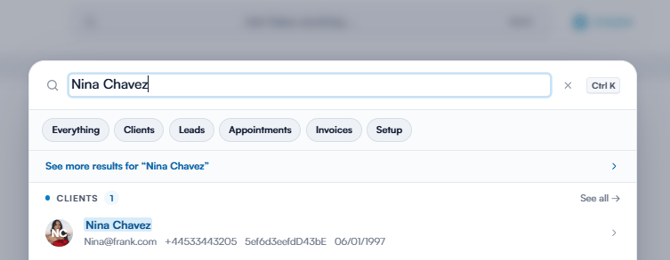
Start by logging in to your Pabau account. Use the search bar at the top of the page to find the client whose gift voucher you want to reactivate, then click on their name to open their client card.
Step 2: Open the Gift Vouchers Tab
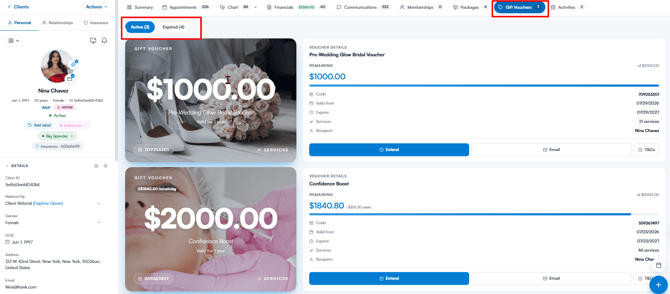
On the client card, navigate to the "Gift Vouchers" tab. Here you will see the client's gift vouchers organized under two options: "Active" and "Expired".
Step 3: Open the Expired Tab
Select the "Expired" option to display a list of all the client's expired gift vouchers. Each expired voucher includes a "Reactivate Voucher" button, along with its terms and conditions.
Step 4: Reactivate the Voucher
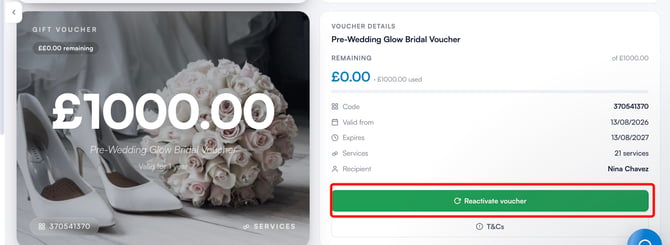
Click the "Reactivate Voucher" button next to the voucher you want to restore. This immediately extends the validity period, giving the voucher a fresh one-year window starting from today's date.
NOTE: Reactivating a voucher does not restore a spent balance. A voucher that has already been fully redeemed will still show a balance of $0.00 after reactivation.
Once reactivated, the gift voucher moves back to the "Active" option and is available for the client to redeem up to its new expiration date.
By reactivating expired vouchers, you can honor a client's remaining balance and save them the hassle of losing value they've already paid for - without having to issue a brand-new voucher.
NOTE: To learn how clients can redeem their gift vouchers, refer to this article: How to Issue and Redeem Gift Vouchers.
For more guides, refer to related articles below, select additional guides, or use the search bar at the top of the page. These guides will help you get the most out of your Pabau account. Additionally, to help you fully utilize and understand your Pabau account, we recommend exploring additional guides and resources offered at the Pabau Academy. It offers in-depth video tutorials and lessons, offering a holistic learning experience that can equip you with the essential skills for achieving success with Pabau.