
This article covers the new Client Card, available to selected clinics from August 2026. If your Client Card looks different, see the How to Create Third Parties (Classic) guide instead.
Step 1: Navigate to Third Parties
Start by logging into your Pabau account. Click on Setup in the left sidebar menu, then click on "Objects", and select Third Parties.
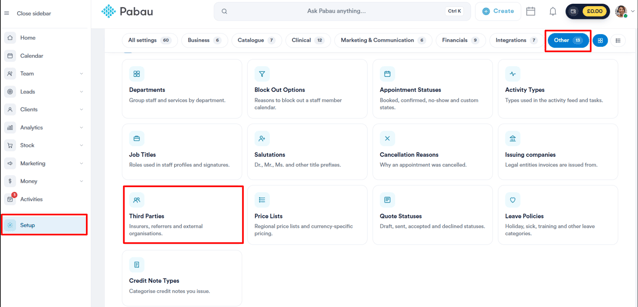
Step 2: Create a Third Party
Click the Create Third Party button in the top-right corner.
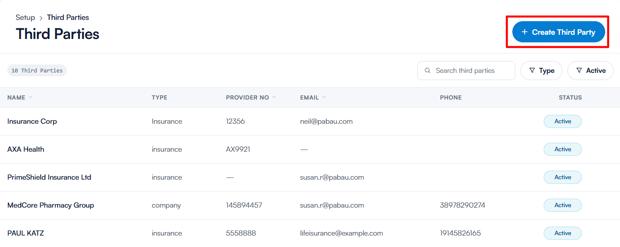
In the Create Third Party window, choose the Type of third party you want to create: Company, Insurance, or Pharmacy.
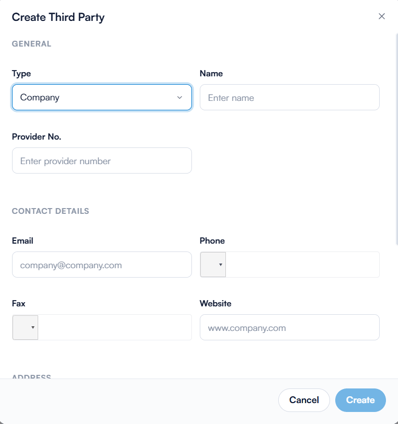
Then, enter the required information, such as the name, provider number (if applicable), contact details, and address. For insurance providers, you can also select a Healthcode identifier if you submit invoices to the insurer electronically.
Once completed, click Create to save the third party.
Step 3: Link Third Parties with Clients
To associate a third party such as a pharmacy, specialist, or company with a client:
- Go to the client’s Client Card.
- Click on the Relationships tab, next to Personal.
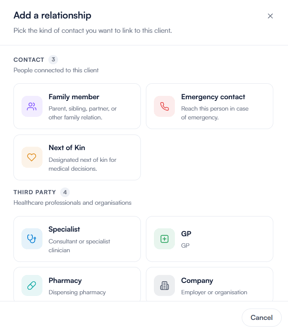
- Click + Add relationship, then pick the type of third party you’d like to add from the Third party group: GP, Specialist, Pharmacy, or Company.
- Search for the third party by name or postcode, select it from the results, and click Save (for pharmacies, the button reads Add Pharmacy) to link it to the client. If it isn’t listed, you can add it manually from the same window.
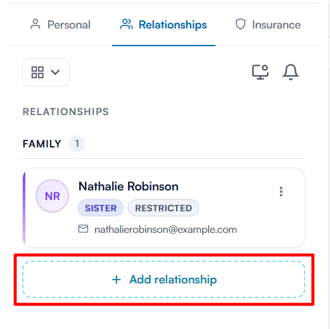
NOTE: Insurance providers are linked from the Insurance tab of the Client Card instead, using the New Policy button. To learn more, see How to Link Insurance with Client.
Linking third parties to clients helps you manage workflows more efficiently. For example:
- Send prescriptions directly to the client’s preferred pharmacy.
- Bill an insurance provider or employer on behalf of the client.
By following these steps, you can successfully create and manage third parties in your Pabau account.
Was this guide helpful? Let us know by voting below - your feedback helps us write clearer articles.
For more guides, browse the related articles below or use the search bar at the top of the page. You can also watch our video learning series, the Pabau Academy, or visit the Support page for additional help.