
On the CMS-1500 claim form, Box 5 carries the patient's mailing address and, on paper, a telephone cell. This guide explains what the box holds and where Pabau takes the values from.
NOTE: This article is part of the US Insurance Billing Additional Resources series, which walks through every box of the CMS-1500. If you are new to claims in Pabau, start with Creating a US Professional (CMS 1500) Claim.
Box 5 — Patient's address
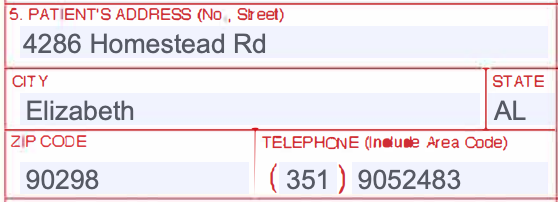
Box 5 breaks the patient's address into cells: street, CITY, STATE, ZIP CODE, and a TELEPHONE cell. The street, city, state, and ZIP are required on every claim, paper or electronic; a second address line and the telephone are optional.
How Pabau fills it
The address lives in the Patient section of the claim editor, which is labeled with the CMS-1500 boxes it covers (2–5): Address line 1, Address line 2, City, State (2 letters), and ZIP. The fields prefill from the client record when the invoice issued to the insurer becomes a claim, you can correct them on the claim before validating or sending, and any Patient field left blank falls back to the client record at validation.

NOTE: On the printed form, Pabau fills the TELEPHONE cell from the phone number on the client record. The phone is not sent on the electronic claim, which matches clearinghouse guidance: it is not a required field there.
On the electronic claim: the street, city, state, and ZIP are sent to Claim.MD with the rest of the patient record.
TIP: The State field takes the two-letter postal abbreviation — IL, not Illinois — exactly as it should appear on the form.
If you print claims to mail them, see Exporting and Submitting CMS1500 Claims Manually.