
On the CMS-1500 claim form, Box 15 reports an other date connected to the patient's condition, paired with a qualifier code that tells the payer what kind of date it is. This guide explains what the box means and when Pabau fills it.
NOTE: This article is part of the US Insurance Billing Additional Resources series, which walks through every box of the CMS-1500. If you are new to claims in Pabau, start with Creating a US Professional (CMS 1500) Claim.
Box 15 — Other date

Box 15 pairs a date with a three-digit qualifier in the QUAL cell — the qualifier identifies which kind of date is being reported, such as an accident date or the date of initial treatment. The box is situational: it is filled only when the payer needs that particular date to process the claim.
How Pabau fills it
Pabau fills Box 15 for accident claims. The Accident / injury date field lives in the Claim details section of the claim editor, and it becomes required whenever Auto accident or Employment related is set to Yes (the Box 10 questions in the same section). On the printed form the date appears in Box 15 with qualifier 439, the code for an accident date.
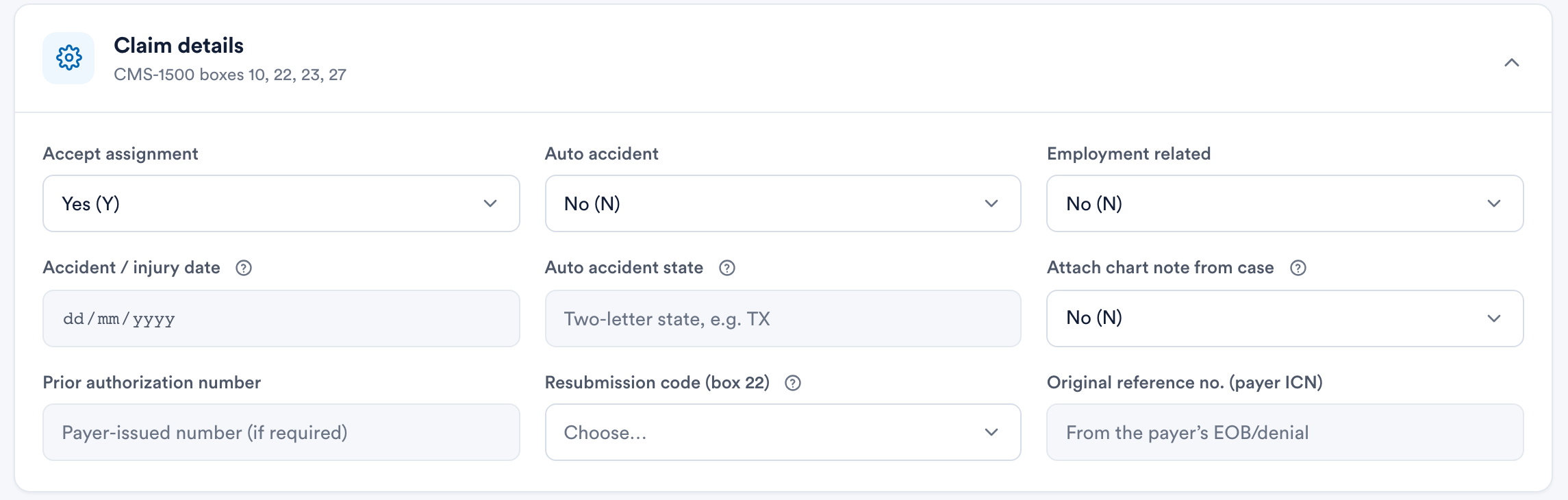
For claims with no accident involved, Box 15 stays blank — by design. Because the box is situational, most professional claims are processed without it.
NOTE: Other Box 15 date types — initial treatment, last X-ray, and similar — are not collected in Pabau. If a payer requires one of those dates, add it in the Claim.MD portal after sending (open the claim under Manage Claim and edit it there), or hand-fill the box on the printed form.
On the electronic claim: the Accident / injury date is sent to Claim.MD as the claim's accident date, and Claim.MD maps it onto the electronic claim for the payer.
For printing and hand-finishing paper claims, see Exporting and Submitting CMS1500 Claims Manually.