
On the CMS-1500 claim form, Box 1 tells the payer what type of health coverage the claim is billed to, and Box 1a identifies the insured person's policy with the payer. This guide explains what each box means and where Pabau takes the values from.
NOTE: This article is part of the US Insurance Billing Additional Resources series, which walks through every box of the CMS-1500. If you are new to claims in Pabau, start with Creating a US Professional (CMS 1500) Claim.
Box 1 — Insurance coverage type

Box 1 carries seven checkboxes — Medicare, Medicaid, TRICARE, CHAMPVA, Group Health Plan, FECA Blk Lung, and Other — and exactly one of them is marked to show the program the claim bills to. On a paper claim the box is optional; on an electronic claim the coverage type always travels with the claim.
How Pabau fills it
For electronic claims, you never set Box 1 by hand. The claim's payer is the Claim.MD payer linked to your insurer in Setup > Claims > Claim.MD > Payers, and it is shown in the Payer tile at the top of the claim. The clearinghouse determines the coverage type from that payer, so picking the right payer is what gets this box right.

For printed claims (Export > Print on the claim), Pabau reads the payer name and marks the matching box: a payer whose name contains Medicare, Medicaid, TRICARE, or CHAMPVA gets that program's checkbox, and every other payer is marked as Other.
NOTE: Pabau never marks Group Health Plan or FECA Blk Lung automatically on the printed form. If a payer requires one of those on paper, print the text-only version onto pre-printed CMS-1500 stock and mark the box by hand.
Box 1a — Insured's ID number

Box 1a holds the member or subscriber ID the payer assigned to the insured person's policy — the number on the front of the insurance card. It is required on every claim, paper or electronic.
How Pabau fills it
The value comes from the membership number on the client's insurance policy. You will find it on the client card: open the Insurance tab of the left panel to see every policy with its membership number, and use New Policy to add one.
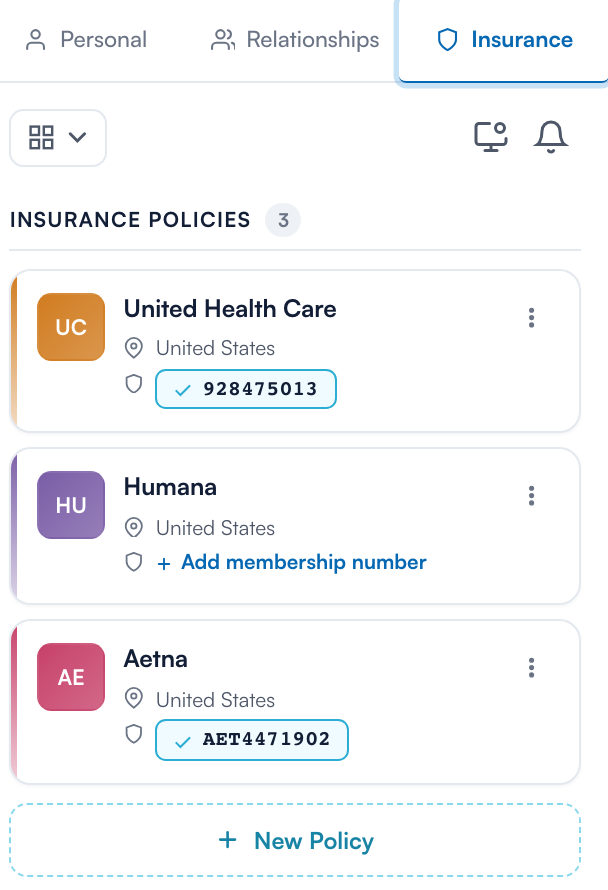
When an invoice is issued to the insurer, the policy's membership number flows onto the claim as Member / policy number in the claim's Insurance section. It is a required field, and you can correct it on the claim itself before validating or sending.

On the electronic claim: the member ID is sent to Claim.MD as the subscriber ID, which lands in Loop 2010BA, Segment NM109 of the 837P file; the coverage type from Box 1 corresponds to the claim filing indicator in Segment SBR09.
TIP: Run an eligibility check from the claim (the Eligibility chip above the Policy Member ID tile) before submitting — it verifies the member ID against the payer and catches typos before they become rejections. See Request eligibility and benefits report.
To set up client policies from scratch, see Insurance Guide Part 2: Client Insurance Setup in Pabau.