
Pabau Scribe is not available or not showing
If Pabau Scribe is not visible in your Pabau GO app, check the following:
- Make sure you have the latest version of the Pabau GO app installed. Go to the App Store, search for Pabau GO, and check whether an update is available. Older versions of the app may not support Scribe or may display it incorrectly.
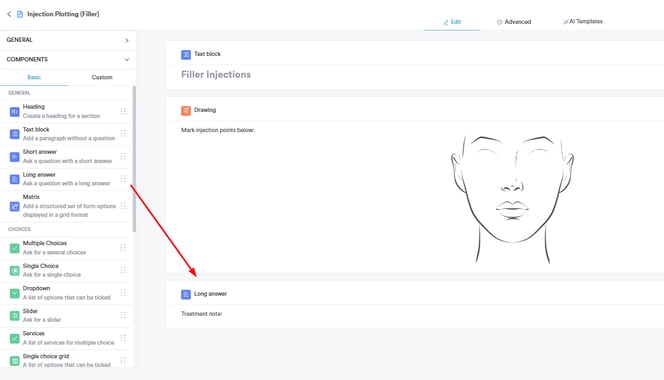
- Make sure the form template you are using has a long answer component added to it. Scribe requires a long answer field in the form to populate the generated notes into — without it, Scribe will not appear as an option on that form.
Scribe is not recording or the microphone is not working
If Scribe is not picking up audio when you try to record, check the following:
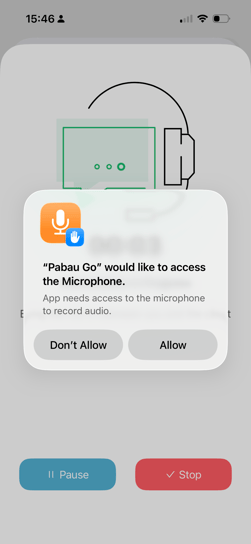
- Make sure you have granted microphone permissions to the Pabau GO app. Go to your phone's Settings → Pabau GO → Permissions and confirm that microphone access is enabled.
- Check that your device microphone is not blocked or covered, and that no other app is currently using it.
- Try closing and reopening the Pabau GO app and starting the recording again.
Scribe is not generating notes after recording
If the recording completes but no notes are generated, check the following:
- Check that you have a stable internet connection during and after the recording. Scribe requires an active connection to process and generate notes.
- Check your Pabau credits — if your credits have run out, Scribe will not be able to process recordings. Review this article on how to check and top up your credits.
- Try recording again with the app in the foreground — switching away from the app during a recording may interrupt the process.
NOTE: If you have a Care Plus subscription, AI features can be used without consuming credits.
The app is crashing or freezing when using Scribe
If the Pabau GO app crashes or freezes during a Scribe session, try the following:
- Update the app to the latest version via the App Store — bug fixes and stability improvements are regularly included in updates.
- Restart your device and try again.
- Reinstall the Pabau GO app if the issue persists after updating and restarting.
- Check that your device has sufficient available storage — low storage can cause apps to crash unexpectedly.
📱Please note: The latest version of Pabau GO requires iOS 17 / iPadOS 17 or later. Devices that can't update to iOS 17 / iPadOS 17 won't be able to run it.
Download Pabau GO on your iPhone or iPad from the App Store.
For more guides, refer to related articles below, select additional guides, or use the search bar at the top of the page. These guides will help you get the most out of your Pabau account.
Additionally, to help you fully utilize and understand your Pabau account, we recommend exploring additional guides and resources offered at the Pabau Academy. It offers in-depth video tutorials and lessons, offering a holistic learning experience that can equip you with the essential skills for achieving success with Pabau.