
Step 1: Navigate to the Client Card
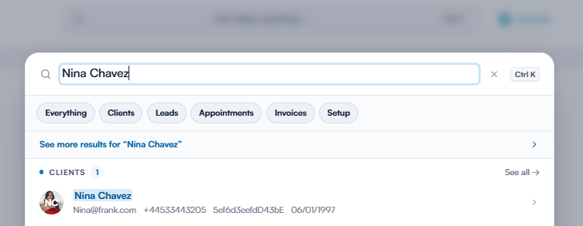
Log in to your Pabau account, and from the search bar located at the top of the page, search for the client whose client card you wish to open.
Step 2: Open Packages
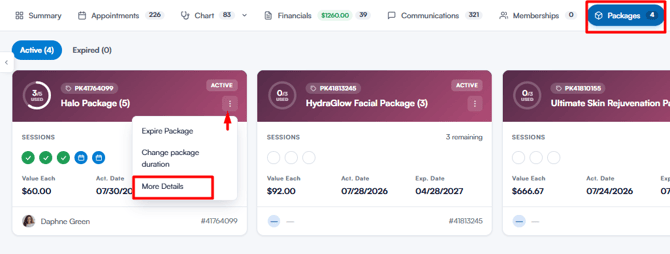
Once you’re on the client’s card, go to the Packages tab. Find the relevant package, click on the three vertical dots on the right, and select More Details. You can also click the package name to open the same view.
Step 3: Check the Usage History
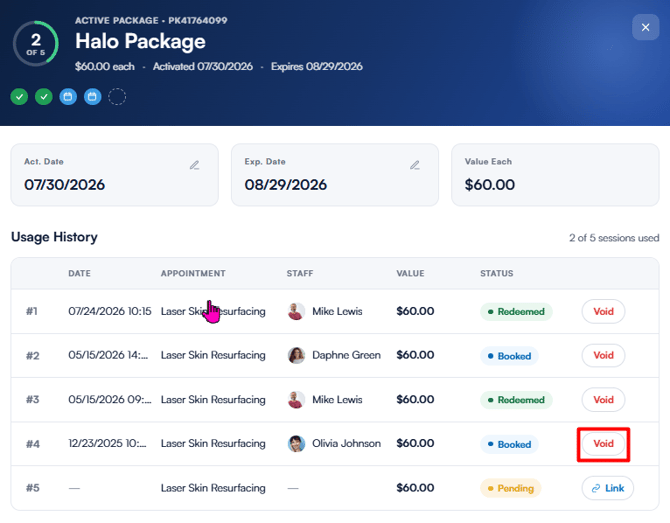
The Usage History lists every session in the package, along with its date, appointment, staff member, value, and current status:
- Booked: The session is linked to an upcoming appointment but has not yet been redeemed.
- Redeemed: The session has been used.
- Manually Redeemed: The session was redeemed manually, without an appointment.
- Pending: The session is still available to use.
- Expired: The session lapsed unused when the package expired.
From this view, you can also manage individual sessions:
- Click Void next to a redeemed or booked session to reverse it. The session becomes available again, ready to be redeemed.
- Click Link next to a pending session to redeem it — either choose one of the client’s appointments, or select Redeem without linking an appointment.
CAUTION: If a redeemed session’s invoice contains more than one item, voiding the session voids the entire invoice. A confirmation window will list the affected items before you proceed.
By following these steps, you can review and manage your clients’ package usage history.
Was this guide helpful? Let us know by voting below - your feedback helps us write clearer articles.
For more guides, browse the related articles below or use the search bar at the top of the page. You can also watch our video learning series, the Pabau Academy, or visit the Support page for additional help.