
Two-factor authentication significantly enhances the security of your Pabau account by requiring an additional verification step beyond just entering your login credentials. This added layer of security helps protect your account from potential attackers, even if they have obtained access to your email address or password.
Why Two-Factor Authentication is Mandatory in Pabau
Clinics and aesthetic practices handle some of the most sensitive data imaginable — personal health records, treatment histories, financial information, and private client details. Protecting that data is not just good practice, it is a legal and ethical obligation.
That is why Two-Factor Authentication (2FA) is mandatory for all Pabau accounts and cannot be disabled. Here is why this matters:
-
🔒 Your client data is highly sensitive Medical and aesthetic records are among the most valuable targets for data breaches. A compromised account could expose confidential client information, putting your clients and your business at serious risk.
-
⚠️ Passwords alone are not enough Even strong passwords can be stolen through phishing attacks, data breaches on other platforms, or simple human error. 2FA ensures that even if a password is compromised, an attacker still cannot access your account without the second verification step.
-
📋 Compliance with data protection regulations Healthcare and aesthetic businesses are subject to strict data protection laws such as GDPR. Enforcing 2FA across all accounts helps Pabau users maintain compliance and demonstrate that appropriate security measures are in place to protect personal data.
-
🏥 Protecting your business reputation A data breach can cause lasting damage to a clinic's reputation and client trust. Mandatory 2FA is one of the most effective ways to significantly reduce the risk of unauthorised access.
-
👥 Securing your entire team 2FA is enforced at the business level, meaning every team member who accesses your Pabau account is protected — not just admins. This ensures there are no weak points in your security, regardless of who is logging in.
Because of these reasons, 2FA is enforced across all Pabau accounts and cannot be turned off. You can, however, configure which verification methods are available to your team — authenticator app, text message, or email — to suit your workflow.
The Login Process with Two-Factor Authentication:
Initiating Login:
When you or your team members attempt to log in to your Pabau accounts, you will first provide your standard login credentials (username and password) as usual.
Verification Code Request:
Upon providing the correct login credentials, you will be prompted to provide a verification code.
Receiving the Verification Code:
The verification code will be delivered via the 2FA method configured for the user — text message, email, or authenticator app (such as Google Authenticator, Authy, or Duo).
Inputting the Verification Code:
To complete the login process, you must input the verification code received through your chosen method. This code acts as the second factor of authentication.
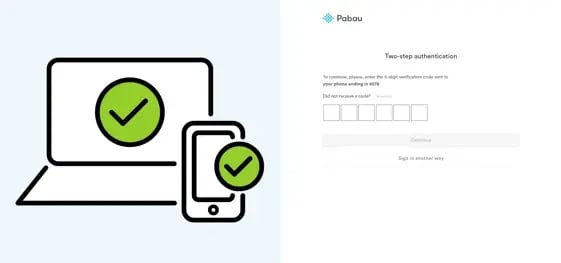
Successful Login:
Once the correct verification code is entered, access to your Pabau account is granted.
To set up 2FA, please follow the steps below:
Step 1: Navigate to Business Details
Click on "Setup" in the left sidebar menu and under "Business," select "Business Details."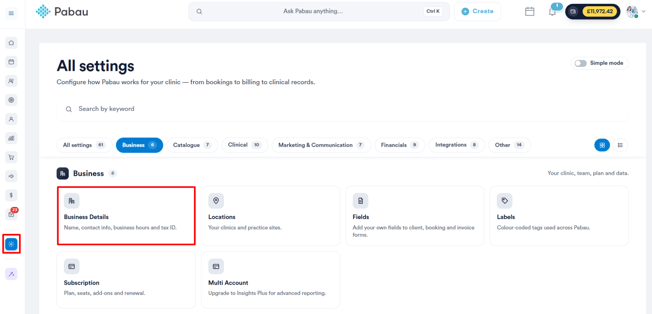
Step 2: Access Security Settings
Click on the "Security" tab on the left side of the screen.
Step 3: Manage 2FA Enrolment
Under the "Improve your security score" section, click "Manage" next to the 2FA recommendation.
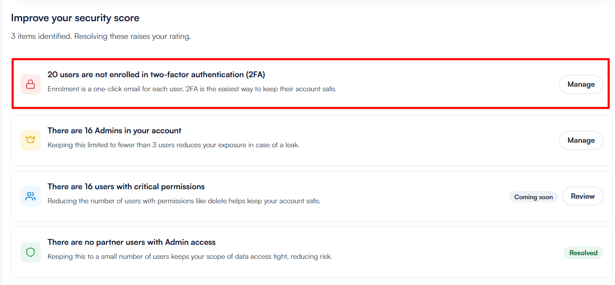
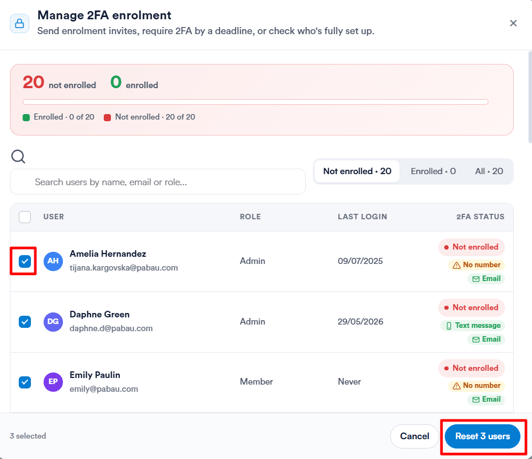
A popup will appear showing all users and their current 2FA status — you can see at a glance how many are enrolled and how many aren't, along with each user's available contact methods.
Select the users you want to enroll and click "Reset users" to send them an enrollment invite. You can filter by enrolled or not enrolled, or search by name, email, or role
NOTE: If 2FA is configured to deliver verification codes via text message, Pabau credits will be charged for each code sent. To ensure uninterrupted access, it's advisable to enable auto top-up of credits.
Choose Your 2FA Delivery Method
Once your staff are enrolled, you can configure which 2FA methods they are allowed to use. Navigate to ''Account 2FA preferences'' and select from the following approved methods:
- Authenticator app (recommended) — a one-time code via Google Authenticator, Authy, or Duo
- Text message — a one-time code sent by SMS
- Email — a one-time code sent to the user's email address
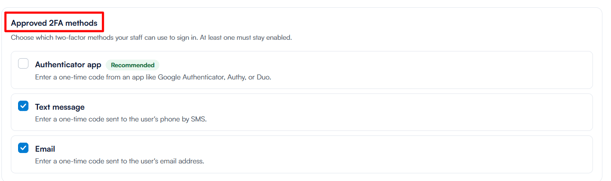
At least one method must remain enabled at all times. Once you've made your selection, click Save Changes in the top right corner to apply.
For more guides, refer to related articles below, select additional guides, or use the search bar at the top of the page. These guides will help you get the most out of your Pabau account.
Additionally, to help you fully utilize and understand your Pabau account, we recommend exploring additional guides and resources offered at the Pabau Academy. It offers in-depth video tutorials and lessons, offering a holistic learning experience that can equip you with the essential skills for achieving success with Pabau.