
This article covers the new Client Card, available to selected clinics from August 2026. If your Client Card looks different, see the How to Write a Consent Form From the Client Card (Classic) guide instead.
Step 1: Access the Client Card
Start by logging into your Pabau account using your login credentials. Then, open the client card using the search bar at the top of the screen.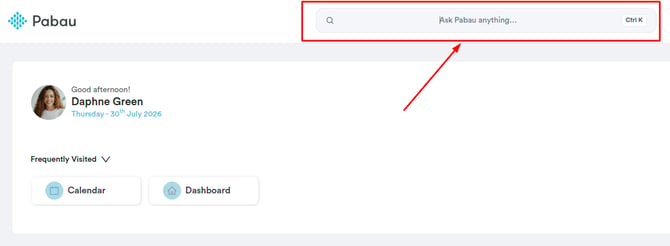
Step 2: Navigate to the Create Button
Once you access the client card, navigate to the bottom right corner of the screen and click the Create button, represented as a blue plus sign. This will reveal the actions you can take.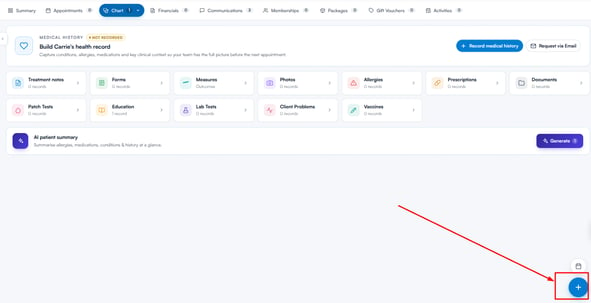
Step 3: Create a Consent Form
The option to create a consent form is listed on the Create menu; click Consent form to proceed.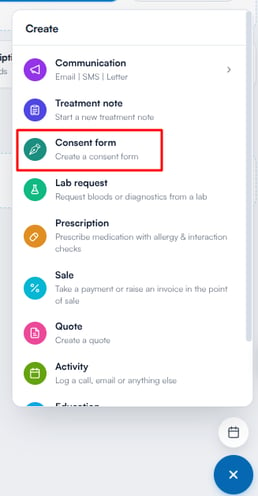
Step 4: Select Template
The Create Consent Form window lists all the consent form templates you’ve created in the system. Use the search bar to find a template by name, or open the Favorites tab to see the templates you’ve starred. Click your preferred template to continue.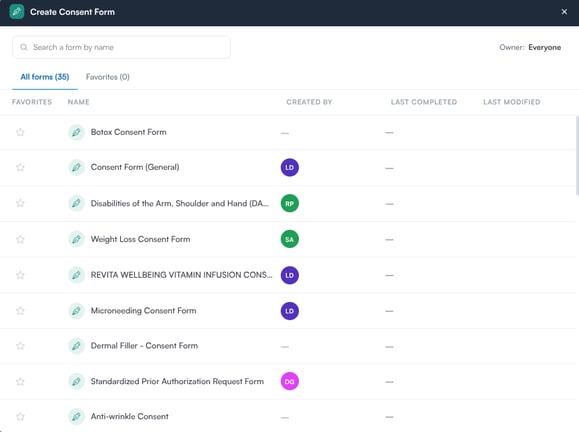
Step 5: Complete Form
Now you can fill out all the necessary fields in the form. Ensure you click the "Save Form" button at the bottom of the screen to save the consent form to the client card.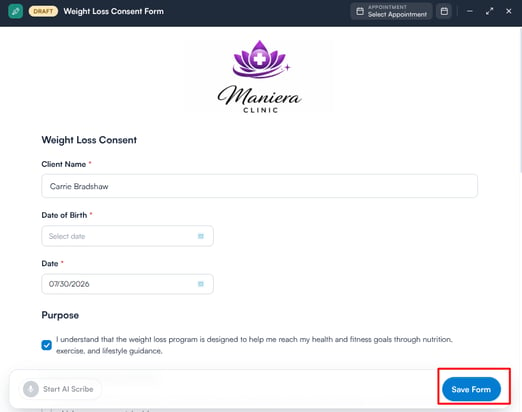
The completed form will be stored in the EMR section of the client card (labelled Chart for US businesses), under Forms.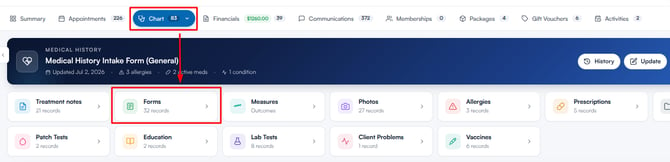
By following these steps, you can easily create a consent form from the Client Card.
Was this guide helpful? Let us know by voting below - your feedback helps us write clearer articles.
For more guides, browse the related articles below or use the search bar at the top of the page. You can also watch our video learning series, the Pabau Academy, or visit the Support page for additional help.