
This article covers the new Client Card, available to selected clinics from August 2026. If your Client Card looks different, see How to Void an Invoice from the Client Card (Classic) guide instead.
Step 1: Navigate to the Client Card
Start by logging in to your Pabau account using your login credentials. Then navigate to the Search bar at the top of the page and type at least three letters of the client’s name. Pabau will filter the results as you type.
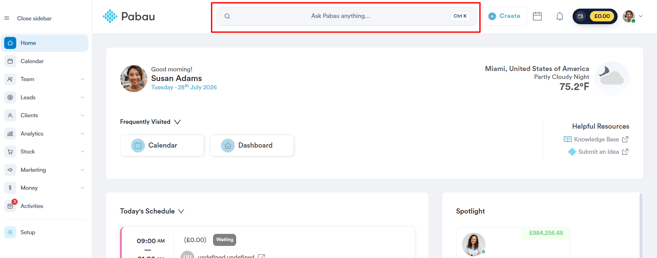
Step 2: Switch to the Financials Tab
After selecting the client, click on the "Financials" tab at the top of the client card. This section holds the client’s invoices, payments, and other financial records.
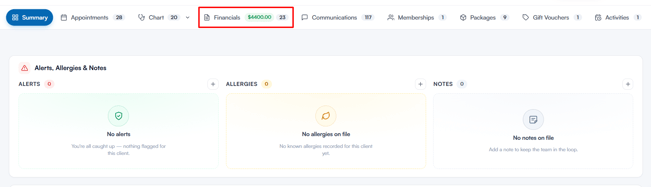
Step 3: Locate the Invoice
In the Financials tab, open the "Invoices" sub-tab, where all raised invoices are listed. To void the invoice, locate the specific invoice and click on its number to view all associated details.
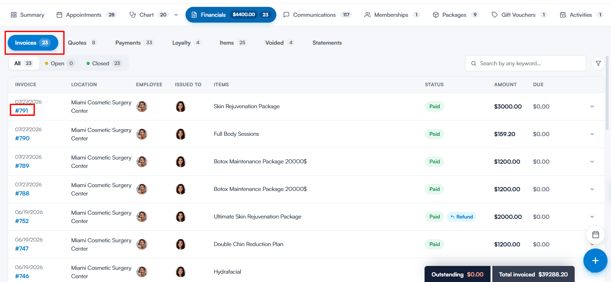
Step 4: Navigate to "Options"
On the Edit Invoice page, click the "Options" button in the top right corner. A menu will open listing the actions you can take with the invoice, one of which is "Void".
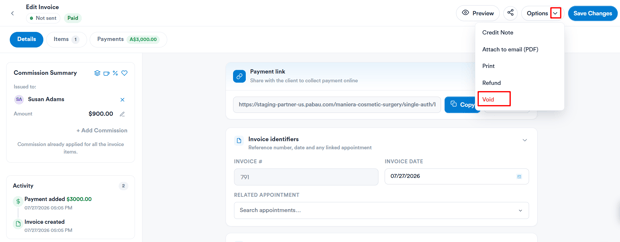
Step 5: Confirm Voiding Invoice
Once you select "Void", a confirmation window opens summarising the invoice number, date, client, and amount. It lists any payments that will be deleted and explains what happens when you void an invoice. Click "Void Invoice" to finalise the action.
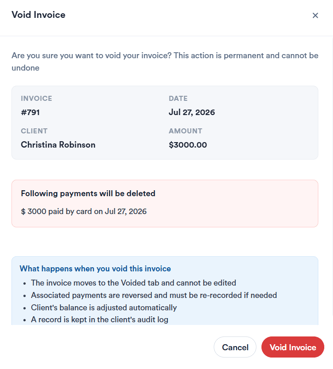
NOTE: Voiding an invoice is permanent and cannot be undone. The invoice moves to the Voided tab and can no longer be edited, its payments are reversed and must be re-recorded if needed, the client’s balance is adjusted automatically, and a record is kept in the client’s audit log.
You can find voided invoices under the "Voided" sub-tab in the Financials section.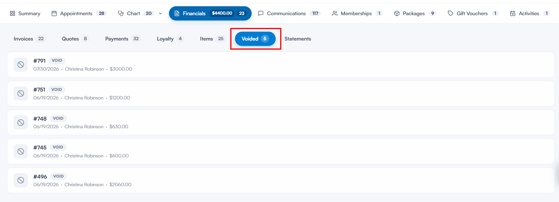
By following these instructions, you will be able to void the invoice from the patient records.
Please note: Invoices with payments processed via Stripe cannot be voided by default, as voiding would break the link between the payment entry in Pabau and the Stripe payment entry. Instead, please refund the payment. If voiding Stripe payments has been enabled for your account, the payments will be refunded back through Stripe when you void — this is not reversible.
Was this guide helpful? Let us know by voting below - your feedback helps us write clearer articles.
For more guides, browse the related articles below or use the search bar at the top of the page. You can also watch our video learning series, the Pabau Academy, or visit the Support page for additional help.