
Step 1: Navigate to the Client Card
Start by logging in to your Pabau account using your login credentials. Then, navigate to the search bar at the top of the page to search for a client. Type at least three letters for the client to appear.
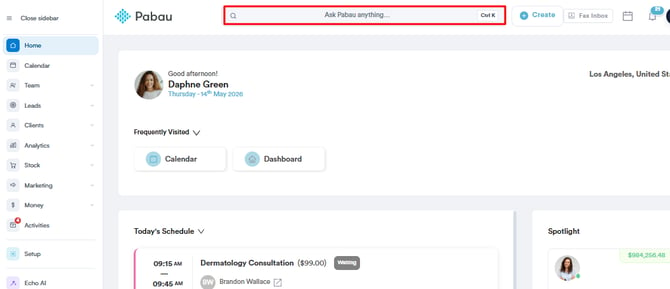
Step 2: Switch to the Financials Tab
After selecting the client, in the client card you will find the "Financials" tab. This tab contains a record of all payments and invoices associated with the client.
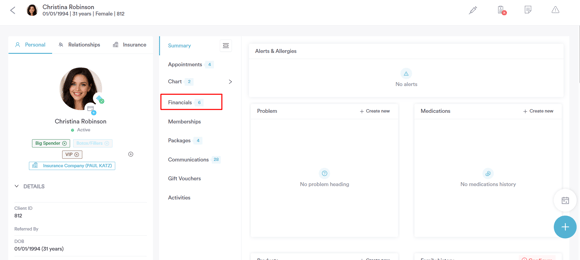
Step 3: Locate the Invoice
Under the ''Financials'' tab, click on the Invoices sub-tab. You’ll see a list of all issued invoices for the client. Browse through the list and select the invoice you want to review.
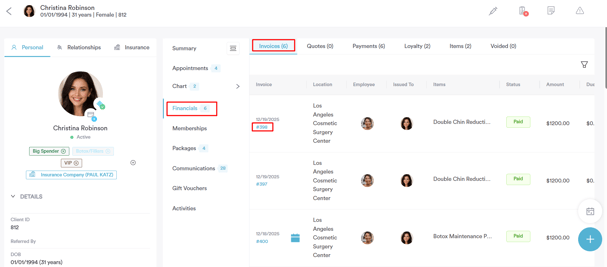
Step 3: View Invoice Audit Logs
Open the invoice you wish to review. In the Edit Invoice modal, you will find the Invoice Audit Log, which provides a complete and detailed history of all key actions performed on the invoice, including:
-
Modifying amounts, biller, tax rates, or dates
-
Sending invoices or Paylinks
-
Adding, removing, or voiding payments, and creating refunds
-
Adding notes
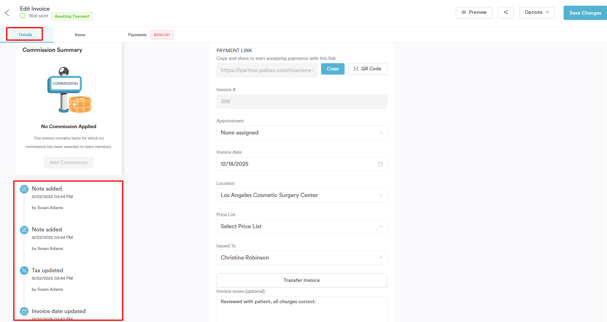
Each entry displays the timestamp, description, and user information, offering full transparency and accountability for all invoice activity. This allows you to track changes accurately and review invoice history efficiently.
Now that you know how to access and review the Invoice Audit Log, you can easily track all actions performed on an invoice. This ensures full transparency, maintains accountability, and allows you to quickly understand invoice activity at a glance.
For more guides, refer to related articles below, select additional guides, or use the search bar at the top of the page. These guides will help you get the most out of your Pabau account.
Additionally, to help you fully utilize and understand your Pabau account, we recommend exploring additional guides and resources offered at the Pabau Academy. It offers in-depth video tutorials and lessons, offering a holistic learning experience that can equip you with the essential skills for achieving success with Pabau.