
NOTE: Usage limits are available for Promotions only. This section does not apply to Flash sales, since Flash sale discounts are applied automatically rather than redeemed individually by clients.
As part of the Scope & Rules step, Usage limits let you control how many times a Promotion can be redeemed. Let's see how to set these limits and control whether a deal can be combined with other active discounts.
Setting usage limits
Under Usage limits, you can set the following, both of which are optional:
- Total redemptions - cap the total number of times the promotion can be used across all clients, for example the first 500 clients to redeem it. Leave blank for unlimited use.
- Per client - cap how many times a single client can use the promotion. Leave blank for no limit.
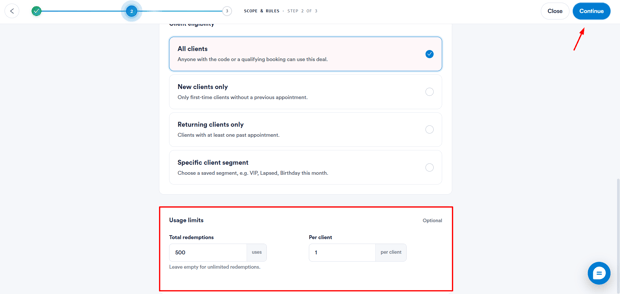
Once you're done, you can continue setting up the rest of the promotion.
By following the steps above, you can control how often a Promotion can be used and whether it can be combined with other discounts.
Was this guide helpful? Let us know by voting below - your feedback helps us write clearer articles.
For more guides, browse the related articles below or use the search bar at the top of the page. You can also watch our video learning series, the Pabau Academy, or visit the Support page for additional help.