
Table of Contents:
1. How to Manage 2FA for Your Team (Admin)2. How to Set Up the Authenticator App (Individual Users)
3. What to Expect at Login
Two-factor authentication (2FA) adds an extra layer of security to your Pabau account by requiring a second verification step at login, beyond just your username and password. Even if login credentials are compromised, 2FA ensures unauthorized access is prevented.
Pabau supports three 2FA methods. Refer to the table below to find the one that best suits your team:
| Method | How it works | Pros | Cons |
| Authenticator app (recommended) | A free app generates a rotating 6-digit code | Secure, free, works offline | Requires downloading an app |
| SMS / text message | A code is texted to the staff member's mobile | Familiar, no app needed | Uses paid SMS credits. Staff need a mobile number on their profile |
| A code is sent to the staff member's email | No app, phone, or cost needed | Only as secure as the email account |
How to Manage 2FA for Your Team (Admin)
NOTE: As an admin, you determine which 2FA methods are available to your team. The methods enabled here will be presented to staff at login, allowing them to select their preferred option each time they sign in.
Step 1: Navigate to Setup
Start by logging in to your Pabau account using your login credentials. Then, navigate to the Setup page by clicking the "Setup" button
%201.png?width=670&height=315&name=How%20to%20Enable%20Two-Factor%20Authentication%20(2FA)%201.png)
Step 2: Access Business Details
Under the Business section, find the "Business Details" tab.
%202.png?width=605&height=292&name=How%20to%20Enable%20Two-Factor%20Authentication%20(2FA)%202.png)
Step 3: Switch to the Security Tab
To access the security options, navigate to the "Security" tab located on the left side of the screen.
-2.png?width=539&height=282&name=Screenshot%20(1)-2.png)
Step 4: Manage 2FA Enrollment
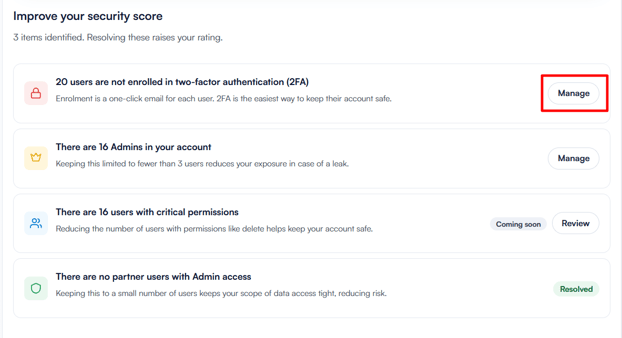
Here you'll find security recommendations provided by Pabau. These suggestions highlight areas where your account's security can be improved.
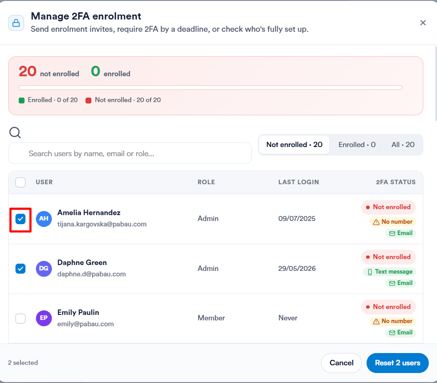
By clicking Manage on the 2FA recommendation, you can see all staff members and their current enrollment status including which 2FA methods they have available.
Select the users you want to enroll and select Reset users to send them an enrollment invite.
Step 5: Set 2FA Preferences
Once users are enrolled, scroll down to Account 2FA preferences to choose which 2FA methods your staff are allowed to use - authenticator app (recommended), text message, or email. At least one method must remain enabled at all times.
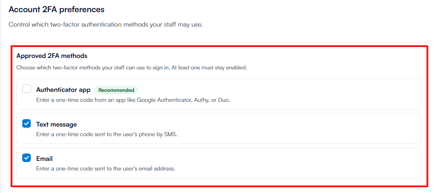
NOTE: Avoid enabling the authenticator app as the only method unless all staff have already completed the setup. Staff who haven't set it up yet will be locked out of their account. Keep at least SMS or email enabled to ensure uninterrupted access.
NOTE: If 2FA is configured to deliver verification codes via text message, Pabau credits will be charged for each code sent. To ensure uninterrupted access, it's advisable to enable auto top-up of credits.
Once you've configured your preferences, click ''Save Changes'' in the top right corner to apply them.
How to Set Up the Authenticator App (Individual Users)
The authenticator app is the most secure 2FA method. Download one of the following apps on your mobile device:
Here are the steps to set it up in your Pabau account:
Step 1: Access Account Settings
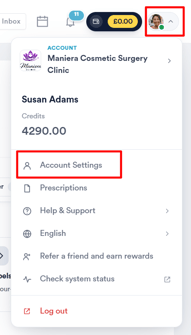
Once downloaded, click on your profile icon in the top right corner of Pabau and select ''Account Settings''.
Step 2: Set Up Authenticator App
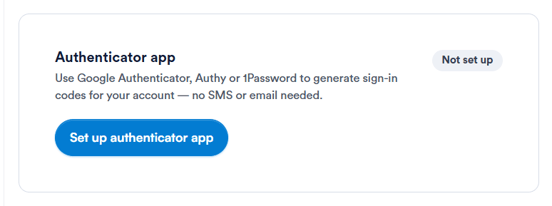
Under ''Security'', locate the Authenticator app and click Set up authenticator app.
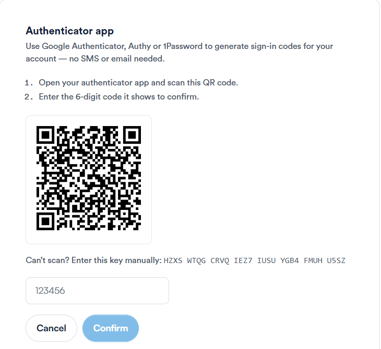
A QR code will appear on screen.
Step 3: Scan the QR Code
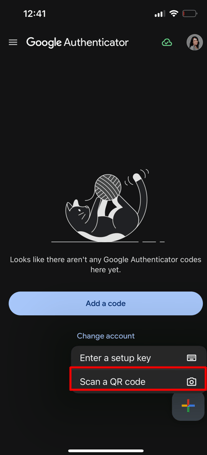
Open the authenticator app you downloaded on your phone and tap the + button, then select Scan a QR code. Point your phone camera at the QR code on screen.
Step 4: Enter the Verification Code
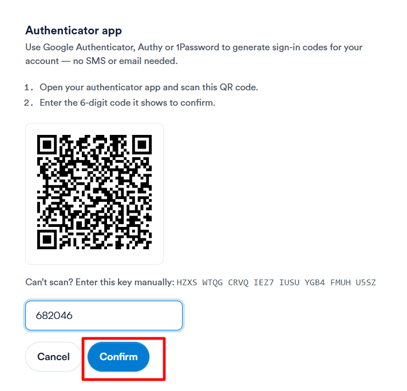
Once scanned, the app will display a 6-digit code. Enter this code in the field provided in Pabau and click Confirm.
After confirming, you'll be shown a set of backup codes. Save these somewhere safe as each one can only be used once if you ever lose access to your device. Click I've saved these codes to complete the setup.
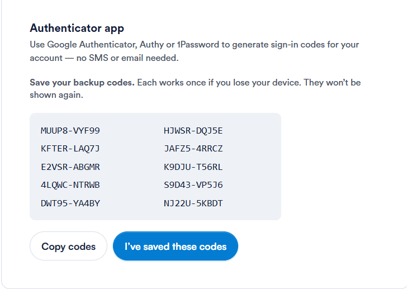
Your authenticator app is now set up and active. You can view and manage it at any time from the ''Security'' section in your ''Account Settings''.
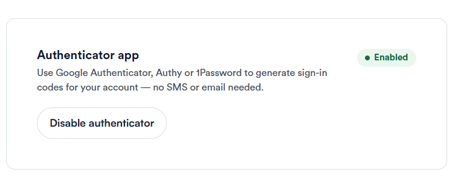
NOTE: The authenticator app must be set up here before it can be used at login. Once done, you'll be prompted to enter the 6-digit code from your app each time you sign in.
What to Expect at Login
Once 2FA is set up, every time you log in to Pabau you'll be prompted to verify your identity after entering your username and password. You'll see a screen showing all the methods your admin has enabled - simply choose the one you prefer.
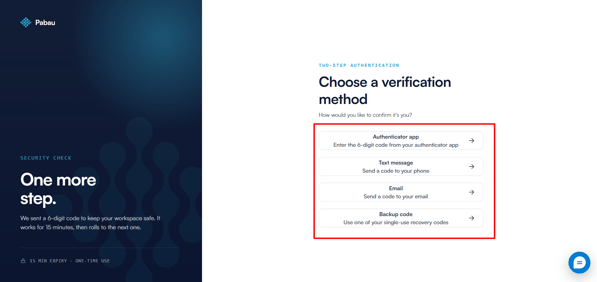
- Authenticator app - open your app and enter the 6-digit code shown
- Text message - a code is sent to your mobile, enter it on the login screen
- Email - a code is sent to your email, enter it on the login screen
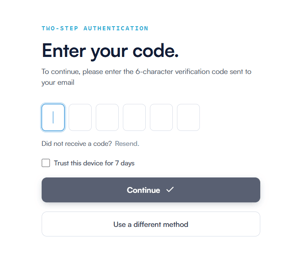
You can choose a different method each time - whichever is most convenient.
By implementing two-factor authentication across your team, you significantly reduce the risk of unauthorized access and ensure your Pabau account meets a strong security standard.
For more guides, refer to related articles below, select additional guides, or use the search bar at the top of the page. These guides will help you get the most out of your Pabau account.
Additionally, to help you fully utilize and understand your Pabau account, we recommend exploring additional guides and resources offered at the Pabau Academy. It offers in-depth video tutorials and lessons, offering a holistic learning experience that can equip you with the essential skills for achieving success with Pabau.