
Pabau allows you to configure how you want to manage access to your calendar when it’s locked. These settings give you full control over who can unlock the calendar and continue working, whether it’s restricted to the last logged-in user or open to any staff member with a valid passcode. This ensures your clinic maintains both security and flexibility, depending on your preferred workflow.
NOTE: For more information on locking and unlocking your calendar, refer to this guide.
Step 1: Navigate to Calendar
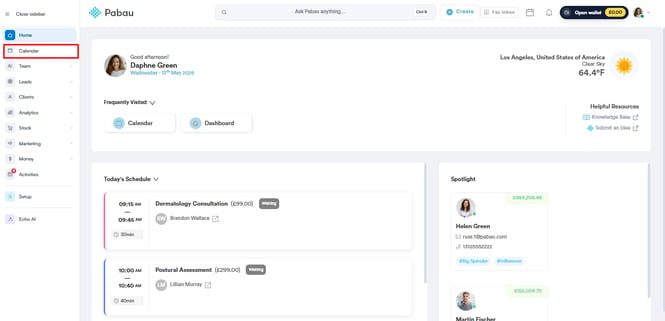
Start by logging into your Pabau account using your login credentials. Then, navigate to the "Calendar" tab on the left sidebar menu.
Step 2: Access Calendar Settings
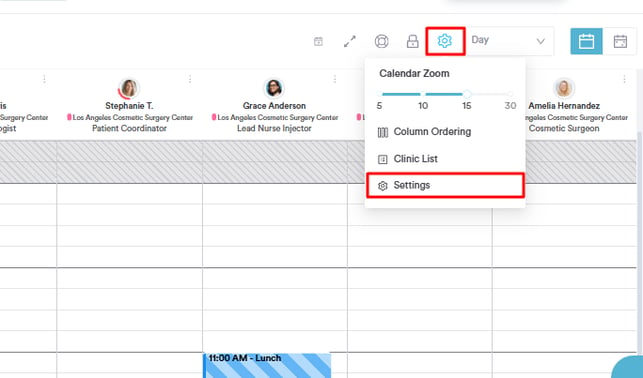
Navigate to the top right corner and click the cogwheel icon. A drop down will show where you can select the "Settings" option.
Step 2: Accept Last User's Passcode
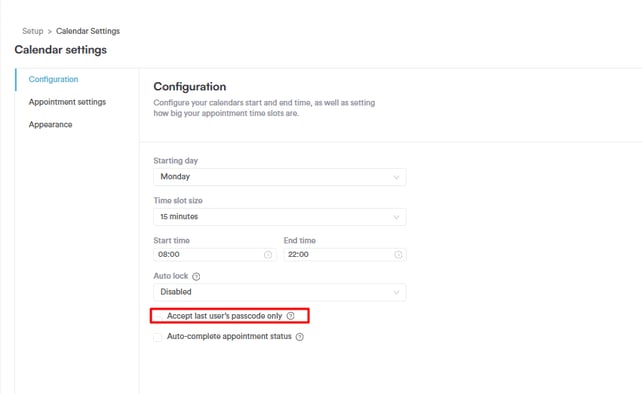
On the "Configuration" tab, you'll find the "Accept last user’s passcode only." Tick or untick the option to control access — ticking it restricts unlocking to the passcode of the staff member who was logged in before the calendar was locked, while unticking it allows passcodes from other staff members and updates the logged-in user based on the entered passcode.
Step 4: Save Changes
After configuring the calendar settings ensure to click the "Save Settings" button at the top right corner to finalize.

By following these steps, you can easily set up and manage passcode rules for locked calendars.
For more guides, refer to related articles below, select additional guides, or use the search bar at the top of the page. These guides will help you get the most out of your Pabau account.
Additionally, to help you fully utilize and understand your Pabau account, we recommend exploring additional guides and resources offered at the Pabau Academy. It offers in-depth video tutorials and lessons, offering a holistic learning experience that can equip you with the essential skills for achieving success with Pabau.