
Credit rollover allows any unused credits from one billing period to carry over to the next, rather than being forfeited when the membership renews. This is configured when adding a Credits perk to a membership.
NOTE: The membership feature will be usable only when the Stripe integration is active.
Step 1: Navigate to Setup
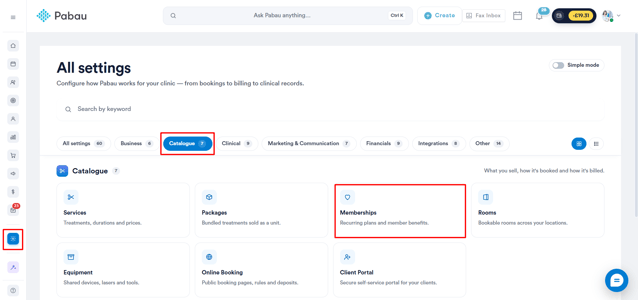
Start by logging in to your Pabau account using your login credentials. Then, navigate to the Setup page and find Memberships under the Catalogue section.
Step 2: Create or Edit a Membership
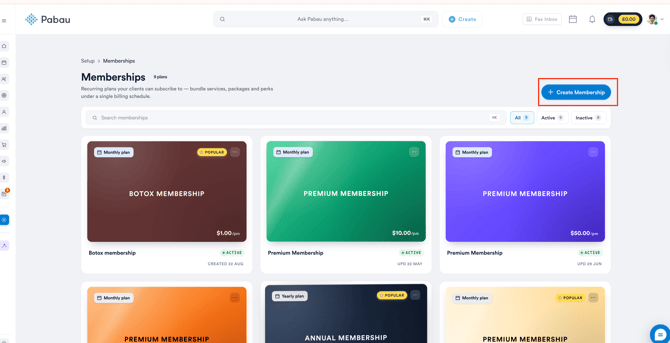
Once you're on the Memberships page, click the "Create Membership" button to get started.
Step 3: Insert Details
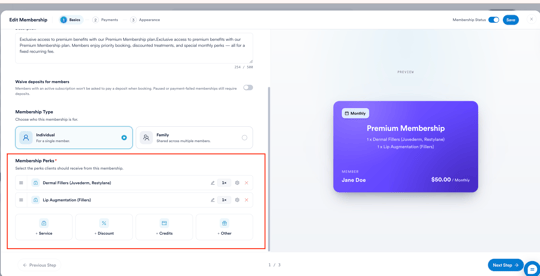
In the Basics step, add the membership name and description. A live preview of the membership card will appear on the right as you fill in the details.
Scroll down to access the Membership Perks section.
Step 4: Add a Credits Perk
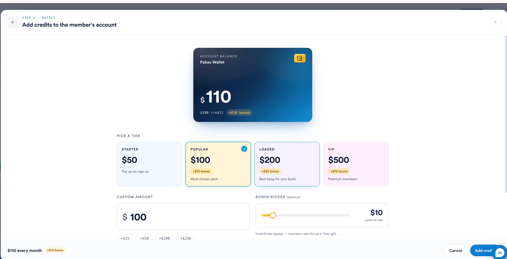
Click + Credits to open the credits panel. Configure the credits amount by either selecting a preset tier or entering a custom amount:
- Starter - $50
- Popular - $100 (+$10 bonus)
- Loaded - $200 (+$25 bonus)
- VIP - $500 (+$75 bonus)
You can also enter a Custom Amount manually, using the quick increment buttons (+$25, +$50, +$100, +$250) to adjust the value.
Optionally, use the Bonus Kicker slider to add extra credits on top as an incentive - members see this as a free gift.
Step 5: Set the Reload Cadence
Under Reload Cadence, choose how credits are added to the member's account:
- Reload every week/month/year - credits top up on the billing date. Any unused credit rolls over to the next period.
- One-time signup bonus - credit lands on day one. Great for welcoming new members. Unused credits do not roll over as there is no recurring reload.
To enable rollover, select Reload every week/month/year. With this option active, any unused credits at the end of a billing period will automatically carry over to the next, accumulating over time as long as the membership remains active.
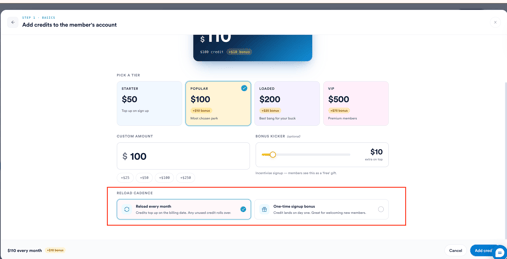
Click Add Credits to confirm and add the perk to the membership.
NOTE: If you select One-time signup bonus, rollover does not apply — credits are issued once at signup and are not replenished.
For more guides, refer to related articles below, select additional guides, or use the search bar at the top of the page. These guides will help you get the most out of your Pabau account.
Additionally, to help you fully utilize and understand your Pabau account, we recommend exploring additional guides and resources offered at the Pabau Academy. It offers in-depth video tutorials and lessons, offering a holistic learning experience that can equip you with the essential skills for achieving success with Pabau.