
NOTE: To learn more about Promotions, including how to create and manage them, please refer to this article.
As part of the Scope & Rules step, Client eligibility lets you decide who is able to use a deal. This applies to both Promotions and Flash sales.
By default, a deal is open to every client, but you can restrict it further - for example, to reward loyal clients, encourage new clients to book their first appointment, or run a targeted offer for a specific group, such as VIP clients.
Setting client eligibility
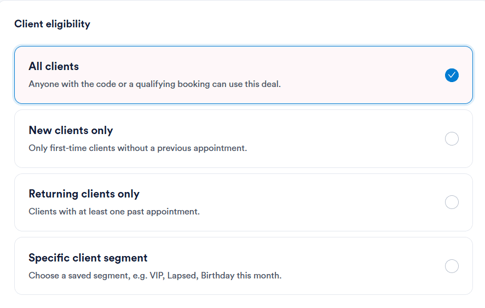
Under Client eligibility, choose one of the following options:
- All clients - anyone with the code, or a qualifying booking, can use the deal.
- New clients only - restricted to first-time clients without a previous appointment.
- Returning clients only - restricted to clients with at least one past appointment.
- Specific client segment - restricted to clients with a particular label, e.g. VIP, Lapsed, or Birthday this month.
Good to know:
A deal is made up of several conditions - who it applies to (Client eligibility), what it applies to (Apply to), and where it can be redeemed (Locations). All conditions must be met for the discount to apply.
For example, if a deal is restricted to returning clients and to facial treatments only, a new client would not qualify, nor would a returning client booking a different service - only a returning client booking a facial treatment would receive the discount.
Upon completing this step, review your selections before publishing the deal.
By following the steps above, you can control exactly which clients are eligible to redeem a Promotion or Flash sale.
Was this guide helpful? Let us know by voting below - your feedback helps us write clearer articles.
For more guides, browse the related articles below or use the search bar at the top of the page. You can also watch our video learning series, the Pabau Academy, or visit the Support page for additional help.