
When a potential client submits an enquiry, it will appear in your Leads section in Pabau. From there, you can view the enquiry details on the Lead Card and send a reply or follow-up email directly to the lead without leaving Pabau.
Step 1: Navigate to Leads
Log into your Pabau account and click on Leads in the left sidebar menu. This will open your leads list showing all current leads and enquiries in your pipeline.

Step 2: Find the Lead Inquiry
Browse your leads or use the search bar to find the lead whose Inquiry you want to respond to. Click on the lead to open their Lead Card.
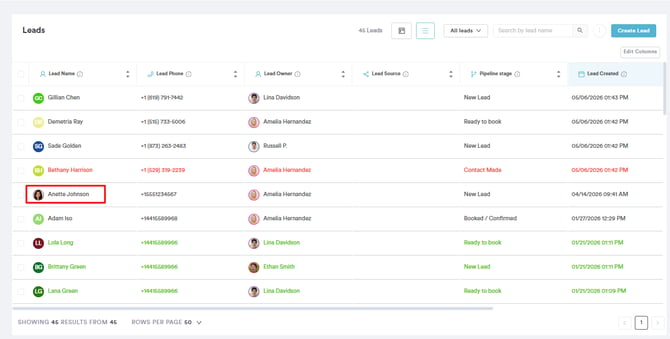
NOTE: Your leads list is sorted by most recent first, making it easy to spot and respond to the latest incoming inquiries quickly.
Step 3: Review the Inquiry
Inside the Lead Card, you can view the details of the inquiry that was submitted — including any message the lead left, their contact details, and the source of the inquiry. Review this information so you have the full context before responding.

Step 4: Create an Email
To send an email to the lead, click the Create button on the Lead Card. From the options that appear, select Email.
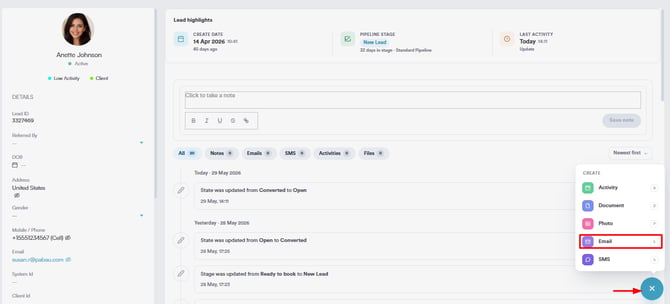
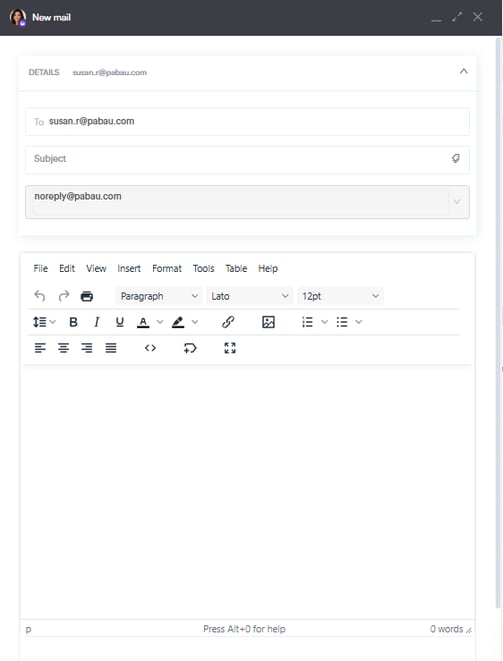
This will open the email composer where you can:
- Write your follow-up message
- Add a subject line
- Select the sender address
- Attach any relevant files if needed
Step 5: Send the Email
Once you are happy with your message, click Send. The email will be sent directly to the lead's email address and logged on their Lead Card so your team has a full record of all communication in one place.

By following these steps, you can easily respond to lead inquiries in Pabau.
For more guides, refer to related articles below, select additional guides, or use the search bar at the top of the page. These guides will help you get the most out of your Pabau account.
Additionally, to help you fully utilize and understand your Pabau account, we recommend exploring additional guides and resources offered at the Pabau Academy. It offers in-depth video tutorials and lessons, offering a holistic learning experience that can equip you with the essential skills for achieving success with Pabau.