
Step 1: Navigate to the Client Card
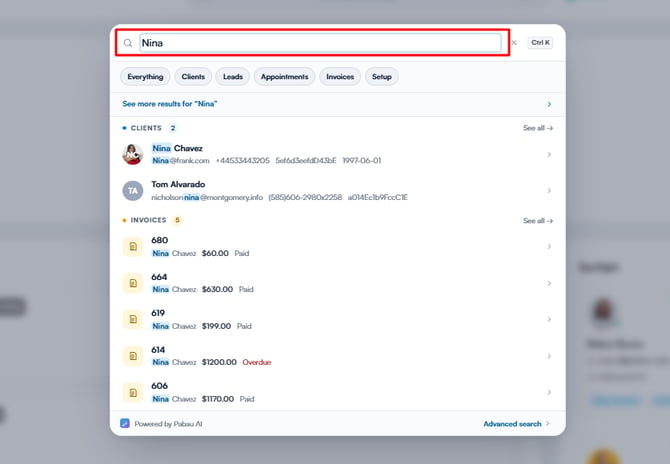
Start by logging in to your Pabau account using your login credentials. Then, navigate to the search bar at the top of the page to search for a client. Type at least three letters for the client to appear.
Step 2: Switch to the Forms Tab
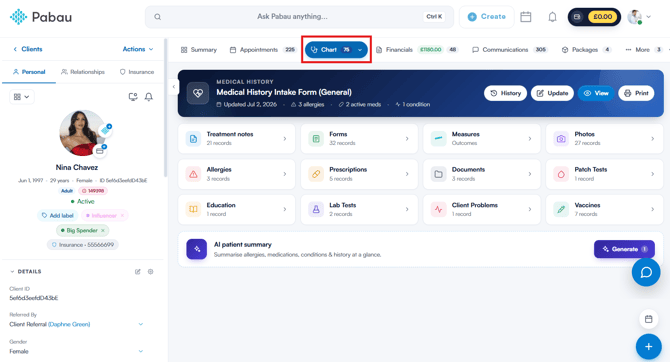
Once you’re in the client card, click the "EMR" tab in the tab menu at the top (labelled "Chart" for businesses in the United States), then open either the "Forms" or "Treatment notes" card, depending on which type of form you want to pin.
Step 3: Locate the Form
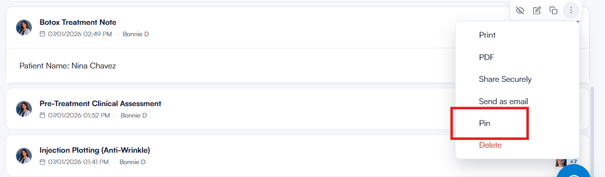
Locate the form you want to pin, then click the three-dot menu at the far right of its row and select "Pin". For treatment notes, hover over the note to reveal its action toolbar, then click the three-dot menu and select "Pin".
Step 4: Pin the Form
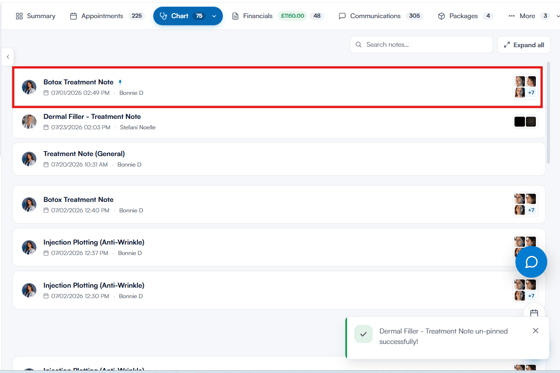
Once you select "Pin", the form moves to the top of the list and is marked with a small pin icon next to its name. If you pin more than one form, the Forms list shows the most recently pinned first, with the rest of the list below an "Other forms" divider; in the Treatment notes list, pinned notes stay in date order at the top. To unpin a form, open the same menu and select "Unpin".
Now that you’ve learned how to pin forms, you can easily access your most important forms at the top of the list, streamlining your workflow and saving you time during client visits.
For more guides, refer to related articles below, select additional guides, or use the search bar at the top of the page. These guides will help you get the most out of your Pabau account.
Additionally, to help you fully utilize and understand your Pabau account, we recommend exploring additional guides and resources offered at the Pabau Academy. It offers in-depth video tutorials and lessons, offering a holistic learning experience that can equip you with the essential skills for achieving success with Pabau.