
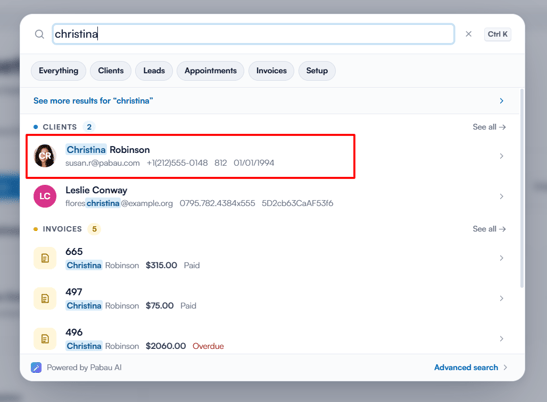
Step 1: Open the Client Card
Start by logging into your Pabau account and opening the client card of the client whose membership you wish to pause.
Step 2: Navigate to Memberships
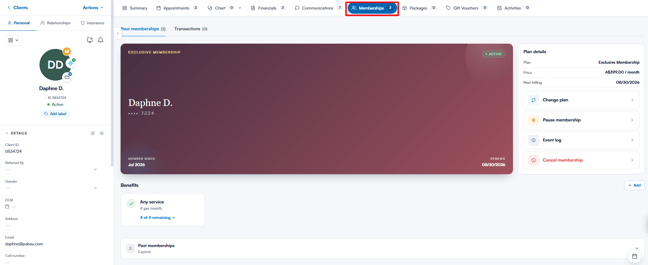
In the client card, click on the Memberships tab.
Step 3: Choose Pause Membership
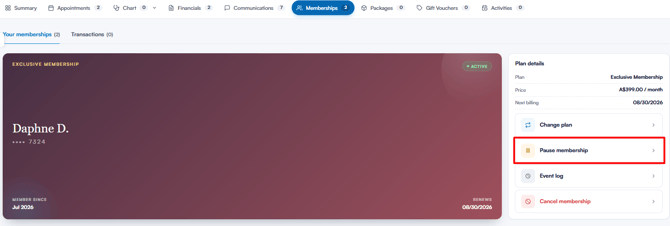
In the "Plan details" panel on the right-hand side of the membership card, click "Pause membership". In the window that opens, you can choose between two options:
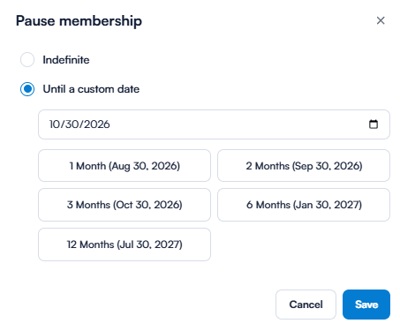
- Indefinite: The membership remains paused until you manually resume it.
- Until a custom date: The membership is paused until the date you specify. Pick a date, or use one of the quick presets (1, 2, 3, 6 or 12 months from today).
Step 4: Confirm the Pause
Click "Save" to confirm the pause. The membership’s status changes to "Paused".
Once a membership is paused:
- The "Membership" payment method is shown as paused in the Point of Sale and can’t be used to pay.
- Discount perks included in the paused membership will not be applied automatically at the Point of Sale.
- The client will not be charged for the membership while it’s paused.
Resuming a Paused Membership
To resume a paused membership, click "Resume membership" in the same panel. The membership becomes active again straight away.
NOTE: A client can only have one active membership at a time. If another membership is already active, an "Active membership in progress" message appears — pause or cancel the other membership before resuming this one.
By following these steps, you can pause and resume memberships.
Was this guide helpful? Let us know by voting below - your feedback helps us write clearer articles.
For more guides, browse the related articles below or use the search bar at the top of the page. You can also watch our video learning series, the Pabau Academy, or visit the Support page for additional help.