
Step 1: Navigate to the Calendar
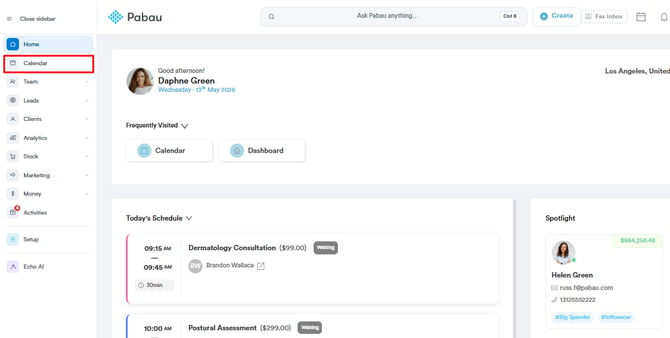
Start by logging into your Pabau account using your login credentials. Then, access the Calendar by navigating to the 'Calendar' tab located on the left sidebar menu.
Step 2: Locate Appointment
All appointments booked for that day will be displayed in the Calendar. Locate the appointment you want to raise an invoice for and click it to open more available options.
Step 3: Proceed to Checkout
In the appointment menu, click Checkout. This will take you into the Point of Sale (POS) with the client and their booked services pre-populated.
/Screenshot%20(99).png?width=650&height=340&name=Screenshot%20(99).png)
Step 4: Edit Cart Items
In the POS cart, you’ll see a list of all booked services for that day. To invoice only one appointment, click the extra service(s) you don’t want to bill for to reveal more options.
/Screenshot%20(100).png?width=636&height=300&name=Screenshot%20(100).png)
A pop-up window will appear where you can click the trash icon on the bottom left right to keep only the single appointment you want to invoice.
/Screenshot%20-%202026-08-07T180741.865.png?width=379&height=464&name=Screenshot%20-%202026-08-07T180741.865.png)
Step 5: Complete Payment
Once the cart reflects only the appointment you want to charge:
-
Click Continue.
-
Choose a payment method
-
Select Confirm Payment to finalize the invoice.
/Screenshot%20-%202026-08-07T180840.685.png?width=664&height=312&name=Screenshot%20-%202026-08-07T180840.685.png)
Step 6: Access Client Card
After payment is complete, you can view the newly created invoice by clicking the client’s name in the POS or by opening their Client Card using the search bar at the top of the screen.
/Screenshot%20-%202026-08-07T180930.513.png?width=633&height=301&name=Screenshot%20-%202026-08-07T180930.513.png)
In the Client Card, click the Financials tab to view the client's invoices.
/Screenshot%20-%202026-08-07T181023.461.png?width=625&height=361&name=Screenshot%20-%202026-08-07T181023.461.png)
By following these steps, you can raise an invoice for a single appointment when a client books multiple in a day.
For more guides, refer to related articles below, select additional guides, or use the search bar at the top of the page. These guides will help you get the most out of your Pabau account.
Additionally, to help you fully utilize and understand your Pabau account, we recommend exploring additional guides and resources offered at the Pabau Academy. It offers in-depth video tutorials and lessons, offering a holistic learning experience that can equip you with the essential skills for achieving success with Pabau.