
Step 1: Navigate to the Marketing Tab
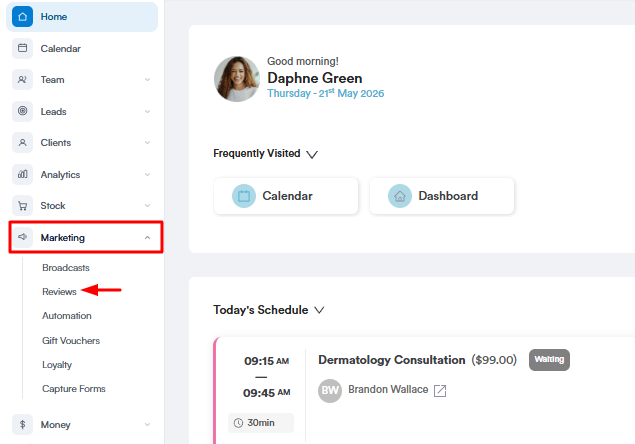
Start by logging into your Pabau account using your login credentials. Then, navigate to the "Marketing" tab located on the left sidebar menu. After clicking the Marketing tab, it will expand to reveal the Reviews sub‑tab. Click Reviews to view all client feedback.
Step 2: Hide Review
Under each review, you’ll see several options, including Report. Click the Report button to hide that review from your website.
The button will display Show instead of Report if you’ve already hidden the review. In that case, clicking Show will make the review visible again on your website.
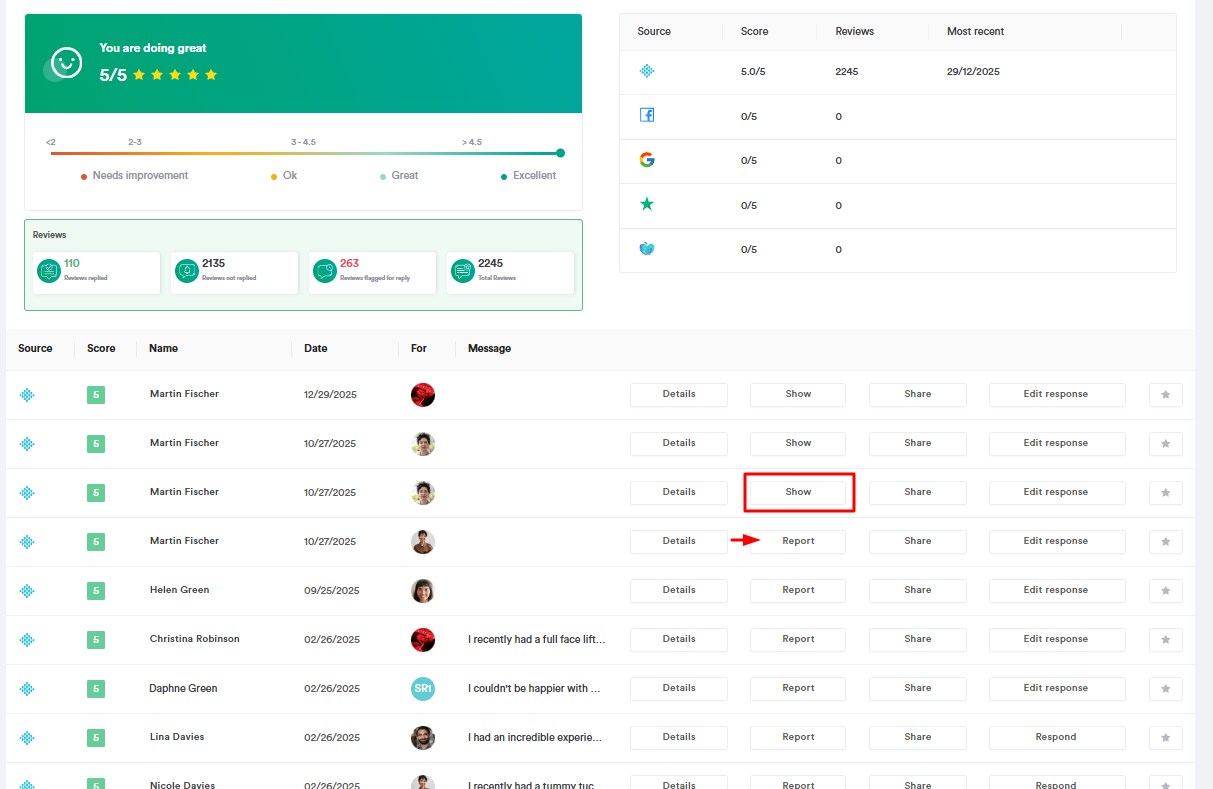
By completing the steps above, you’ll successfully hide selected reviews from your website.
For more guides, refer to related articles below, select additional guides, or use the search bar at the top of the page. These guides will help you get the most out of your Pabau account.
Additionally, to help you fully utilize and understand your Pabau account, we recommend exploring additional guides and resources offered at the Pabau Academy. It offers in-depth video tutorials and lessons, offering a holistic learning experience that can equip you with the essential skills for achieving success with Pabau.