
Forwarding emails directly from the client card helps keep all communication in one place and reduces the risk of missing important information. It allows you to share messages quickly while maintaining a complete and accurate client record.
NOTE: To learn more about the client card and its features, please refer to this article.
Step 1: Access the Client Card
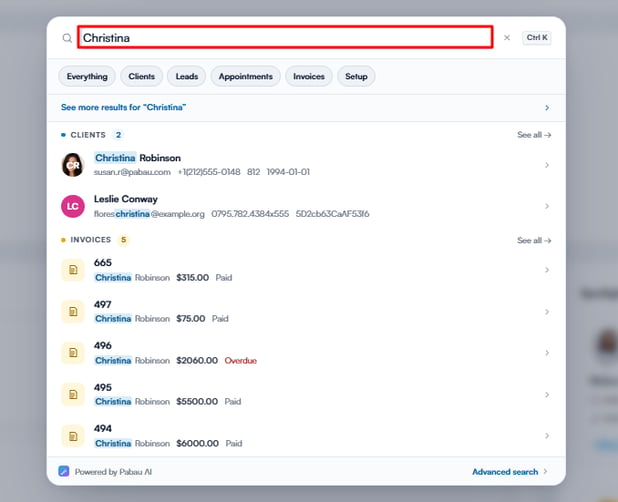
Start by logging into your Pabau account using your login credentials. Then navigate to the top of the screen and type in the search bar to search for your client. The client profile will appear on the search results.
Step 2: Navigate to the Communications Section
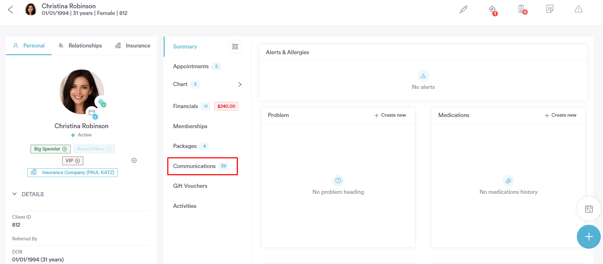
Once you have opened the client card, go to the Communications section. Here you can see all messages sent to or scheduled for the client, making it easy to select the email you want to forward.
Step 3: Forward the Email
In the Communications section, locate the email you wish to forward. Click the three dots next to the email and select ''Forward''.
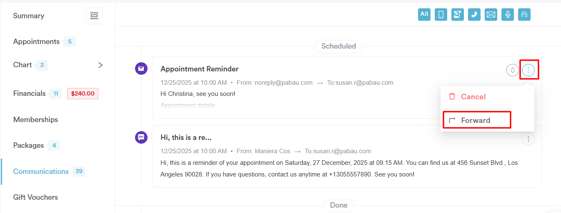
This will open a new email window where you can review and edit the message, add additional recipients, or change the sender address if necessary.
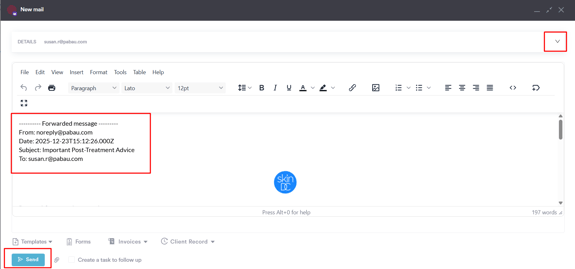
Once you have confirmed all details, click ''Send'' to forward the email securely to the intended recipient.
How the Email Will Appear to the Recipient
The email will appear to the recipient as a forwarded message.
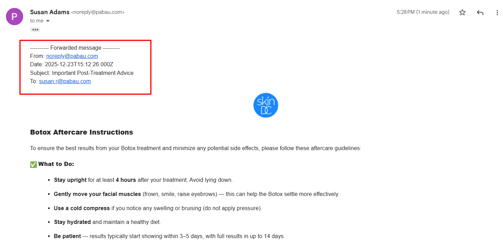
By following these steps, you can easily forward emails from the client card, keeping all communication organized and ensuring messages reach the intended recipients efficiently.
For more guides, refer to related articles below, select additional guides, or use the search bar at the top of the page. These guides will help you get the most out of your Pabau account.
Additionally, to help you fully utilize and understand your Pabau account, we recommend exploring additional guides and resources offered at the Pabau Academy. It offers in-depth video tutorials and lessons, offering a holistic learning experience that can equip you with the essential skills for achieving success with Pabau.