
Step 1: Navigate to Services
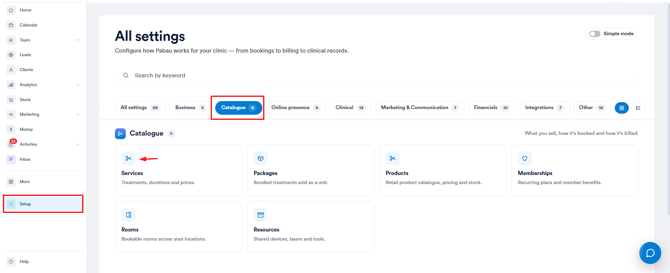
Log in to your Pabau account, and in the left sidebar menu, go to Setup, then click on the "Services" card under "Catalogue".
Step 2: Access the Service to Edit
Find and click on the specific service you want to edit.
Step 3: Make Desired Changes
You’ll be taken to the service creation and editing page, where you can update various details.
Use the tabs to navigate and make changes: General, Assign, Pricing, Online Booking, Forms and Addons.
-
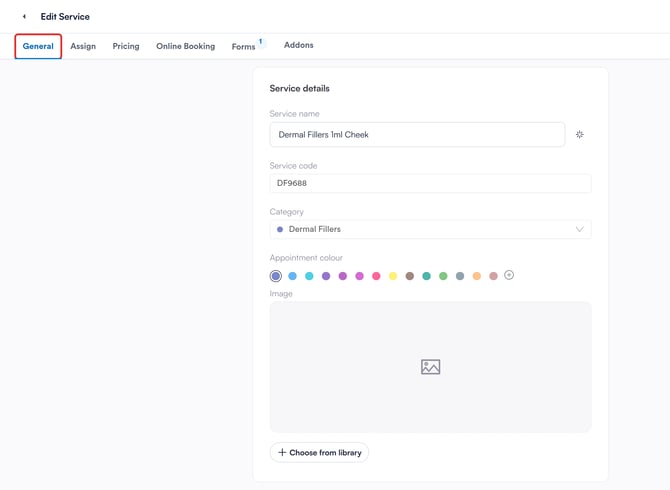
In the General tab, update service details like the service name, code, category, appointment color, and image.
-
In the Assign tab, specify the locations where the service is offered and assign the staff members who can perform it.
-
In the Pricing tab, adjust the service type and pricing details. Choose if the service is:
-
Book & Sell — available to book on the calendar and sell at checkout.
-
Book — bookable only, not sold at checkout.
-
Sell — sellable only, not bookable.
-
-
Set the service duration and configure deposit or payment requirements if needed.
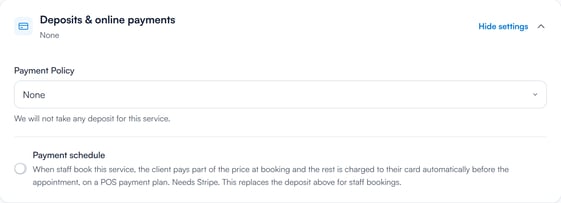
If your clinic has a default deposit policy set (e.g. requiring a 50% deposit for all bookings), you can override it for an individual service.
In the Pricing tab, scroll down to Deposits & online payments and set Payment Policy to None if you wish to make that service bookable without a deposit. This allows greater flexibility for specific services that may not require upfront payment.
-
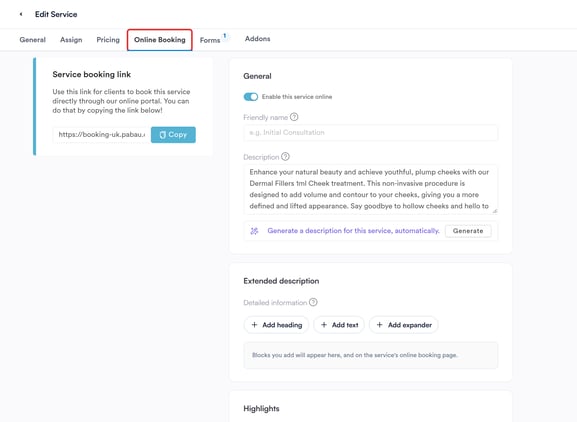
In the Online Booking tab, enable or disable online booking for the service and add a booking notice for clients. On the Restrictions tab, under Restrict patient bookings to, you can restrict bookings to only new clients, existing clients, or both.
-
You can also limit bookings to clients who have previously received a specific service.
Step 4: Save Changes
When finished, click Save in the top right corner to apply your updates.
This ensures your service details are current and reflect your business offerings accurately.
NOTE: In addition, we suggest reading our Services article for a more in-depth exploration of this topic.
Was this guide helpful? Let us know by voting below - your feedback helps us write clearer articles.
For more guides, browse the related articles below or use the search bar at the top of the page. You can also watch our video learning series, the Pabau Academy, or visit the Support page for additional help.