
Step 1: Navigate to Products
Log in to your Pabau account and click on "Setup" in the left sidebar menu. Under "Catalogue", click on "Products".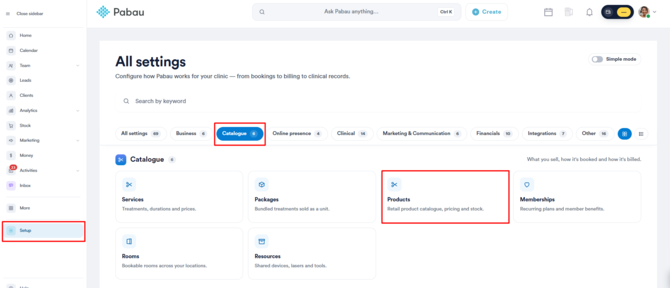
Step 2: Locate the Product
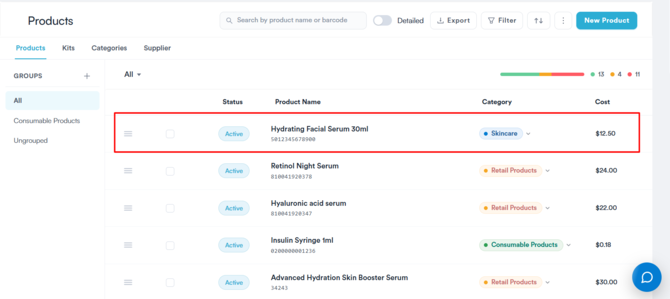
Locate the product you wish to edit in the Products list and click on it.
Step 3: Edit Product Details
In the "Edit Product" page, make the necessary changes to the product's details, such as name, category, measure, supplier, pricing, or inventory. The editing process is similar to creating a new product.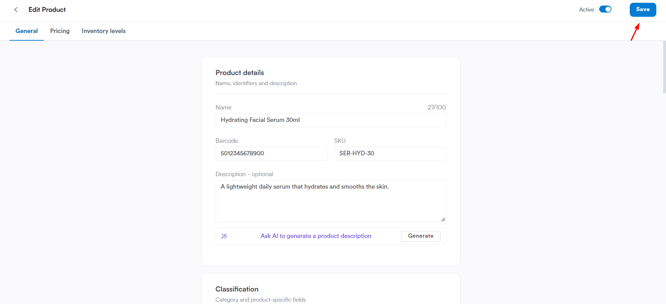
Modify the required fields as needed.
Step 4: Save Changes
Once you have made the necessary changes, click on "Save" in the top right corner to save the edits.
By following these steps, you can effortlessly update and modify product details in Pabau, ensuring your inventory management remains accurate and efficient.
Was this guide helpful? Let us know by voting below - your feedback helps us write clearer articles.
For more guides, browse the related articles below or use the search bar at the top of the page. You can also watch our video learning series, the Pabau Academy, or visit the Support page for additional help.