
NOTE: Cases is part of the Care Plus plan. If you do not see Cases under Clients in the sidebar, speak to your account manager about upgrading.
Step 1: Navigate to Cases
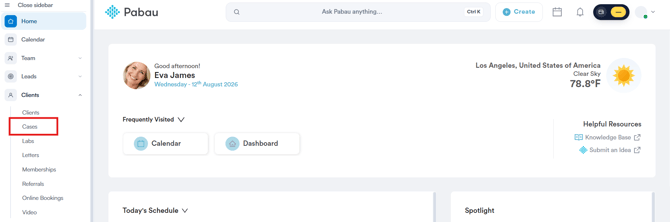
Start by logging into your Pabau account using your login credentials. Then, navigate to the left sidebar menu and click to expand the 'Clients' tab. Here you can find the 'Cases' sub-tab.
Step 2: Click on the Three Dots
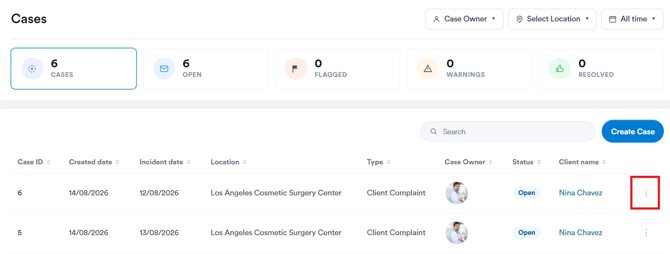
On this page, you’ll see all cases that have been created in your Pabau account. On the far right side of the case, you'll view a three-dot menu. Click to open the available options.
Step 3: Delete Case
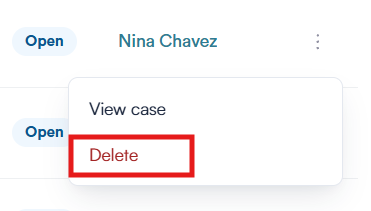
When clicking the three-dot menu, the 'Delete' option will be revealed.
By clicking 'Delete,' a pop-up will appear where you will be prompted to confirm if you'd like to permanently delete this case.
Click 'Yes, Remove case' to finalize.
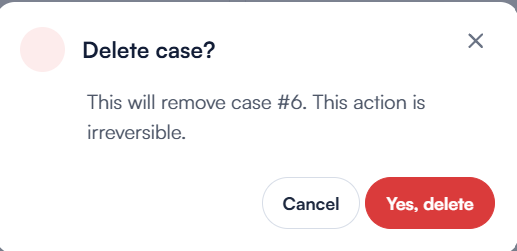
WARNING: Deleting a case cannot be undone from the Cases screen. If the case was only logged under the wrong type, convert it instead of deleting it.
By following these steps, you can easily delete any created case on your Pabau account.
Was this guide helpful? Let us know by voting below - your feedback helps us write clearer articles.
For more guides, browse the related articles below or use the search bar at the top of the page. You can also watch our video learning series, the Pabau Academy, or visit the Support page for additional help.