
Step 1: Navigate to Products
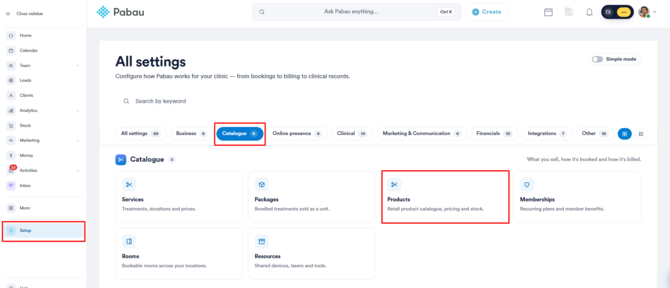
Log in to your Pabau account and in the left sidebar, click Setup. Then, under ''Catalogue'', click Products.
Step 2: Locate the Product
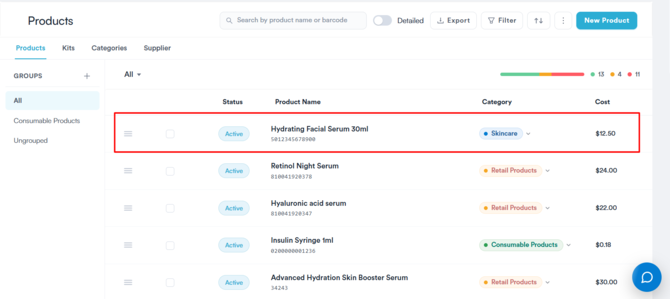
Locate the product you wish to delete in the Products list and click on it.
Step 3: Switch the Product to Inactive
On the Edit Product page, find the Active toggle in the top right corner and switch it off. Then click Save to apply the change.
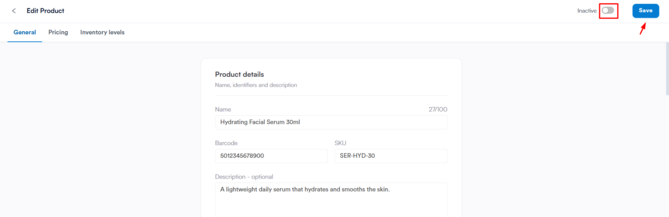
NOTE: Products can’t be deleted. Making a product inactive is the only way to remove it from use.
To use the product again: open it from the Products list, switch Active back on and click Save.
By following these steps, you can keep your product list up to date by switching off the products you no longer need.
Was this guide helpful? Let us know by voting below - your feedback helps us write clearer articles.
For more guides, browse the related articles below or use the search bar at the top of the page. You can also watch our video learning series, the Pabau Academy, or visit the Support page for additional help.