
Schedule types help you organize how different vaccine courses are structured in Pabau. Whether it's a first dose, booster, or a recurring vaccination type, schedule types let you define and manage these stages clearly.
Step 1: Navigate to Setup
Log in to your Pabau account and in the left sidebar menu, click on Setup. Click on the "Clinical" filter tab, then click on the "Vaccines" card and select "Vaccine Schedules."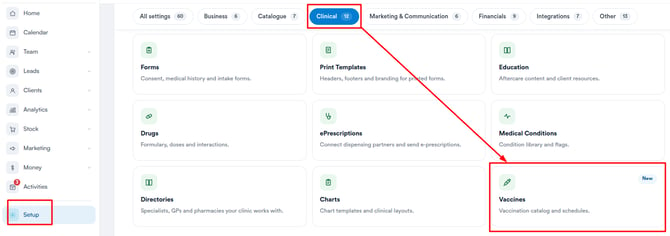
Step 2: Access Vaccine Schedules
Click on "Vaccine Schedules" to open the setup area where you can create, edit, or manage different schedule types for your vaccines.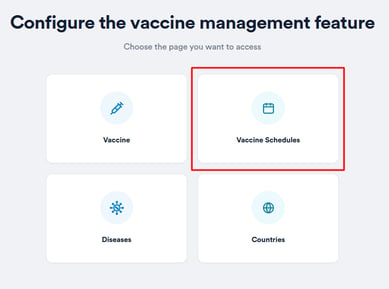
Step 3: Create Schedule Type
Click "Create Schedule Type" in the top right corner. A modal will appear where you can enter a name such as "First Dose," "Booster," or "Second Dose." The Create button will only activate once a valid name is entered. Once created, the schedule type will appear in the list immediately.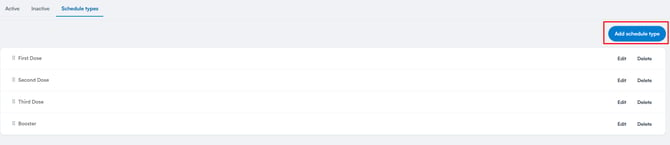
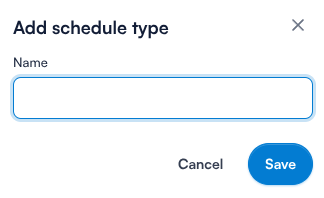
Step 3: Edit or Delete Schedule Types
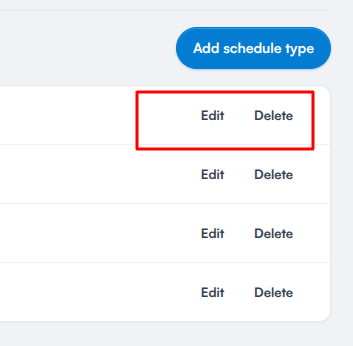
Each schedule type has direct Edit and Delete buttons on the right side of its row.
-
Edit: Opens the modal with the current name pre-filled, allowing you to update and save.
-
Delete: Soft-deletes the schedule type - it won't be available for future use but will remain visible in historical data. A confirmation prompt will appear before the deletion is finalized.
Step 4: Reorder Schedule Types
Drag and drop schedule types using the reorder icon on the far left side to define the order in which they appear when assigning vaccine schedules to clients.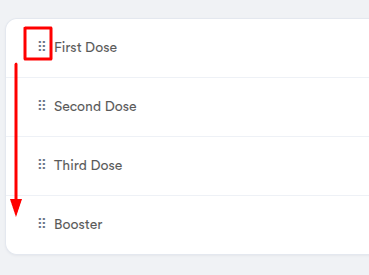
Having structured vaccine schedule types helps maintain consistency across all vaccination plans, ensures clarity in multi-dose treatments, and improves efficiency when scheduling or administering follow-ups.
Was this guide helpful? Let us know by voting below - your feedback helps us write clearer articles.
For more guides, browse the related articles below or use the search bar at the top of the page. You can also watch our video learning series, the Pabau Academy, or visit the Support page for additional help.