
This article covers the new Client Card, available to selected clinics from August 2026. If your Client Card looks different, see the How to Create an Album in the Client Card (Classic) guide instead.
Step 1: Navigate to the Client Card
Start by logging in to your Pabau account. Then, navigate to the search bar at the top of the page and type at least three letters of the client’s name — Pabau will filter the results as you type.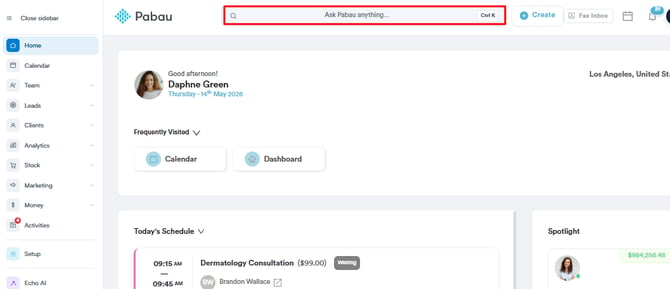
Step 2: Open the Photos Tab
In the navigation bar of the client card, click EMR (labelled Chart on some accounts), then select Photos to open the client’s photo gallery.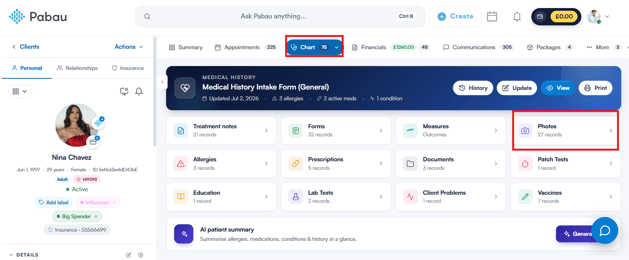
Step 3: Create an Album
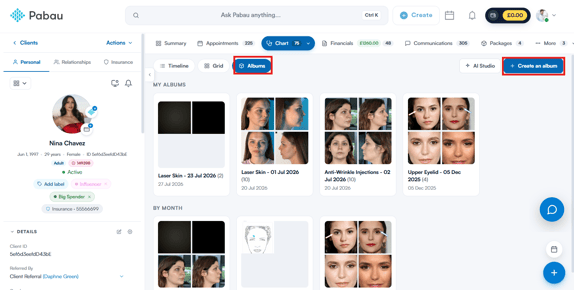
On the Photos tab, switch to the Albums view using the toggle at the top left, then click + Create an album in the top-right corner.
You’ll be prompted to name the album — for example, “First consultation” — and finish by clicking Create.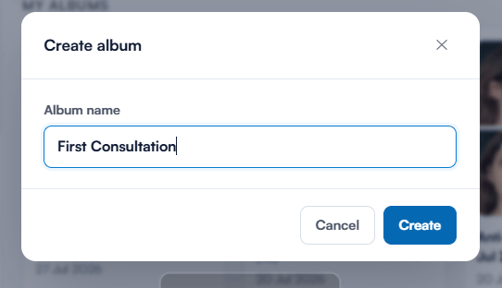
Created albums are listed under My albums at the top of the Albums view. Underneath, the By month section automatically groups all of the client’s photos by the month they were taken.
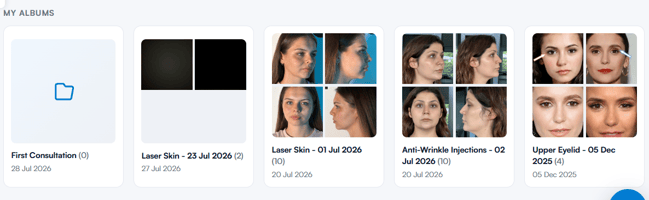
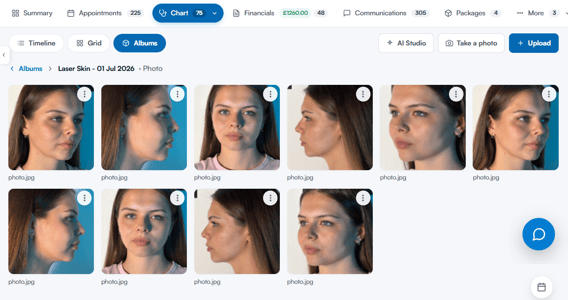
TIP: To add photos to an album, open the album and click + Upload, or hover over any photo in the gallery, click the three-dot menu in its top-right corner, and choose Add to album. To rename or delete an album, use the three-dot menu on the album card — deleting an album doesn’t delete its photos; they stay in the client’s gallery as uncategorised.
By following these steps, you can easily create a photo album on a client card.
For more guides, refer to related articles below, select additional guides, or use the search bar at the top of the page. These guides will help you get the most out of your Pabau account.
Additionally, to help you fully utilise and understand your Pabau account, we recommend exploring additional guides and resources offered at the Pabau Academy. It offers in-depth video tutorials and lessons, offering a holistic learning experience that can equip you with the essential skills for achieving success with Pabau.