
A fixed-term membership bills for a defined number of charges and then closes automatically, with no manual cancellation required. This is useful for structured programmes with a defined duration, such as a 12-week treatment course billed in 3 monthly payments.
NOTE: The membership feature will be usable only when the Stripe integration is active.
Step 1: Navigate to Setup
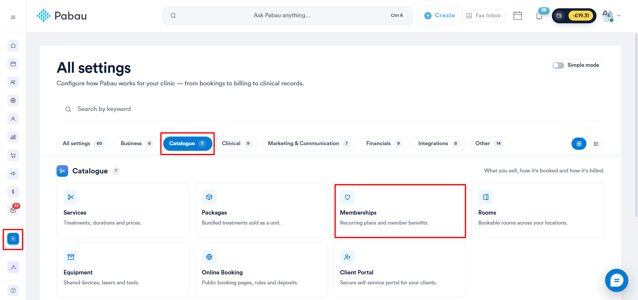
Start by logging in to your Pabau account using your login credentials. Then, navigate to the Setup page and find Memberships under the Catalogue section.
Step 2: Create a Membership
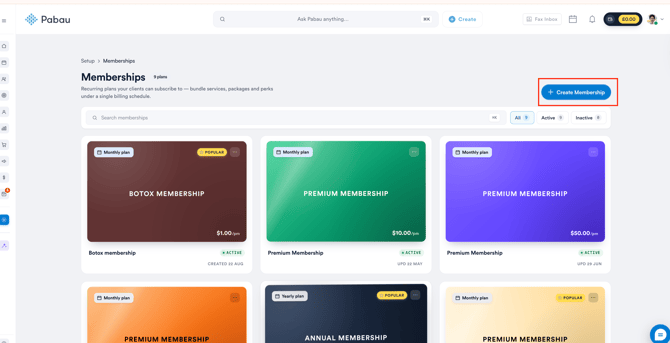
Once you're on the Memberships page, click the "Create Membership" button to get started.
Step 3: Insert Details
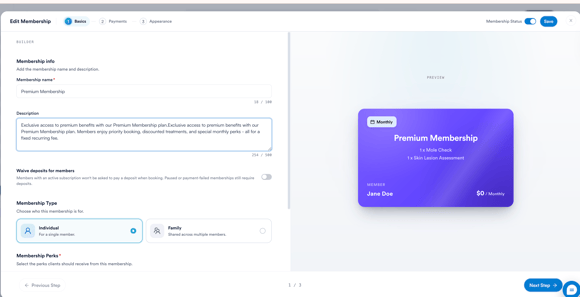
In the Basics step, add the membership name and description, then scroll down to add the perks clients should receive, such as services, discounts, or credits.
Step 4: Set the Payment Plan to Fixed
Click Next Step to move to the Payments tab. Set the Base price, Tax, and Recurring schedule as normal.
Under Payment plan, select Fixed — stop after a set number of charges.
Use the + and - buttons to set the number of payments the membership should collect before it closes (e.g. 8 payments).
The preview panel on the right will show the upcoming payment schedule based on this setting.
Step 5: Finish Setup
Continue through the Location and When to collect payment? sections as normal, then proceed to the Appearance step to finish customizing and save the membership.
Once the final payment in the sequence is taken, the membership will close automatically — no manual cancellation is needed.
What happens after the final payment of a fixed membership?
A Fixed plan does not renew. Pabau sets the end date when the client signs up (the start date plus the number of payments you chose, e.g. 12 monthly payments = 12 months), and no further charges are taken after that. An Ongoing plan is the one that keeps renewing until it is cancelled.
Clients can use their membership benefits up to the end date.
Is the client told before a fixed membership ends?
Pabau doesn't send an automatic "your membership is ending" message. To contact members before they finish, use the Expiring memberships report, which lists memberships ending soon that haven't been renewed, and reach out to offer a new membership.
TIP: Switch on Prevent early cancellation under Payment plan to stop clients cancelling from the client portal before their final payment. It applies to new sign-ups; current members keep the terms they joined on.
Was this guide helpful? Let us know by voting below - your feedback helps us write clearer articles.
For more guides, browse the related articles below or use the search bar at the top of the page. You can also watch our video learning series, the Pabau Academy, or visit the Support page for additional help.