
Custom fields offer a way to tailor Pabau according to your specific requirements. Whether you need to capture specific information about clients, leads, appointments, products, staff, locations, or services that aren't initially available, this feature allows you to create it yourself easily.
Step 1: Access Custom Field Setup
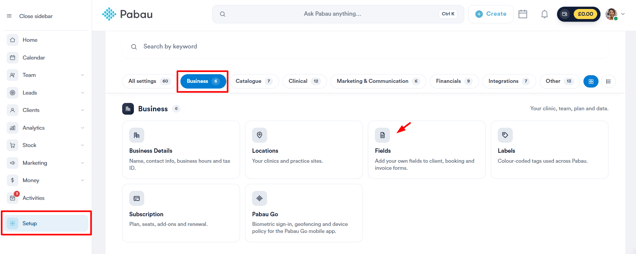
Log in to your Pabau account, navigate to the left sidebar menu, and click on Setup. From there, click on the Business tab, then select ''Fields''.
NOTE: You can also learn about this topic by watching a lesson on Pabau Academy.
Step 2: Initiating Custom Field Creation
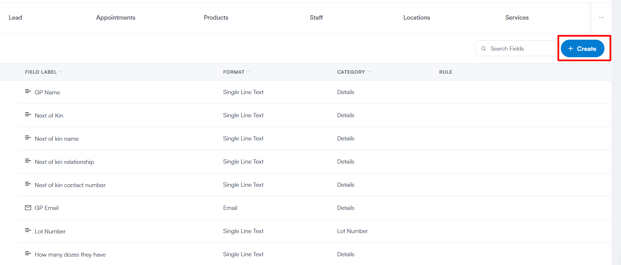
Scroll down below the quick-access cards to the fields list, then click the "+ Create" button on the right.
Step 3: Custom Field Configuration
After clicking "+ Create," you'll first be asked to choose a Field Object - the area you want the custom field to apply to (e.g. Client, Appointment, Product).
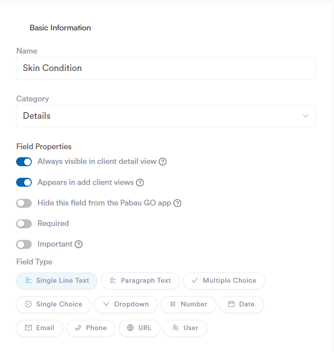
Once selected, the "Create A Custom Field" page opens, where you can fill in the following:
- Name: A name for the custom field.
- Category: The category under which the field will appear.
- Field Properties: Toggles that control how the field behaves and displays, such as whether it's required or visible in certain views.
- Field Type: The type of input the field will accept, such as text, dropdown, date, or number.
Step 4: Confirming Custom Field Creation
Once all necessary details are filled, make sure the Active toggle in the top right is switched on, then click "Create" to confirm and create the custom field.
By following these steps, you can create custom fields in your Pabau account, allowing you to capture and manage specific information tailored to your business needs.
For more guides, refer to related articles below, select additional guides, or use the search bar at the top of the page. These guides will help you get the most out of your Pabau account.
Additionally, to help you fully utilize and understand your Pabau account, we recommend exploring additional guides and resources offered at the Pabau Academy. It offers in-depth video tutorials and lessons, offering a holistic learning experience that can equip you with the essential skills for achieving success with Pabau.