
NOTE: To learn more about Promotions, including how to create and manage them, please refer to this article.
Once the Type and Details steps are complete, you'll move on to the Scope & Rules step, where you define which items in your catalogue the discount applies to and the locations where it can be redeemed. This step is the same for both Promotions and Flash sales.
What to Apply the Discount To
Under Apply to, select which catalogue items the discount applies to. Items can be selected individually, or included all at once:
- Services - choose from all active services in the catalogue.
- Products - choose from all active products.
- Gift cards - apply the discount to gift card purchases.
- Packages - apply the discount to packages.
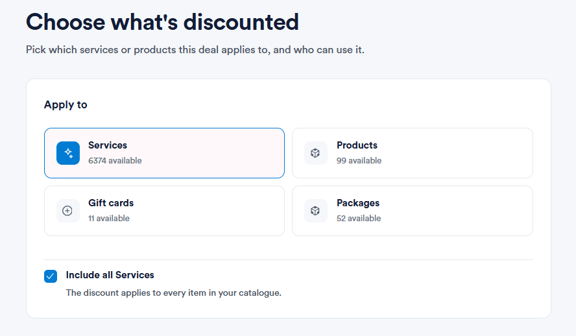
To apply the discount across an entire category without selecting items one by one, tick Include all Services, Include all Products, Include all Gift cards, or Include all Packages, depending on which category you're working with.
Eligible Locations
Under Locations, select which clinic locations the deal can be redeemed at. All active locations are listed and can be toggled on or off individually, allowing you to run a deal at one clinic, a selection of clinics, or across your entire business.
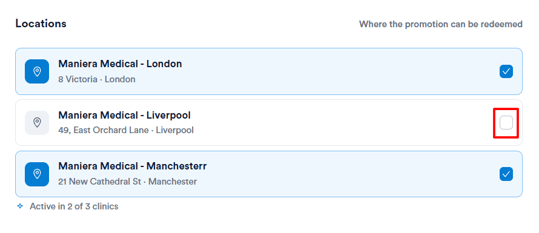
Upon completing this step, review your selections before publishing the deal.
Please note: If a deal is scoped to specific services, products, or locations, it will only apply to items in the basket that match those rules. Any items that don't match will be charged at their standard price.
By choosing what's discounted and where it applies, you can make sure each deal reaches the right services, products, and locations.
Was this guide helpful? Let us know by voting below - your feedback helps us write clearer articles.
For more guides, browse the related articles below or use the search bar at the top of the page. You can also watch our video learning series, the Pabau Academy, or visit the Support page for additional help.