
Step 1: Navigate to the Client Card
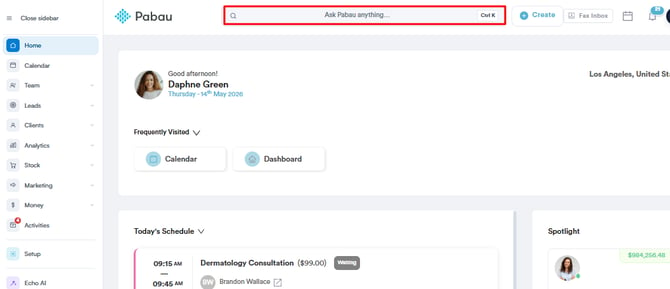
Start by logging in to your Pabau account using your login credentials. Then navigate to the search bar at the top of the page and type at least three letters of the client’s name. Pabau will filter the results as you type.
Step 2: Open the Gift Cards Section
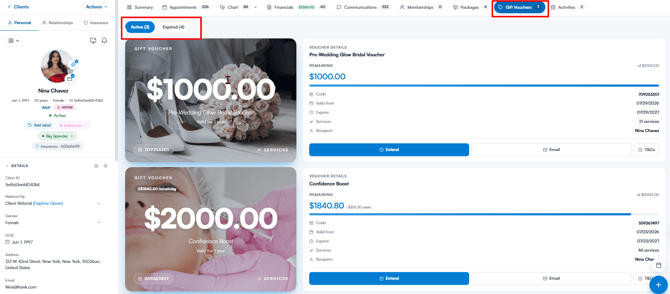
After opening the client card, select Gift Cards in the navigation bar to see the gift cards previously purchased by the client. They’re grouped into Active and Expired tabs.
Step 3: Change the Gift Card’s Duration
Once you’ve found the gift card you want to change the duration for, click the Extend button.
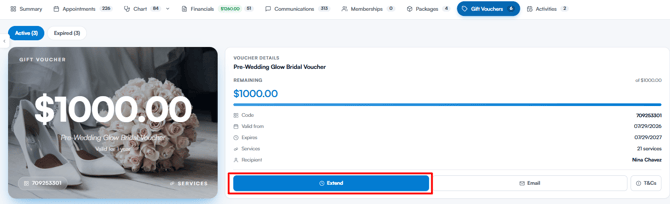
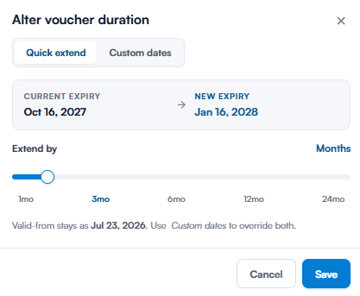
The Alter gift card duration window will appear, with two tabs for adjusting the gift card’s validity:
- Quick extend: Drag the Extend by slider to push the expiry date out by 1 to 24 months, or click one of the shortcut stops (1, 3, 6, 12, or 24 months). The window shows the current expiry date alongside the new one, and the valid-from date stays the same.
- Custom dates: Set the Valid from and Valid to dates yourself. The end date must be after the start date.
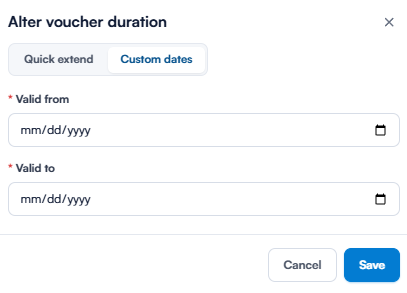
Once you’re done, click Save. The updated dates appear next to Valid from and Expires in the gift card’s details, and the validity shown on the gift card artwork updates too.
Repeat this process for any other gift cards whose duration you want to change.
NOTE: The Extend button is only available for active gift cards. Gift cards on the Expired tab show a Reactivate voucher button instead, which reopens them with a fresh one-year validity period starting today.
Was this guide helpful? Let us know by voting below - your feedback helps us write clearer articles.
For more guides, browse the related articles below or use the search bar at the top of the page. You can also watch our video learning series, the Pabau Academy, or visit the Support page for additional help.