
Step 1: Navigate to Stock
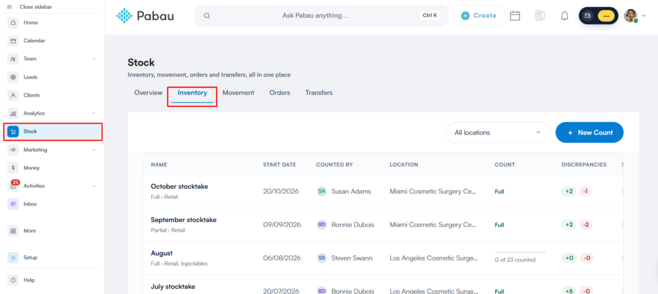
Start by logging in to your Pabau account using your login credentials. Then, navigate to "Stock" in the left sidebar menu. Once you click on "Stock," the "Inventory" tab will appear.
Step 2: Review Inventory
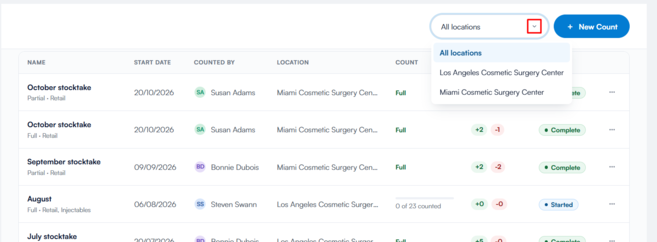
On the Inventory page, you can view all counts performed in your Pabau account and filter them by location.
Step 3: Cancel an Inventory Count
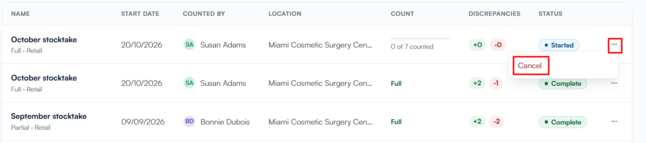
To remove a count, click the three dots on the far right of the in-progress count. Click ''Cancel'' to continue.
Click ''Cancel'' again on the prompt that appears to cancel the paused count.
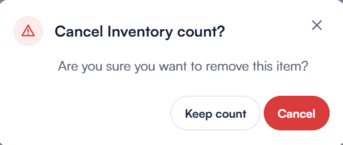
The count will now disappear from the inventory page. By following these steps, you can cancel an inventory count in your Pabau account.
Was this guide helpful? Let us know by voting below - your feedback helps us write clearer articles.
For more guides, browse the related articles below or use the search bar at the top of the page. You can also watch our video learning series, the Pabau Academy, or visit the Support page for additional help.