
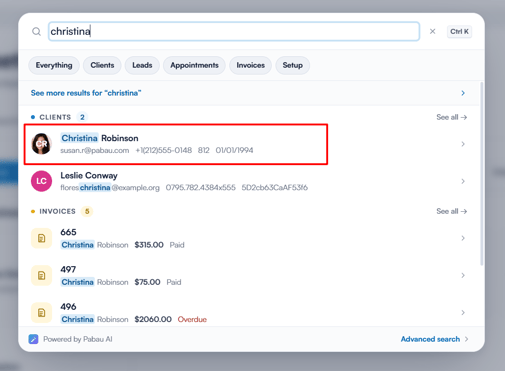
Step 1: Open the Client Card
Start by logging into your Pabau account and navigating to the client card of the client whose membership you wish to cancel.
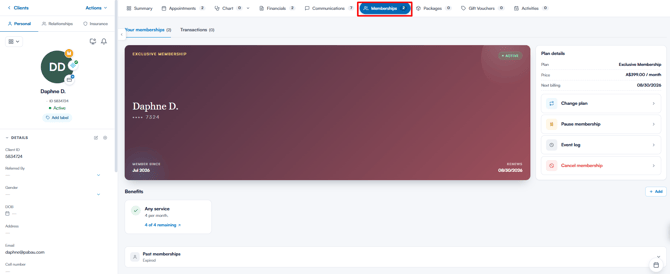
Step 2: Go to the Memberships Tab
In the client card, click on the "Memberships" tab to view the memberships associated with the client.
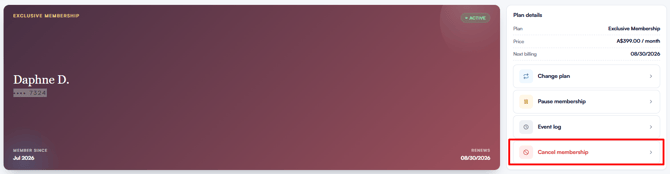
Step 3: Select Cancel Membership
In the "Plan details" panel on the right-hand side of the membership card, click "Cancel membership".
You will be presented with three cancellation options:
- Immediately: The membership is cancelled straight away — today’s date is shown next to the option. The client immediately loses access to the membership benefits, and the membership moves to the "Past memberships" section of the tab.
- End of current billing period: The membership is cancelled at the end of the current billing cycle — the date is shown next to the option. The client keeps access to the membership benefits until then, and no further payments are taken.
- On a custom date: The membership is cancelled on a date of your choosing — pick it in the date field that appears. The client keeps access to the membership benefits until that date.
Step 4: Confirm the Cancellation
After selecting your preferred option, click "Save" to confirm. A "Membership cancelled" confirmation appears, and the membership is cancelled based on the option you selected.
NOTE: Only active, paused and pending memberships can be cancelled — an expired membership has nothing left to cancel.
By following these steps, you can easily cancel a client’s membership.
Was this guide helpful? Let us know by voting below - your feedback helps us write clearer articles.
For more guides, browse the related articles below or use the search bar at the top of the page. You can also watch our video learning series, the Pabau Academy, or visit the Support page for additional help.