
This article covers the new Client Card, available to selected clinics from August 2026. If your Client Card looks different, see the How to Block Clients From Booking (Classic) guide instead.
Step 1: Navigate to the Client Card
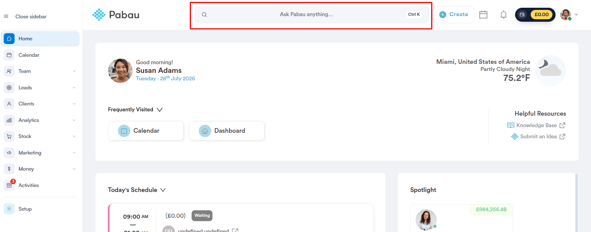
Log in to your Pabau account, then type the client’s name into the search bar at the top of the screen. The client will appear in the search results — click to open their client card.
Step 2: Open the “Actions” Dropdown
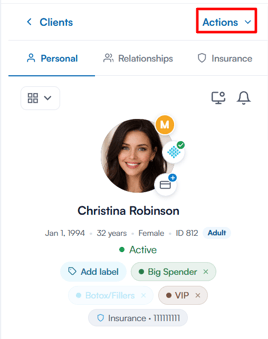
Click the “Actions” dropdown at the top of the client card.
Step 3: Block the Client
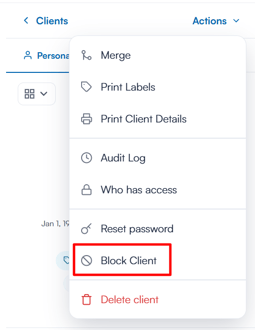
From the dropdown, select “Block Client”.
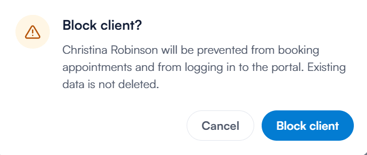
A confirmation prompt appears, explaining that the client will be prevented from booking appointments and from logging in to the portal — their existing data is not deleted. Click “Block client” to confirm.
Once a client is blocked, their status displays as “Blocked” beneath their name on the client card.
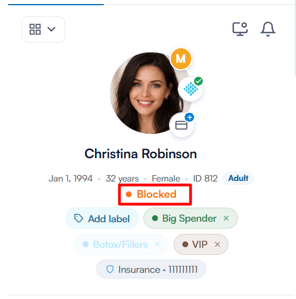
A blocked client is restricted from performing key actions:
- No in-clinic booking: staff members will not be able to book a new appointment for this client from the calendar.
- No online booking: the client will not be able to book new appointments through your online booking portal.
- No portal access: the client will be unable to log in to their Connect (client portal) account.
Step 4: Unblock the Client
To unblock a client, open the “Actions” dropdown again and select “Unblock Client”, then click “Unblock” in the confirmation prompt. The client will be able to book appointments, receive communications and access their portal again.
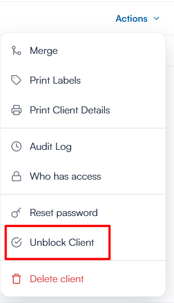
By following these steps, you can restrict bookings for certain clients in your Pabau account.
Was this guide helpful? Let us know by voting below - your feedback helps us write clearer articles.
For more guides, browse the related articles below or use the search bar at the top of the page. You can also watch our video learning series, the Pabau Academy, or visit the Support page for additional help.