
Step 1: Access the Client Card
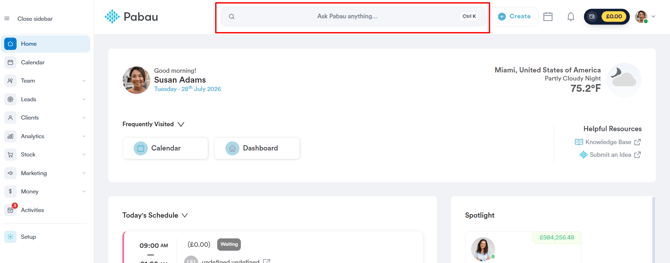
Start by logging in to your Pabau account using your login credentials. Then, navigate to the Client Card of the client you want to update by using the search bar at the top of the screen.
Step 2: Open the Invoice
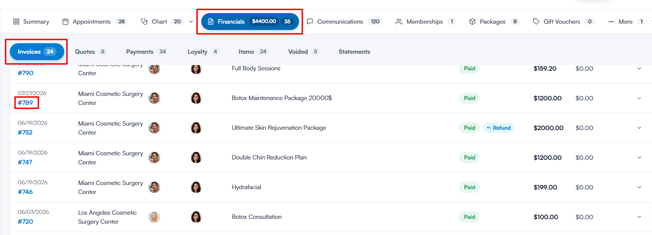
Click on the Financials tab at the top of the client card. The Invoices sub-tab opens by default — click on the invoice number of the invoice you wish to open.
Step 3: Add Commission
Once you open the invoice, you’ll see the Commission Summary panel on the left side. If no commission has been assigned to any items on the invoice, it will display No Commission Applied.
The Commission Summary panel only appears when commissions are enabled for your account.
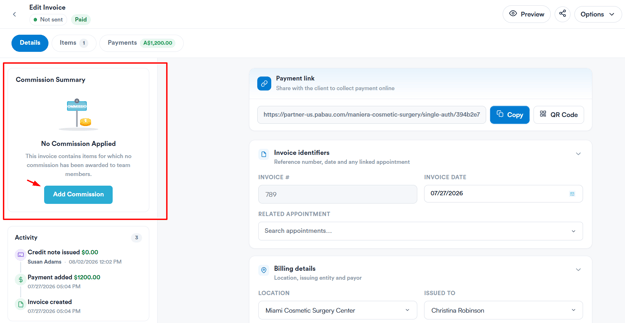
Click Add Commission, then fill in the following:
- Item Name – Select the invoice item the commission applies to.
- Employee – Fills in automatically with the team member assigned to the selected item.
- Amount – Enter the commission amount.
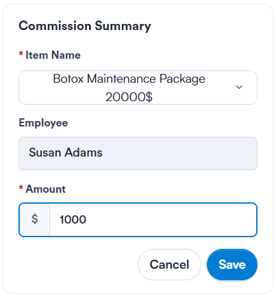
Click Save to confirm the commission details. The commission is added to the invoice straight away and appears in the Commission Summary. To award commission on another item, click + Add Commission.
Step 4: Save the Invoice
If you’ve made any other changes to the invoice, click Save Changes in the top-right corner to apply them.
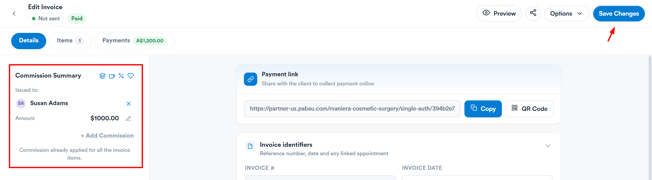
Once saved, the commission will be reflected in the Commission Summary, and can also be tracked in the Commissions Activity report, found under the Sales category in Analytics.
By following the steps above, you can add commission to an invoice and ensure it’s accurately tracked and awarded to the right team member.
Was this guide helpful? Let us know by voting below - your feedback helps us write clearer articles.
For more guides, browse the related articles below or use the search bar at the top of the page. You can also watch our video learning series, the Pabau Academy, or visit the Support page for additional help.