
When a customer buys a gift card, you've taken their money but haven't yet delivered anything for it — until they spend it, that money is a liability, since you still owe them goods or services to that value. This report shows how much outstanding gift-card value the business owes, and how that balance moved over a chosen period. Accountants use it to put a figure for "unredeemed gift cards" on the books.
Think of it as a bank statement for your gift-card balance: it starts with what was owed at the beginning of the period, adds and subtracts everything that happened during the period, and ends with what's still owed at the end.
How to find it
Step 1: Open Reports
Log in to your Pabau account. In the left sidebar, hover over Analytics and click Reports. The reports catalogue opens, with every report you have access to.
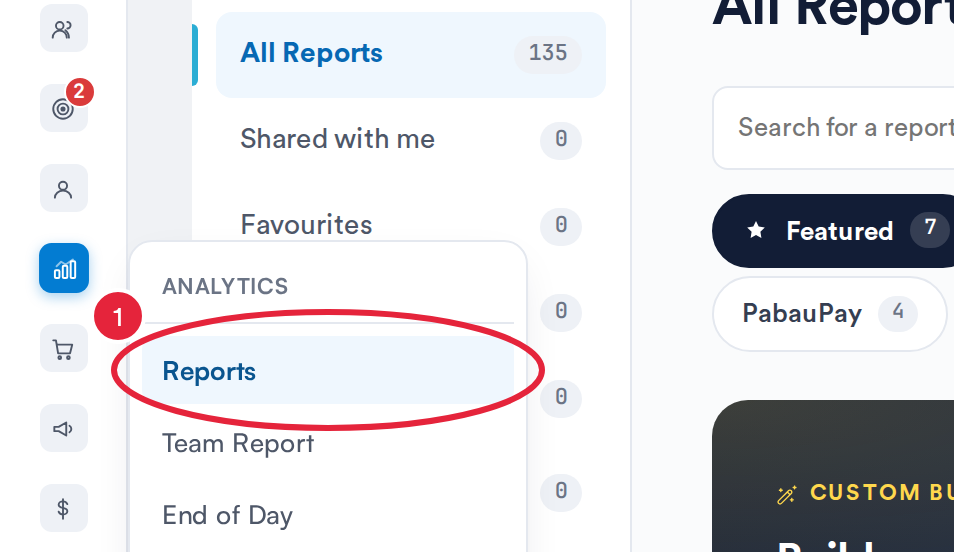
Analytics → Reports opens the reports catalogue
Step 2: Open the Report
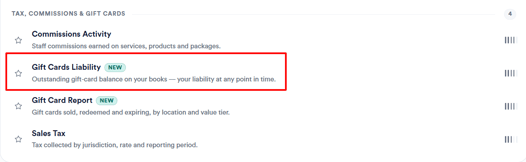
Click the Sales & Finance tab, then click Gift Cards Liability in the Tax, commissions & gift cards section to open the report. You can also type the report’s name in Search for a report.
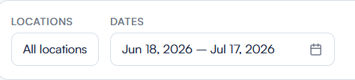
Filters
- Locations – Narrow the report to a single branch, or leave it on All locations to include every branch you have access to.
- Dates – The period you're reporting on (start and end date). All the movement columns are measured within this window. The range is required and defaults to the last 30 days when the report opens, with quick presets for Today, Last 7 days, Last 30 days, Last 90 days, and Year to date. The longest period you can report on in one go is 365 days.
Toolbar controls
| Button | What it does |
|---|---|
| Columns | Choose which columns are included in the exported file — the on-screen table always shows all six. Your selection is remembered for next time. |
| Export | Downloads the report as a CSV file, respecting your current filters. In the file, Redemptions and Expired are written as negative numbers, just as they read on screen. |
| Prints in landscape so the wide table isn't clipped. | |
| Help | Opens an in-app help panel with the same definitions covered in this article. |
| Refresh | Re-runs the report with the latest figures. |
Understanding the report
The "Liability Type" toggle: By Value / By Sale
Every figure can be shown two ways:
- By Value – the monetary amount, in your account's currency. This is the accounting view, and the one to rely on.
- By Sale – the same story counted as the number of gift cards rather than their value.
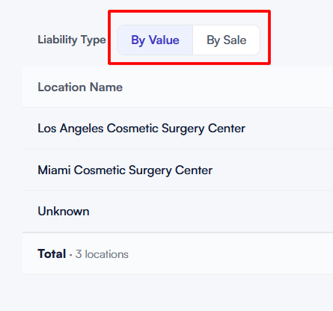
NOTE: Switching the toggle just re-displays the same data, it doesn't reload the report.
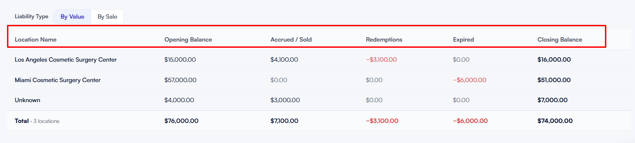
The columns, left to right
| Column | What it shows |
|---|---|
| Location Name | The branch that sold the gift cards. Cards with no branch on record are grouped under "Unknown". |
| Opening Balance | What was still owed at the start of the period — cards sold before the start date, minus anything already spent off them before then. The balance carried in. |
| Accrued / Sold | New liability created during the period — the value of gift cards sold within the date range. |
| Redemptions | Value spent by customers during the period. Shown as a reduction — a minus-signed figure in red. |
| Expired | Value lost because gift cards reached their expiry date during the period. Shown as a reduction — a minus-signed figure in red. |
| Closing Balance | What's still owed at the end of the period: Opening + Accrued − Redemptions − Expired. This becomes the next period's Opening. |
Worked example
Let's report on the Brighton branch for June. Three gift cards are in play during the month:
| Card | Sold | Value | Activity |
|---|---|---|---|
| Card A | March (before June) | £100 | £40 already spent before June; a further £25 spent during June |
| Card B | 10 June (during) | £50 | Not yet used |
| Card C | Last year | £30 | Never used; expiry date falls on 15 June |
Here's how each column fills in:
- Opening = £90. This is what was owed coming into June — the live balance on cards sold before June. Card A had £60 left (£100 − £40 already spent), and Card C still had its full £30. That's £60 + £30 = £90. Card B isn't counted here, since it wasn't sold until June.
- Accrued = £50. One new card was sold during June — Card B at £50.
- Redemptions = £25. The only spending inside June was the £25 taken off Card A.
- Expired = £30. Card C hit its expiry date on 15 June with £30 unused, so that balance drops off.
Now the Closing balance: Opening £90 + Accrued £50 − Redemptions £25 − Expired £30 = £85.
Does that reconcile? Checking what's genuinely still owed at the end of June: Card A has £35 left (£100 − £40 − £25), Card B still has its full £50, and Card C has expired at £0. That's £35 + £50 = £85 — exactly the Closing figure. The statement balances. That £85 then becomes July's Opening, and the cycle continues.
If you flip to By Sale, the same month reads as card counts rather than pounds — 2 cards open at the start, 1 sold during the month, 1 redeemed against, 1 expired — telling the same story in units instead of value.
The total row
The bottom row sums every column across all listed locations and applies the same Closing calculation to the totals. It also shows how many locations are included.
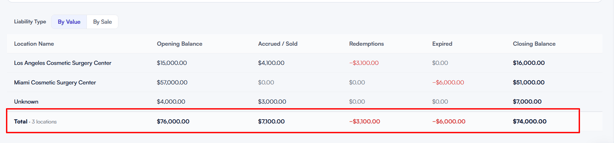
With this understanding, you can confidently read the Gift Card Liability report to see exactly how much gift-card value your business owes, and how that balance has moved over time.
Was this guide helpful? Let us know by voting below - your feedback helps us write clearer articles.
For more guides, browse the related articles below or use the search bar at the top of the page. You can also watch our video learning series, the Pabau Academy, or visit the Support page for additional help.