
The routing builder is a drag-and-drop canvas: conditions test each new conversation, YES/NO branches split the path, and actions do the work. This article walks the building blocks.
Opening the Builder
Settings → Conversation routing → Open the builder, then + New workflow (or edit an existing one). Name the workflow at the top; Save draft keeps work in progress, Save changes updates the live version.
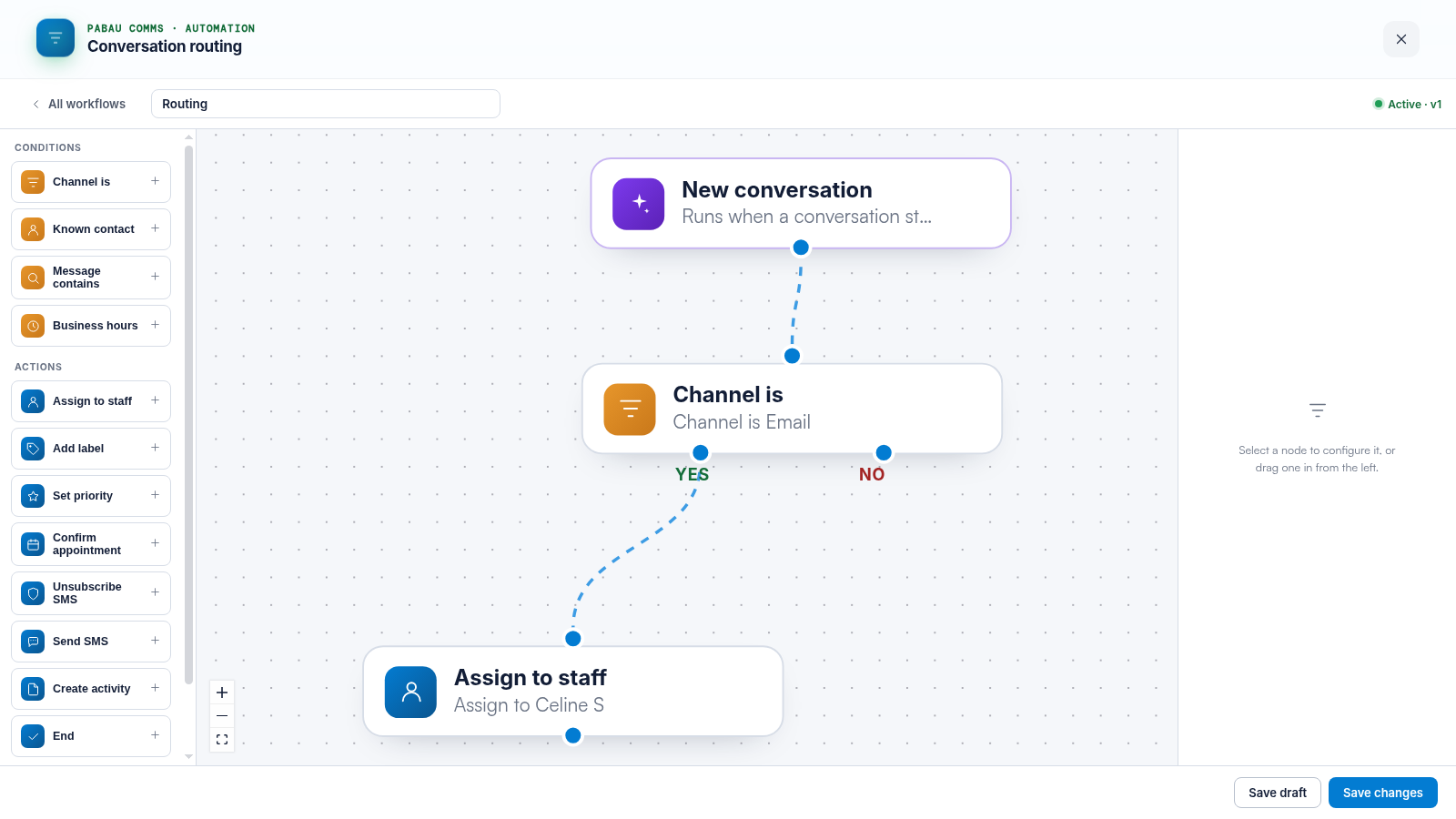
The Trigger
Every workflow starts from New conversation — it runs when a conversation starts.
Conditions
- Channel is — test where the conversation arrived (email, SMS, fax…).
- Known contact — is the sender linked to a client record?
- Message contains — look for keywords in the first message (CONFIRM, STOP, "reschedule").
- Business hours — inside or outside your opening hours.
Each condition has a YES and a NO branch — chain them to express "email from a known client, out of hours".
Actions
- Assign to staff — give the conversation an owner.
- Add label / Set priority — organise it on arrival.
- Confirm appointment — mark the booking confirmed (pair with a CONFIRM keyword condition).
- Unsubscribe SMS — honour a STOP reply.
- Send SMS — reply automatically.
- Create activity — raise a task in Pabau.
- End — stop the workflow explicitly.
Build, Test, Activate
Drag blocks in from the left, click a node to configure it on the right, and connect the dots. Save as draft until you are happy; the workflow list shows which version is Active. Send yourself a test message that should match, and check the conversation gets the label or assignee you expect.
TIP: Keep workflows small and stack them — five one-job workflows in priority order beat one giant tree, because the first match wins.
Related Articles
We suggest reading our Routing Recipes: CONFIRM and STOP Keywords and Common Setups article for patterns to copy.
For more guides, refer to related articles below, select additional guides, or use the search bar at the top of the page. These guides will help you get the most out of your Pabau account.
Additionally, to help you fully utilize and understand your Pabau account, we recommend exploring additional guides and resources offered at the Pabau Academy.