
On the CMS-1500 claim form, Box 29 reports money already paid toward the claim's charges — most importantly, what a primary insurer paid before the claim goes to a second payer. This guide explains what the box means, when Pabau fills it, and when it deliberately stays empty.
NOTE: This article is part of the US Insurance Billing Additional Resources series, which walks through every box of the CMS-1500. If you are new to claims in Pabau, start with Creating a US Professional (CMS 1500) Claim.
Box 29 — Amount paid
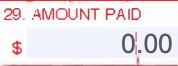
Box 29 holds a dollar amount: what has already been paid toward the services on the claim. On a claim to a secondary payer it shows the primary payer's payment, so the second insurer can work out what remains. It sits next to Box 28 (Total charge), which carries the full billed amount.
How Pabau fills it
On printed claims, Box 29 shows what has already been paid toward the claim: on a secondary claim, the primary payer's payment; on a claim whose invoice was split at checkout, the client's share billed on the other part of the split. When nothing has been paid, the box stays empty.
On electronic claims, it depends on the claim:
- Primary claims send nothing in Box 29. The client's share is printed on the paper form only, so a zero or missing amount on an electronic primary claim is correct.
- Secondary claims carry the primary payer's total payment automatically. When you record the primary payer's payment and create the secondary claim, the amount travels with the claim — there is nothing to type.
The amount never travels alone: the same step that carries the primary payer's payment into Box 29 also fills the Box 9 block with the primary policy's details, so the secondary payer sees who paid first and how much in one picture.
TIP: Record the primary payer's payment before creating the secondary claim — that payment is exactly what Pabau carries into Box 29, so the secondary payer starts from the right number.
For the full workflow — recording the primary payment and creating the follow-on claim — see Submitting Secondary Claims in Pabau.