
Once your referral campaign is set up in Pabau, the next step is making sure your clients know about it and understand how to take part. This guide walks you through what to communicate, how referrals are currently registered, and how to keep your clients motivated to refer friends.
To learn how to set up your referral campaign first, read our How to Set Up a Referral Campaign article.
Step 1: Let Clients Know the Program Exists
The first step is simply making sure your clients are aware that a referral program is running. You can do this in a number of ways depending on what works best for your clinic, such as mentioning it during appointments, including it in follow-up emails, or displaying it in your reception area.
When explaining the program, keep the message simple and direct:
- Your clinic offers a referral reward for clients who bring in a friend.
- The referred friend may also receive a welcome reward, depending on how your campaign is configured.
- The more friends they refer, the more they can earn, especially if you've set up milestone rewards.
TIP: Spread the Word Using Pabau's Marketing Tools
You can also use Pabau's built-in marketing tools to reach your entire client base directly and let them know about your referral program:
- 💡 Broadcast - Send a one-off announcement to your client base letting them know the referral program is live.
- 💡 Automation - Automatically notify clients at a specific point in their journey, such as after a completed appointment.
- 💡 Workflow - Build a more structured communication sequence around your referral campaign.
NOTE: Not sure what to write? Click here for inspiration and ready-to-use messaging ideas for your referral campaign communications.
Step 2: Explain How to Refer a Friend
Referrals are registered in Pabau when a new client is added. When a new client visits your clinic for the first time, make sure to ask how they heard about you and record it correctly.
Here's how the process works:
When creating a new client manually, fill in the "How did you hear about us" field in the new client form, select "Client Referral" from the drop-down, and choose the referring client from your client base.
If you're updating an existing client, open their Client Card and locate the "Referred by" field in the client details profile on the left side of the screen, then select the referring client from there. Once saved, the referral is linked and the reward logic applies based on your campaign's goal.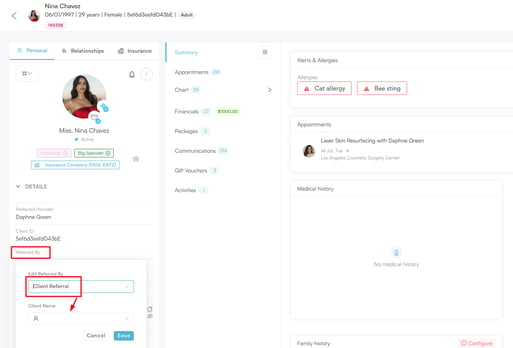
NOTE: Make sure the "Client Referral" option is set as active in your marketing sources, otherwise it won't appear in the dropdown. You can check this under Setup > Marketing Sources.
Step 3: Set Expectations Around Rewards
Be clear with your clients about what they'll receive and when. What the reward is and when it's issued will depend on the goal you've selected in your campaign:
-
Client Created: The reward is issued as soon as the referred friend is added as a new client in Pabau.
-
First Booking: The reward is issued once the referred friend's appointment has been completed.
-
First Purchase: The reward is issued once the referred friend's invoice has been fully paid.
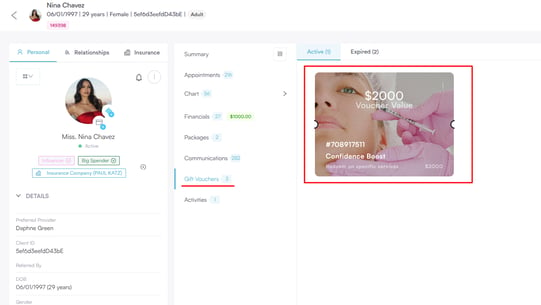
Let your clients know where to expect their reward. Voucher rewards will appear on their Client Card under the Gift Vouchers tab, and can be redeemed in the same way as any other gift voucher. Custom rewards are recorded on your Referrals dashboard and are handled directly between you and the client.
Step 4: Keep Advocates Engaged
Once a client has made a referral, a small personal touch can go a long way in encouraging them to refer again. From the Referrals dashboard, you can send a personal thank-you note directly to an advocate by clicking "Compose note" on their advocate card. Advocates who receive a personal note tend to refer more often.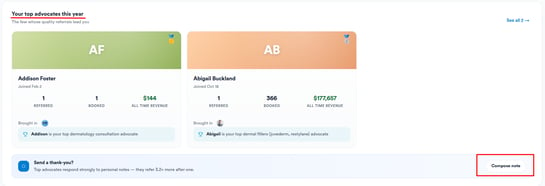
If you've set up milestone rewards in your campaign, remind clients that there are additional rewards available when they reach a certain number of successful referrals, as this gives them an extra incentive to keep referring.
NOTE: You can monitor your top advocates and their referral activity at any time from the Referrals dashboard. For a full breakdown of the dashboard, read our How to Use the Referrals Dashboard article.
With a clear process for registering referrals and a consistent way of communicating the program to your clients, you're giving your referral campaign the best chance of success.
By keeping clients informed, setting clear expectations around rewards, and following up with a personal touch where needed, you can turn satisfied clients into a reliable source of new business for your clinic.
Was this guide helpful? Let us know by voting below - your feedback helps us write clearer articles.
For more guides, browse the related articles below or use the search bar at the top of the page. You can also watch our video learning series, the Pabau Academy, or visit the Support page for additional help.