
In this article, we’ll walk you through best practices for creating and sending SMS campaigns in Pabau — from planning your message and choosing the right audience to designing effective copy, scheduling sends, and reviewing performance.
Following these steps will help you reach the right clients at the right time and get better engagement from your SMS outreach.
To access SMS campaigns in Pabau, navigate to the Marketing tab located on the left sidebar menu and click to expand it. There you'll find the "Broadcasts" sub-tab. On the SMS tab at the top of the screen, all SMS campaigns you've created will show.
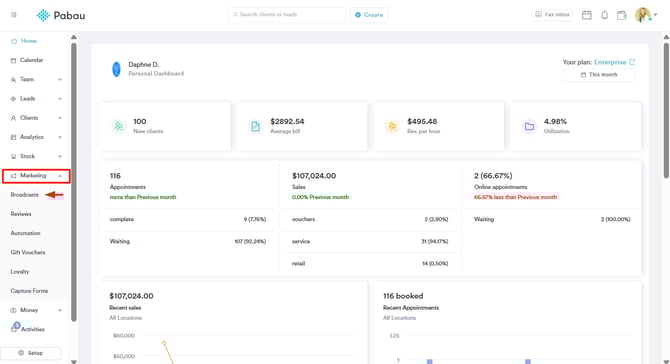
NOTE: For step-by-step instructions on how to create an SMS campaign, refer to this guide.
Define Your Campaign Details
Begin by giving your campaign a clear purpose and identity. In Pabau’s Settings tab, enter a descriptive internal Campaign Title that reflects the goal (e.g., “April Appointment Reminders” or “Summer Promo SMS”).
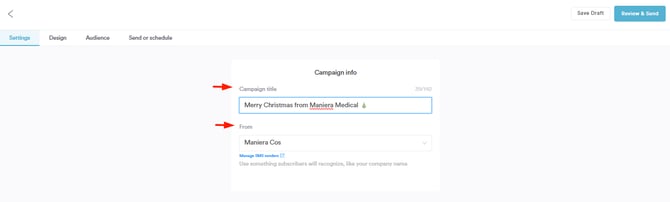
1. Enter Catchy Campaign Title
Choose a title that is both specific and easy to understand at a glance. While the title won’t be seen by clients, it should clearly communicate the purpose of the campaign internally — such as “New Client Welcome SMS” or “Holiday Special Reminder”. This practice keeps your campaign list organized and helps when comparing performance across campaigns later.
2. Select Proper Sender
The Sender field determines what clients see on their phones when they receive the SMS. Always use a recognizable name — ideally your clinic’s name or a consistent sender ID — so recipients immediately know the message’s origin. This builds credibility and reduces the chance your message gets ignored or marked as spam. Consistency in the sender name also helps clients quickly associate texts with your clinic over time.
Insert Campaign Text
Once you’ve defined the campaign basics, it’s time to write the message your clients will receive. Keep your text short, clear, and action-oriented so it’s easy to understand and encourages engagement. Since SMS messages are most effective when they get straight to the point, focus on one key idea and include a clear next step.
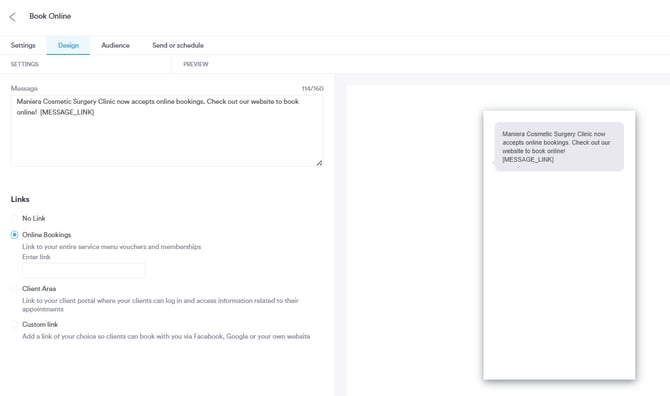
1. Type in Message
Write your SMS copy with a conversational but professional tone. Keep the message concise and focused on a single action you want the client to take — for example, booking an appointment, confirming attendance, or redeeming an offer. Short messages are easier to read and more likely to be fully displayed on mobile screens, improving engagement.
2. Include Links in the Message (Online Bookings, Client Area, Custom Link)
Adding a relevant link helps guide clients directly to the next step — such as your Online Booking page, their Client Portal, or a custom landing page you’ve created for your campaign. Always use only one link per message to avoid confusion and keep the text clean.
Filter Audience
When narrowing down your audience for an SMS campaign, use Pabau’s filtering options to target the most relevant group of clients or leads.
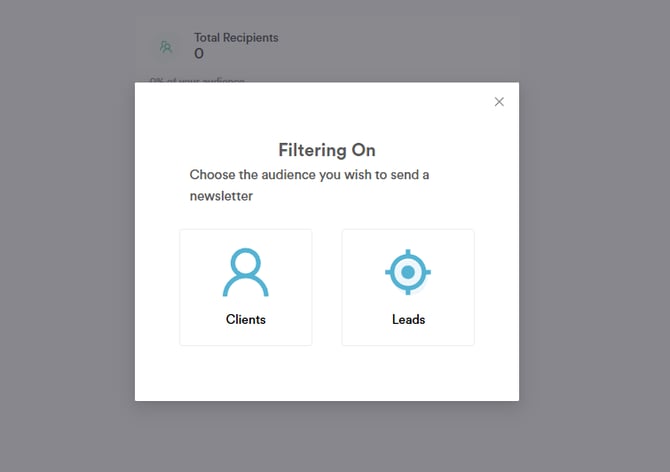
1. Filter Clients
You can choose to send the campaign to all clients or filter them by specific criteria such as appointment history, client labels, or other custom attributes. This helps ensure the right message reaches the right people and increases the chances of engagement.
2. Filter Leads
Filtering leads works similarly to filtering clients. Once you select “Leads” as your audience in the campaign setup, you can choose to send your SMS to all leads or apply filters based on lead status, groups, or other attributes. This helps you tailor messages to potential new clients who are most likely to respond, such as leads at a certain stage or with specific interests, making your campaigns more effective and relevant.
Send or Schedule
After setting up your audience and writing your SMS message, the final step is delivering your campaign. In Pabau, you can either send the campaign immediately or schedule it for later — both options have strategic uses depending on your goals and timing. Choosing the right moment can improve engagement and ensure your message reaches clients when they’re most likely to read it. Good timing is a key part of effective SMS marketing.
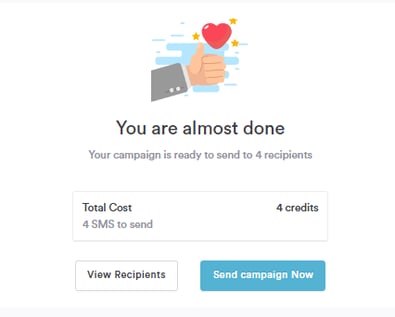
1. View Recipients
Before sending, always review the list of recipients to confirm you’re targeting the right audience. This lets you double-check that your filters have been applied correctly (e.g., clients vs leads, specific labels) and that no one is mistakenly included or left out. A final recipient check helps prevent sending irrelevant messages and keeps your audience segmented accurately.
2. Send Campaign
If you want the message to go out right away, choose Send Campaign. Immediate sends are useful for time-sensitive messages like last-minute appointment availability, urgent reminders, or flash offers. Make sure everything is correct before hitting send, including message content, links, and audience selection.
3. Schedule Campaign
Use Schedule Campaign if you want to send your SMS at a specific future date and time. Scheduling helps you plan ahead and reach clients when they’re most likely to engage — for example mid-morning or early afternoon on a weekday. Scheduling also lets you align SMS sends with promotions, events, or reminders well in advance, creating consistency and predictability for your audience.
For more guides, refer to related articles below, select additional guides, or use the search bar at the top of the page. These guides will help you get the most out of your Pabau account.
Additionally, to help you fully utilize and understand your Pabau account, we recommend exploring additional guides and resources offered at the Pabau Academy. It offers in-depth video tutorials and lessons, offering a holistic learning experience that can equip you with the essential skills for achieving success with Pabau.