
Buffer time is a setting that automatically inserts a set number of minutes between appointments. When enabled, Pabau creates a Block Out immediately after each new appointment, preventing the next booking from starting too soon. This is particularly useful for clinics where practitioners need time to clean a room, document notes, or simply take a short break between clients.
NOTE: Buffer time only applies to new bookings once it's set up. Existing appointments and their schedules will not be affected when you add or change a buffer setting.
Step 1: Navigate to the Scheduler
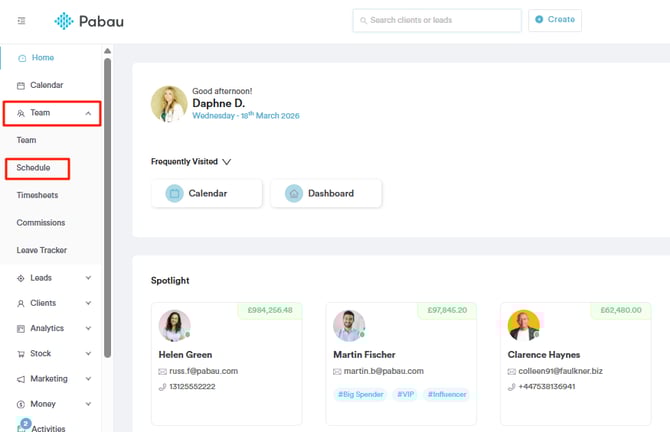
Log into your Pabau account and navigate to Team in the left sidebar menu. Click on Scheduler to open the scheduling view.
Step 2: Create or Edit a Shift
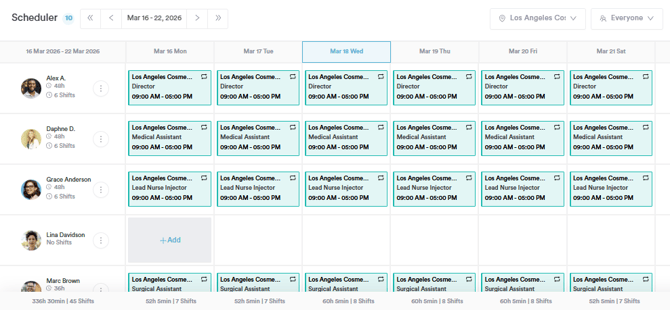
Click on an existing shift to edit it, or create a new one by clicking the relevant day and staff member slot. This will open the Create Schedule modal.
Step 3: Enable Buffer Time
On the bottom of the modal, just below the Schedule Note field. You will see a toggle labelled Add buffer time between bookings. Click to enable it.
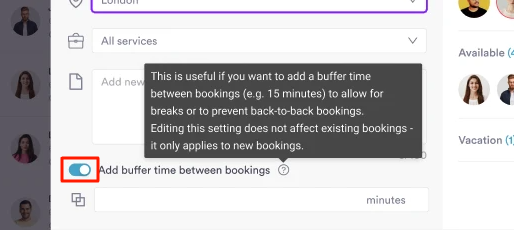
This setting is useful if you want to add a gap between bookings — for example, 15 minutes — to allow for room resets or to prevent back-to-back bookings. Editing this setting does not affect existing bookings; it only applies to new ones going forward.
Step 4: Set the Buffer Duration
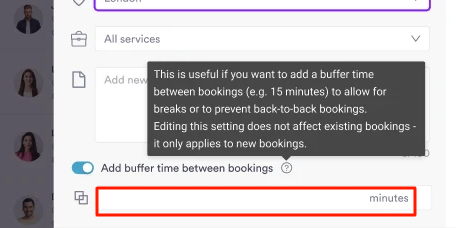
Once the toggle is enabled, an additional field will appear allowing you to enter the buffer duration in minutes. Enter the number of minutes you want to be blocked out after each appointment for that shift.
Step 5: Save the Shift
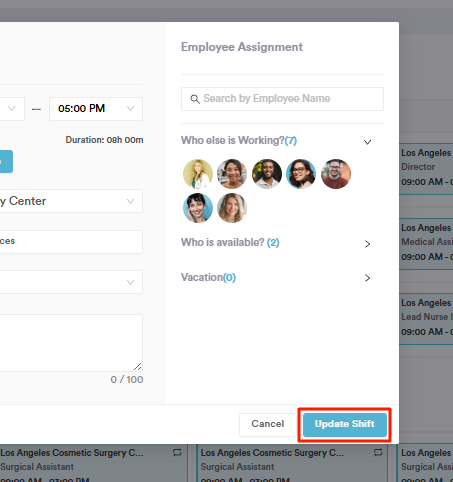
Click Save or Update to apply the buffer setting to the shift. The buffer duration will now be visible on the shift in the scheduler. You can edit or remove the buffer at any time by reopening the shift — removing it will update the scheduler accordingly and only affect new bookings from that point onwards.
Once buffer time is configured on a shift, Pabau automatically handles the blocking in the calendar whenever a new appointment is created.
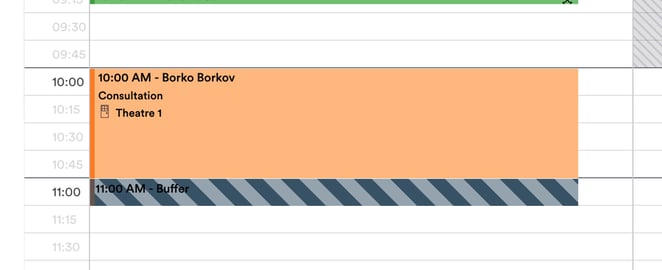
Automatic Block Out creation When a new appointment is booked on a day where the staff member's schedule has buffering enabled, Pabau will automatically create a Block Out immediately after the appointment ends. This Block Out:
-
Matches the room of the appointment
-
Matches the location of the appointment
-
Is assigned to the same staff member as the appointment
-
Is labelled "Buffer time" (translated into your business language as configured in Setup > Business Details)
-
Has a duration matching the buffer minutes set on the shift
The Block Out will appear directly after the appointment in the calendar view, preventing any new bookings from being scheduled in that window.
Multiple appointments booked back-to-back If you book multiple services for the same client in one go — using the create appointment modal — the buffer Block Out will only be created once, immediately after the last appointment in the sequence. You will not get a Block Out between each individual service in a back-to-back booking.
Availability and online bookings When Pabau calculates availability for online bookings, the buffer time is factored in automatically. If a shift has a 15-minute buffer, the system will add 15 minutes onto the duration of each appointment when checking what slots are free — so clients cannot book a slot that falls within the buffer window.
For more guides, refer to related articles below, select additional guides, or use the search bar at the top of the page. These guides will help you get the most out of your Pabau account.
Additionally, to help you fully utilize and understand your Pabau account, we recommend exploring additional guides and resources offered at the Pabau Academy. It offers in-depth video tutorials and lessons, offering a holistic learning experience that can equip you with the essential skills for achieving success with Pabau.