
Restoring a form allows you to reactivate forms that were previously deactivated or removed. This ensures that important forms can be recovered or reused at any time without affecting your current latest form. By using this functionality, you can manage your forms confidently and maintain smooth clinic workflows.
NOTE: To learn more about forms and how to manage them, please refer to this article.
Step 1: Navigate to Form Templates
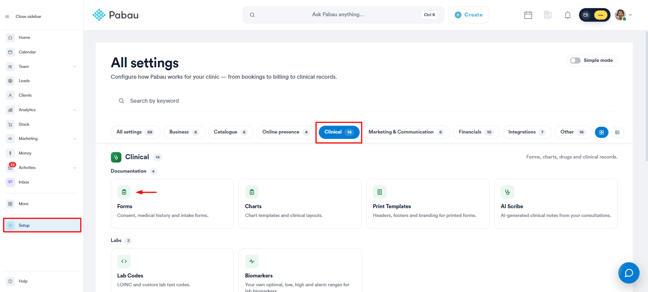
Log into your Pabau account and navigate to Setup, then click on "Forms" under Clinical.
Step 2: Access Inactive Forms
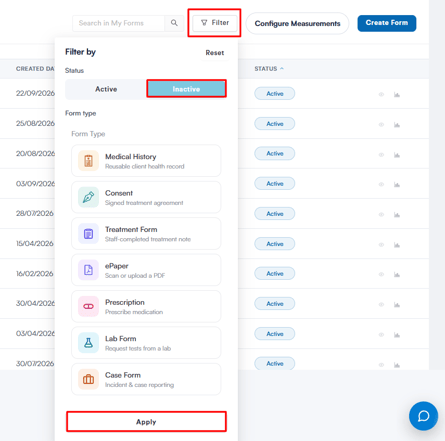
After opening the forms list, click the filter button in the top right corner. Select ''Inactive'' from the filter options, then click ''Apply'' at the bottom of the filter window. This will display all inactive forms.
NOTE: Restoring an older form version creates a new copy of that version. Your current latest form will remain unchanged. This prevents accidental overwriting of your most recent form.
Step 3: Choose the Form you Want to Restore
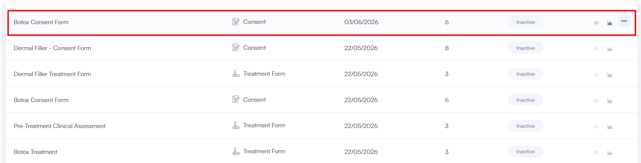
You will now see a list of all inactive forms, each marked with an ''Inactive'' status. Locate the specific form you want to reactivate.
Step 4: Access the Restore Option
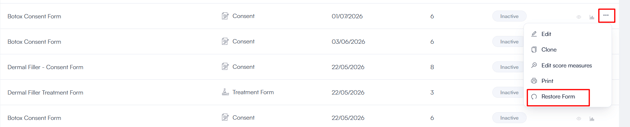
Locate the three-dot button on the far right side of the form you want to restore. Click the button to open the menu, then select ''Restore Form'' from the list of options.
After clicking ''Restore Form'', a confirmation notification will appear indicating the form has been successfully restored.

To view the form, use the filter at the top, select ''Active'', and click ''Apply'' to return to the list of active forms.
Restoring inactive forms allows you to easily manage and reactivate important documents as needed. By following the steps outlined above, you can efficiently restore any form and ensure it is available for use again.
Was this guide helpful? Let us know by voting below - your feedback helps us write clearer articles.
For more guides, browse the related articles below or use the search bar at the top of the page. You can also watch our video learning series, the Pabau Academy, or visit the Support page for additional help.