
Step 1: Navigate to Teams
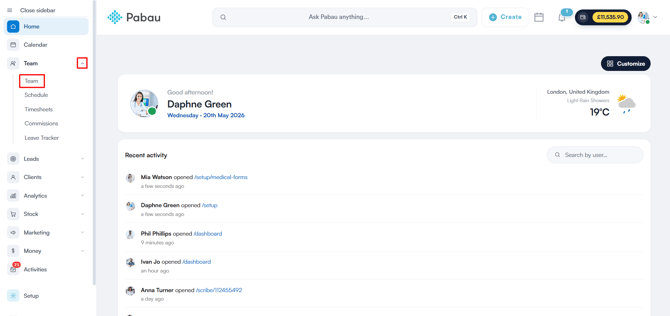
Log in to your Pabau account, and in the left sidebar menu, go to Team, then select "Team" again, and click on the Team tab.
NOTE: If you would like to learn more about the Team feature and explore all of the available options, please refer to the following guide
Step 2: Create Team
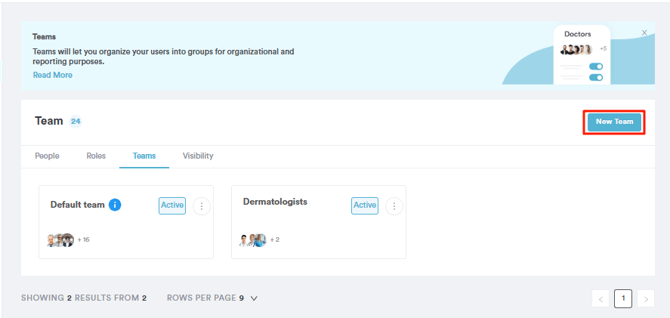
When you go to the Teams tab, you’ll see a default team that includes all employees not yet assigned to specific teams.
To create a new team, click the "New Team" button in the top right corner. Keep in mind that each person can only be part of one team.
Step 3: Select the Default Homepage and Enter Team Details
In this step, you can select the default homepage for your staff members and enter the necessary team details. You'll also have the option to decide which staff members will see the selected homepage.
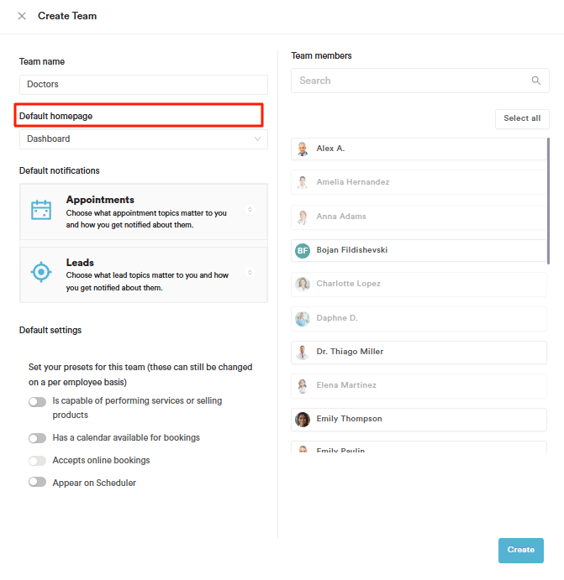
Note: When creating a new team to set the default homepage, be aware that other settings, such as client access permissions, calendar availability, and reporting, will also apply to that team. If the team is meant to have a calendar available for bookings, you'll also need to select the services they’ll provide.
Step 4: Save changes
Once you're finished, make sure to save your changes by clicking the "Save" button in the bottom right corner.
This way, you can set the default homepage for your staff members, and upon logging into Pabau, they will be directed to it automatically.
NOTE: The dashboard option in the Default homepage list is now labelled Home. It sends the staff member to the same Home page described in Understanding the Home Page.
NOTE: Setting a default homepage for a whole team applies it to every member of that team, and grants each of them the permission needed to open that page. Setting it on an individual staff record affects only that person.
What’s next?
Was this guide helpful? Let us know by voting below - your feedback helps us write clearer articles.
For more guides, browse the related articles below or use the search bar at the top of the page. You can also watch our video learning series, the Pabau Academy, or visit the Support page for additional help.