
Step 1: Navigate to the Scheduler
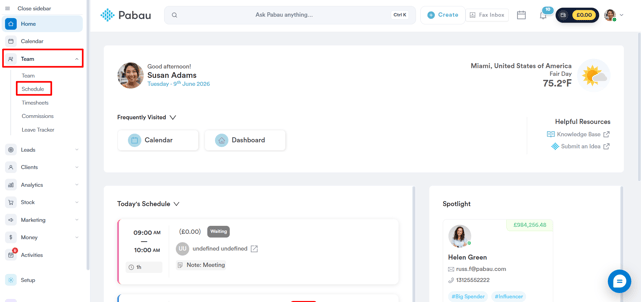
Log in to your Pabau account, and in the left sidebar menu, go to Team, then click on "Schedule".
Step 2: Select Slot for the Shift
The Schedule page displays all staff members on the left, with dates across the top. Click on the desired slot to initiate the shift creation. 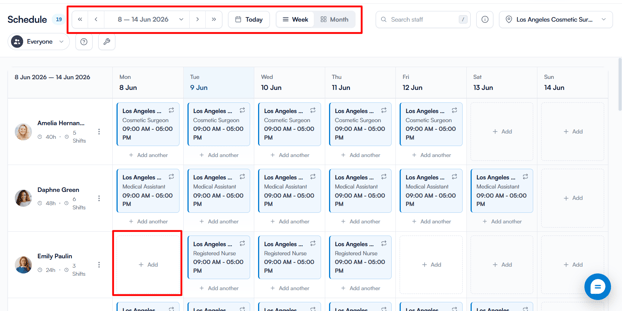
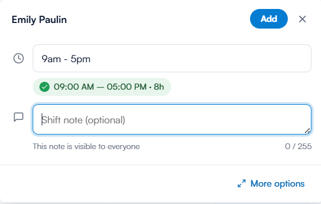
Create a shift by entering start and end times or choosing from default templates. Alternatively, click More options at the bottom for additional settings.
Step 3: Create a Shift
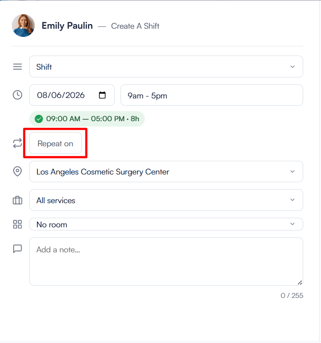
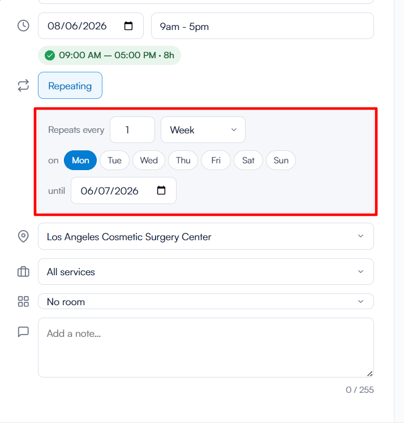
In the Create a Shift menu, after choosing the start and end time, location, and services for the shift, click on "Repeat on". This will reveal the Repeat Options directly below.
Step 4: Input Repeat Options
Once expanded, fill in the following:
- Repeats every — set how frequently the shift repeats (e.g. every 1 week)
- On — select which days of the week the shift should repeat
- Until — set the end date for the repeating pattern
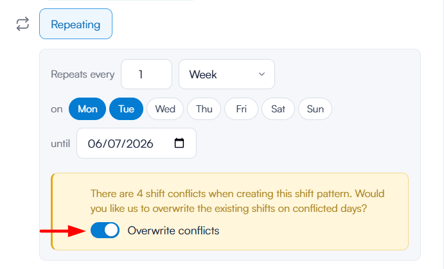
If there are any shift conflicts, you can override them by activating the toggle shown below.
Step 5: Set Repeat Option and Confirm
Click on "Set Repeat Option" when done. Click on "Create Shift" to confirm and schedule the repeating shifts.
Shifts featuring all services will be highlighted in blue, whereas shifts with only select services will be displayed in yellow.
With these steps, you can easily set up recurring shifts in Pabau.
NOTE: You can also learn about this topic by watching a lesson on Pabau Academy.
In addition, we suggest reading our Scheduler article for a more in-depth exploration of this topic.
For more guides, refer to related articles below, select additional guides, or use the search bar at the top of the page. These guides will help you get the most out of your Pabau account.
Additionally, to help you fully utilize and understand your Pabau account, we recommend exploring additional guides and resources offered at the Pabau Academy. It offers in-depth video tutorials and lessons, offering a holistic learning experience that can equip you with the essential skills for achieving success with Pabau.